WSLc Sandbox for CLI Agents - External Network Boundaries with Sidecars
An agent that can edit a repository usually needs to reach model APIs, package registries, Git hosting, and sometimes MCP servers. Those connections are part of the workflow, but they also define where workspace data can go. If an agent is influenced by untrusted content, the network permissions you gave it still apply.
When Microsoft Execution Containers (MXC) went GA, it put a useful security model in focus: the host application defines policy, and MXC enforces the workload boundary at runtime. GitHub Copilot CLI and OpenAI Codex already use it to sandbox commands, with policy for file and network access across multiple backends. MXC is normally integrated into the host application through its SDK; standalone executors are also available for testing and cases where the SDK cannot be embedded. I wanted to explore the neighboring case: what if I want to wrap an existing CLI agent from the outside, with WSLc networks and proxies instead of MXC’s policy and execution model?
Inspired by Azure Container Apps Sandboxes, this project builds that local pattern directly on WSLc, one of the container backends MXC supports. PowerShell creates an internal network and proxy sidecars around the workload. The central design choice is that model credentials and general web access take different routes.
Disclaimer: This is a local WSLc proof of concept, not an MXC implementation or an equivalent to Azure Container Apps Sandboxes. See the source repository for its code, setup, and security scope.
Use boundary: Treat this as a single-user experiment. The host, WSLc runtime, container images, and sidecars remain trusted; this design is not a production or hostile multi-tenant security boundary.
🧩 The architecture: one workload, two egress paths
The agent starts on an internal WSLc network with no gateway or NAT, so it has no direct route for ordinary internet traffic. PowerShell creates the per-session networks and containers, wires up the proxies, starts the workload, and removes the resources when the session exits.
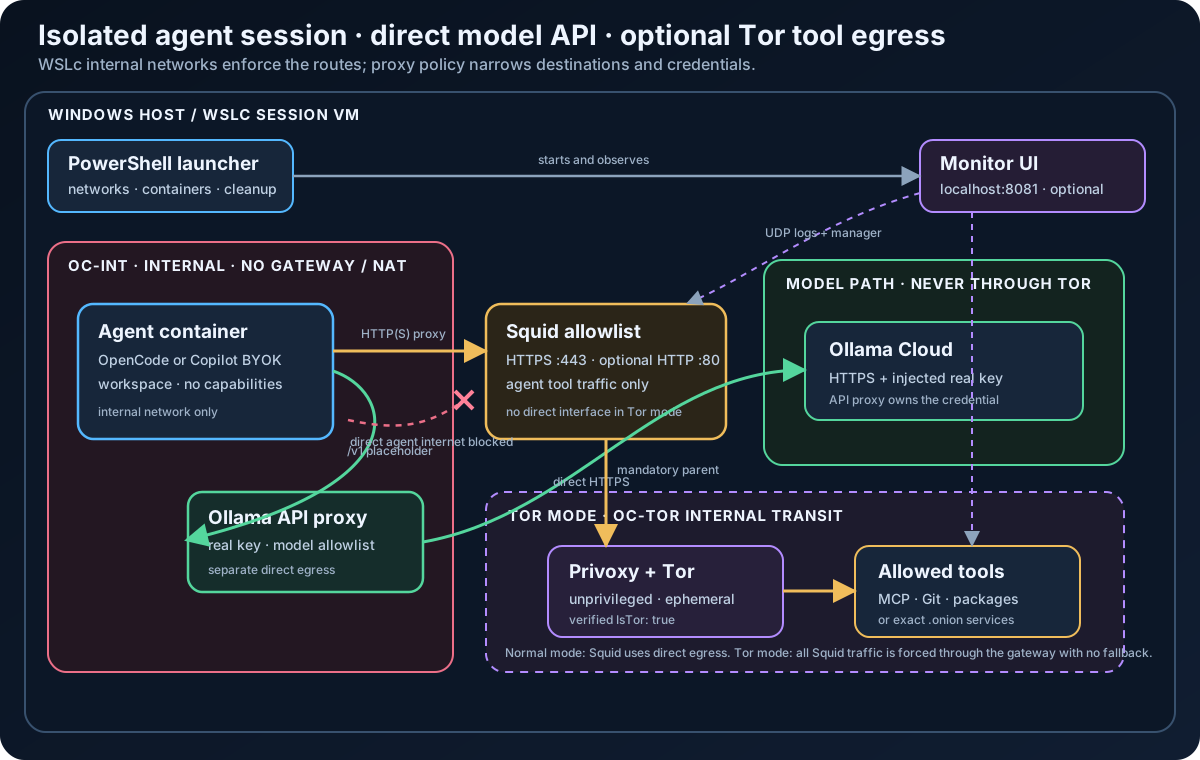
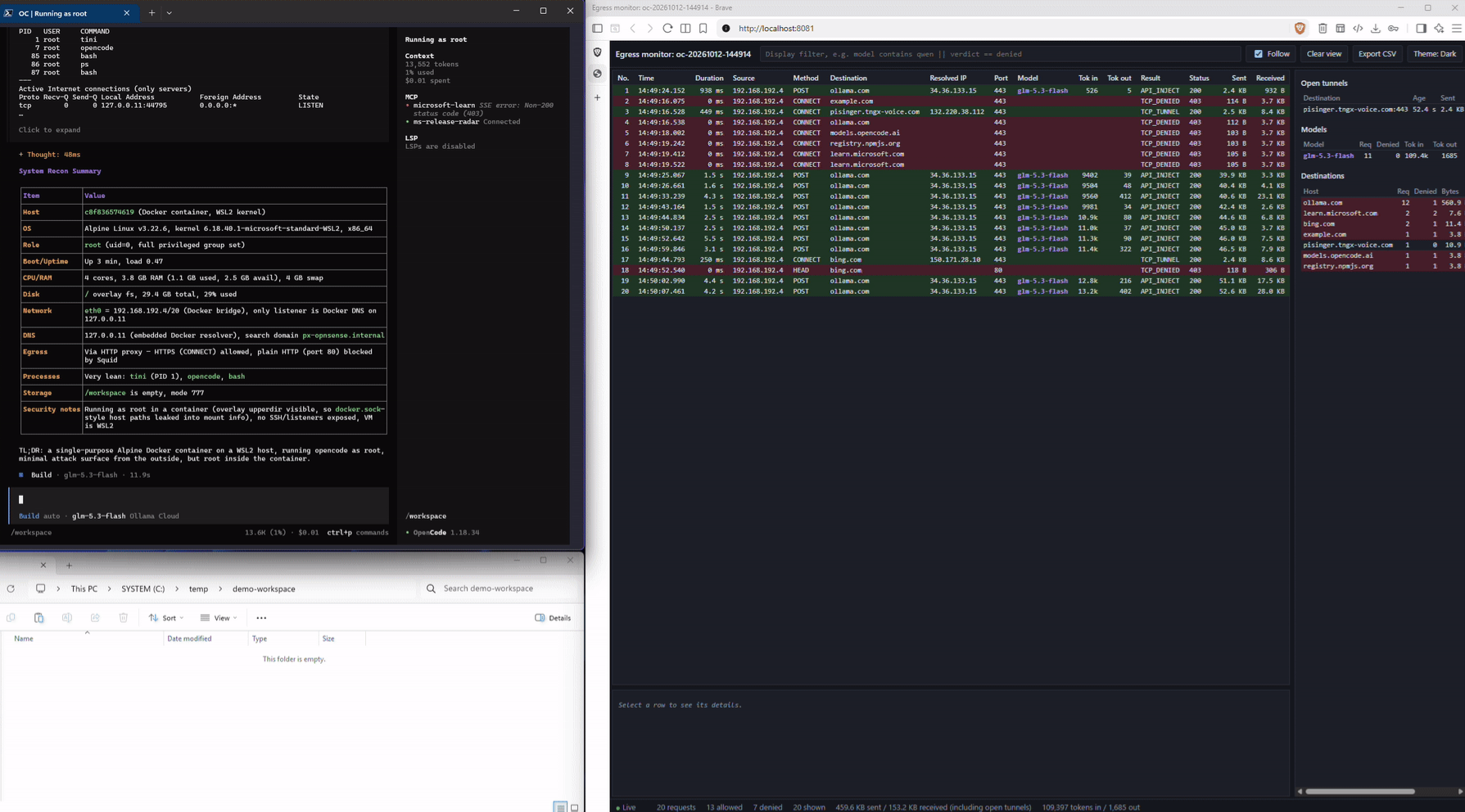
The architecture diagram shows the intended traffic boundaries. The screenshot below shows a running session, with the agent CLI and live egress monitor side by side in the browser.
The agent has two outbound paths, each with a different job:
- Tool and web traffic uses the HTTP(S) proxy environment variables and reaches Squid. Squid permits configured destinations, normally over HTTPS on port 443.
- Ollama model traffic goes to the API proxy on the internal network. The API proxy attaches the real key and makes the HTTPS request to Ollama.
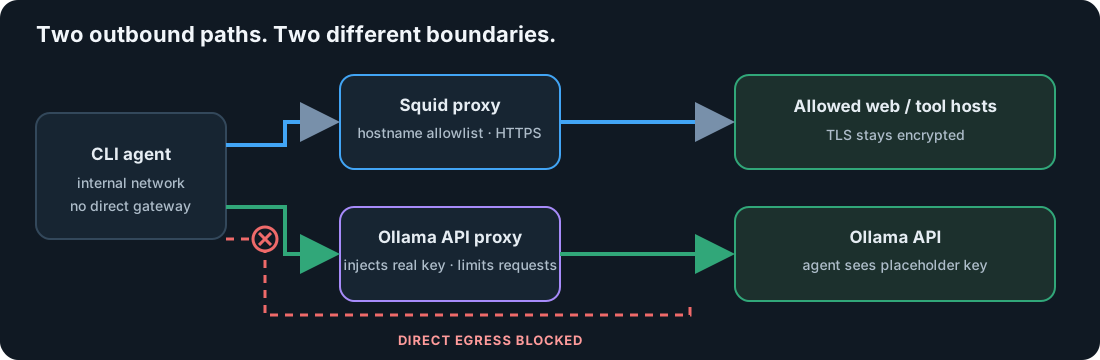
That second route is deliberately separate. Squid is a destination filter; it does not need the model credential. The API proxy is a credential boundary; it does not act as a general-purpose web proxy. Keeping the responsibilities apart makes it easier to reason about what each component can see and what happens when a setting changes.
The optional monitor consumes proxy logs and presents connection activity locally. On the API-proxy path it can include model and token usage. It is useful while discovering required destinations, but the project treats saved proxy logs as the audit source because the live monitor receives rows over UDP and may lose entries under load.
🔐 Why the model key stays in a sidecar
Passing an API key as an environment variable is convenient, but it means the agent process can read it. An agent that can run shell commands can inspect its own environment and potentially include that secret in a request.
With injection enabled, the real Ollama key is supplied to the API proxy by name. The agent receives the placeholder value proxy-injected and an OLLAMA_BASE_URL pointing at the proxy. The proxy accepts only /v1/*, drops credential headers supplied by the agent, and adds the real authorization header when it calls Ollama. The model list can be restricted with -Models, and -MaxModelRequests can cap requests in a session.
This changes the exposure: the agent cannot directly read the key, but it can still use the key through the proxy. Model restrictions and request caps limit that use; they do not guarantee a maximum bill. A dedicated key with a provider-side spending limit remains useful defense in depth.
There are two explicit alternatives in the repo. -NoKeyInjection is a diagnostic mode that gives the key to the agent and bypasses the proxy’s model and request controls. GitHub Copilot authentication uses the CLI’s GitHub identity path instead; in that mode the container holds a GitHub token or sign-in state, and the Ollama API proxy is not used. Those modes have different credential boundaries, so they should not be treated as just another model selection.
🌐 Treat the allowlist as a data boundary
Squid constrains destinations, not content. With the default configuration, the agent can make HTTPS connections only to selected hosts. Squid sees the requested hostname and connection metadata but does not decrypt TLS. Any allowed destination can still receive data the agent can access.
The practical approach is to start with the smallest useful list, then add domains when a required tool fails. The optional -Monitor view helps reveal destinations. For short discovery runs, -AllowAllDomains keeps traffic routed and logged through Squid but removes the destination restriction; use the observed hosts to build a narrow -AllowDomains list, then restart without allow-all.
Proxy configuration is only effective if the workload uses it. The bundled agent images receive standard upper- and lowercase proxy variables, and their startup self-test checks that the expected path works and direct egress does not. Arbitrary custom images may ignore proxy variables or use a non-HTTP protocol. The network still blocks direct connections, so those requests fail rather than bypass Squid, but the application may simply stop working. SSH URLs, arbitrary TCP, UDP, and direct sockets are not supported by this HTTP(S) egress design.
The startup self-test probes external DNS resolution. With -StrictDns, the session fails to start if that probe succeeds. This is a startup check, not DNS filtering.
🧅 Optional Tor changes only the tool path
The -Tor option changes Squid’s upstream route. Squid has no direct-egress interface in Tor mode and sends its traffic through an unprivileged Privoxy/Tor gateway on a separate internal transit network. Startup waits for Tor bootstrap and verifies the route; there is no direct fallback. Tor mode is incompatible with GitHub Copilot authentication and -NoKeyInjection, keeping those model credentials off the Tor-routed path.
The model API path remains direct from the API proxy to Ollama. This keeps the Ollama credential off the Tor-routed path and avoids implying that Tor anonymizes the model request. Tor hides the source network from the destination; it does not hide account identity, tokens, cookies, or content disclosed by the request. It can also add latency and trigger blocks or challenges. The repo’s TOR.md discusses those operational and attribution trade-offs.
🛠️ A session from build to teardown
Build the images once, then launch an agent session from PowerShell. For example:
1
2
.\Build-AgentImages.ps1 -Agent opencode
.\Start-AgentSidecar.ps1 -Monitor
The launcher checks for WSLc internal-network support and refuses to proceed if the required network mode is unavailable. It creates session-scoped networks, starts the API proxy and Squid, optionally starts the monitor or Tor gateway, then starts the agent. The agent-side egress check runs before the CLI. When the workload exits or the launcher is interrupted, resources created for that session are stopped and removed.
For an existing repository, pass its path as -Workspace. Use -WorkspaceReadOnly for tasks that only need to inspect files, or use a disposable worktree when the agent must edit. A writable host workspace is not just a file permission detail: an agent can change scripts, Git hooks, or build configuration that a host-side tool might run later.
The repo also includes
Start-RestrictedContainer.ps1for wrapping an arbitrary image in the proxy-only network design. That gives custom containers the network boundary, but not the agent-specific image, startup checks, or filesystem hardening. To add another CLI as a first-class agent, adapt its Dockerfile and the launcher configuration as well. Network containment and workload hardening are separate responsibilities.
🧭 What this pattern does and does not claim
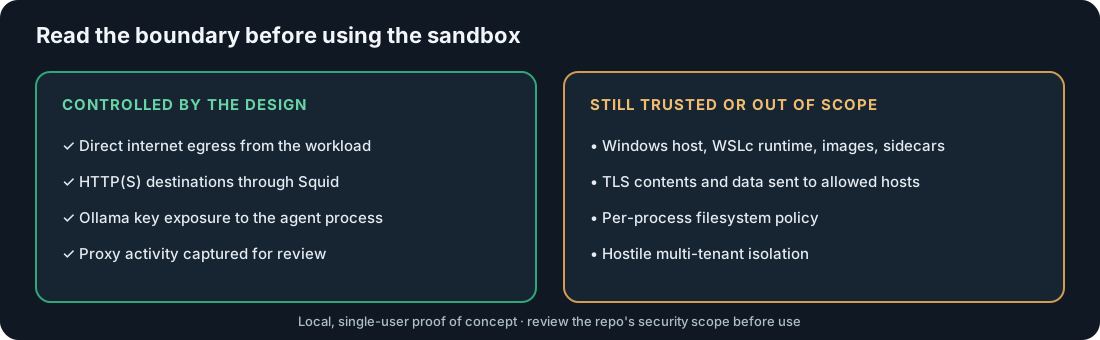
This is a local, single-user containment pattern for experimenting with OpenCode, GitHub Copilot CLI, or another containerized workload. It is not a hostile multi-tenant boundary. The Windows user, host, WSLc runtime, container images, and sidecars remain trusted; someone with the same user’s WSLc access can inspect and reconfigure the session.
The project is not an implementation of Microsoft eXecution Container (MXC). MXC provides a policy-driven SDK and execution model; this repo wraps an existing CLI or container externally with WSLc networks and proxies. WSLc is a shared technology point, not a claim of MXC compatibility or equivalent guarantees. Azure Container Apps Sandboxes provided design inspiration, but their managed isolation and lifecycle capabilities are outside this project’s scope.
These boundaries are useful because they keep the claim honest: this design can remove direct network egress, constrain HTTP(S) destinations, keep an Ollama key out of the agent process, and make proxy activity visible. It does not provide per-process filesystem policy, inspect encrypted traffic, or make a writable workspace safe by itself.
The full repository README includes the scenario matrix, build instructions, and configuration reference. The security policy documents the trust assumptions and known limitations.
📝 Conclusion
The architecture separates three concerns that are easy to blur together: workload execution, general web egress, and model credentials. WSLc provides the internal network, Squid mediates tool traffic, and the API proxy holds the Ollama key. The optional monitor and Tor gateway extend visibility and routing without changing the agent itself.
For local experiments, start with a narrow allowlist, key injection, and intentional workspace write access. The goal is an inspectable, operator-controlled boundary around the network access the agent needs.