Agentic Incident Response with Foundry and Logic Apps - Human Approval Without Custom MCP Code
If you work with Microsoft Sentinel and Defender, you probably already have response playbooks: Teams cards, approval emails, incident updates. When I started giving a Foundry agent response tools, I wondered why I would build a custom MCP server for each action when Logic Apps could expose the workflows I already use.
The setup itself was super straightforward and much more simpler than you may expect. The use case I see is an autonomous agent started by a Foundry routine, an external scheduler, or a SOAR playbook. I attached the Microsoft Sentinel data exploration MCP server and 2 Logic App MCP servers to the same agent. Sentinel handles investigation; Logic Apps handles response and human approval. Of course, the same design principle could also apply to interactive agent scenarios.
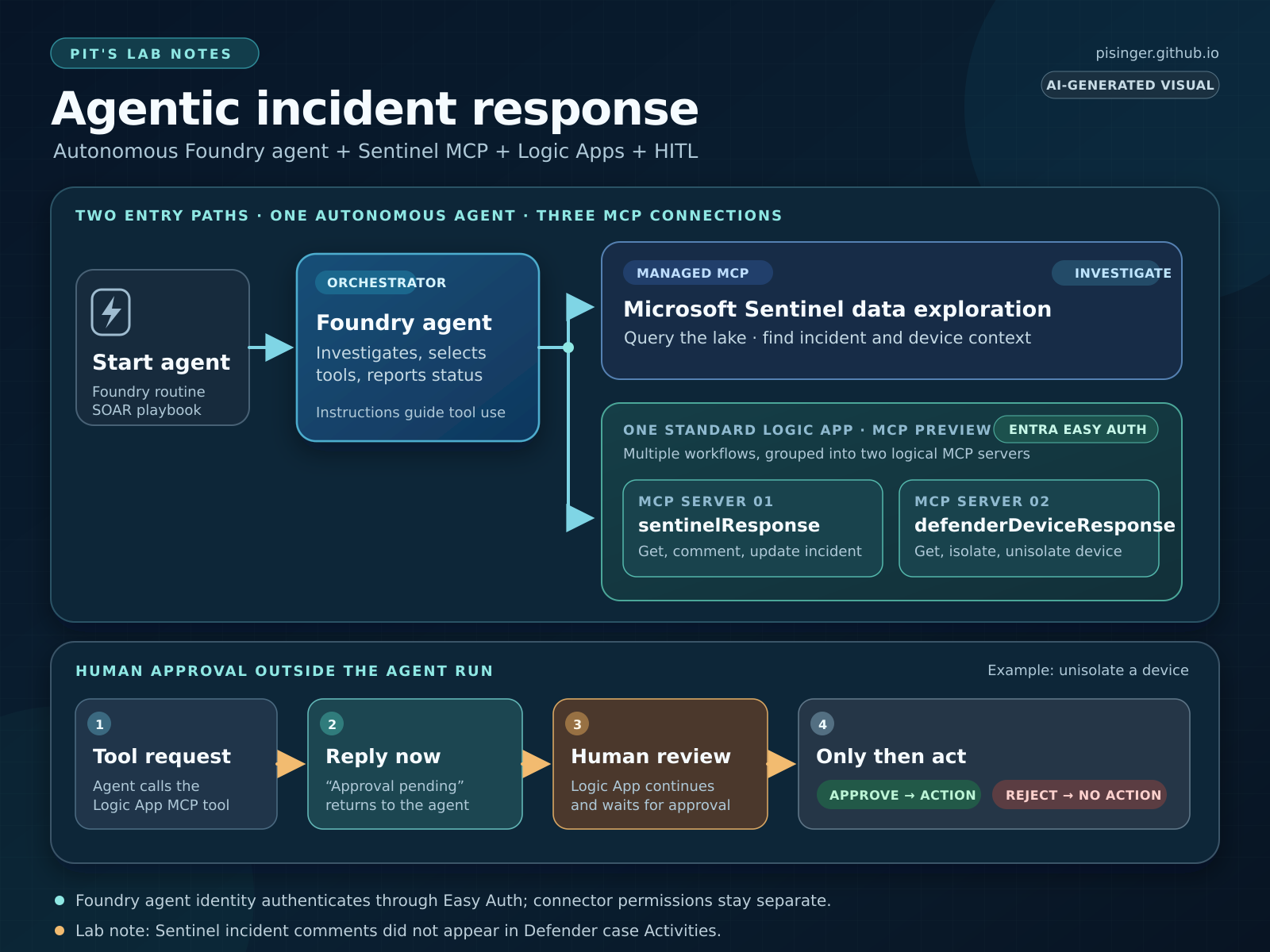 The full path: an autonomous agent investigates through Sentinel MCP and calls response workflows through Logic Apps MCP.
Even while the above shows 2 Logic App MCP servers, that is still one Standard Logic App deployment. It can host multiple workflows as usual, expose them as MCP tools, and group those tools into several MCP servers. In my lab, the incident and device servers share one Logic App resource. Microsoft documents multiple MCP server groups in one Standard Logic App.
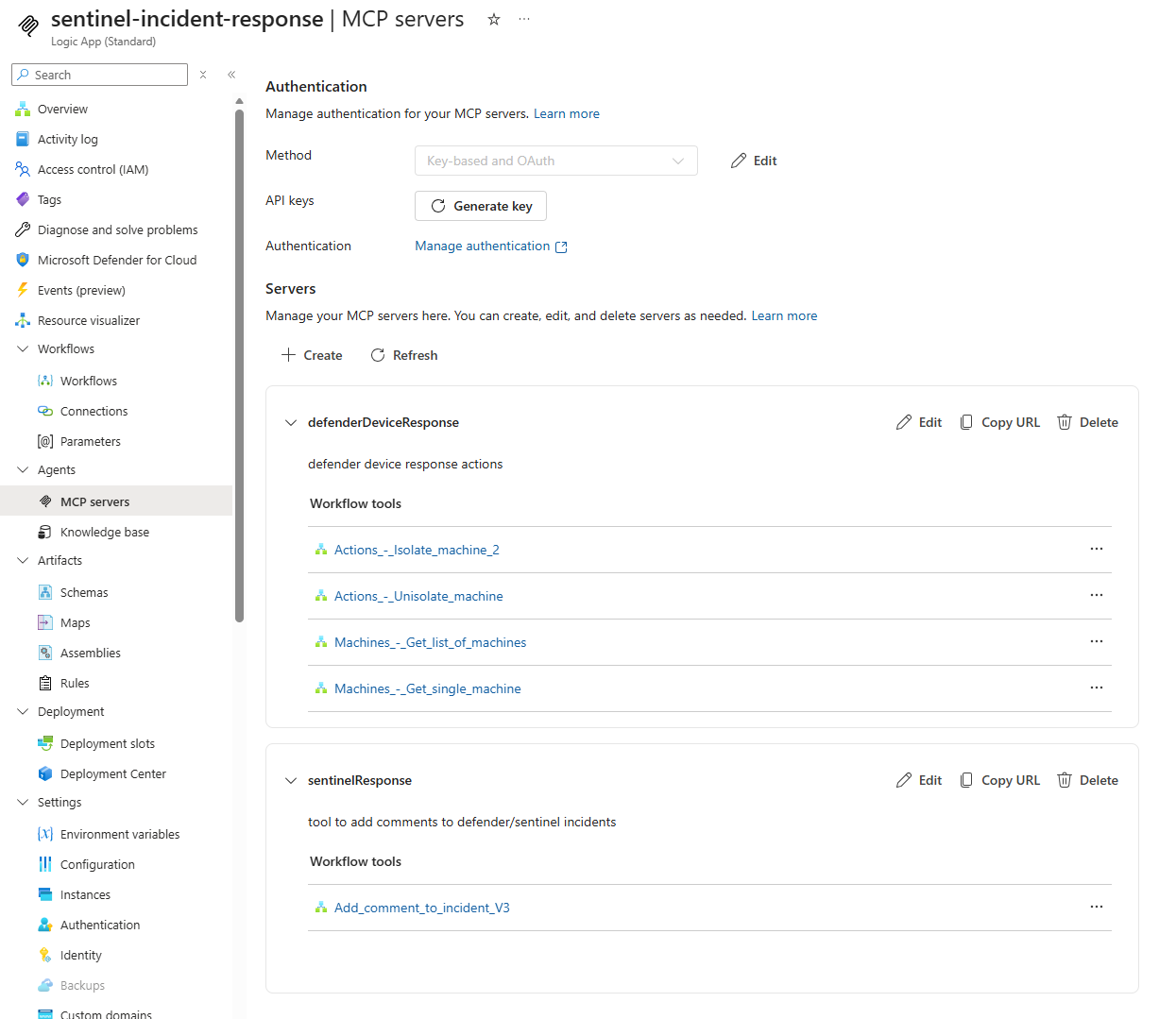 My Standard Logic App hosts both
 defenderDeviceResponse and sentinelResponse.
Microsoft currently documents the Standard Logic Apps MCP server feature as preview as of 2026-09. I would recheck the setup requirements before promoting this workflow into a production response path. https://learn.microsoft.com/en-us/azure/logic-apps/create-model-context-protocol-server-standard
⏰ How the autonomous agent starts
I prefer to trigger this agent from Sentinel automation via SOAR playbook, so the incident context is already available when the investigation starts. Foundry also provides native agent routines: a routine has one trigger and one action, and Foundry invokes one prompt or hosted agent when that trigger fires. No one needs to open a chat. Whichever entry point I use, I pass enough context into the response path for the approver to make an informed decision:
incident severity and linkdevice name and IDrequested actionrationalecorrelation ID
That context needs to be planned in the agent’s instructions, tool schemas, and skills. Foundry routines currently support:
- recurring or one-time schedules
- GitHub issue events
- Teams channel messages.
The trigger is secondary here; the important part is that every path supplies the same response context.
🧩 Reuse the response layer you already have
In Sentinel automation, human approval often means a Logic App with a Teams adaptive card or approval email. I kept that familiar step. The agent decides when to call the workflow; the workflow still decides whether the action runs. So this offloads the approval gate to existing paradigms.
Avoid email-based approvals actions. Email security solutions may interact with approval links during URL inspection, creating a risk of unintended approval processing. For sensitive actions such as device unisolation, prefer Teams Adaptive Card approvals, which require explicit user interaction and provide stronger security and auditability. If email approvals are used, ensure that following the approval link requires authentication and an explicit confirmation step before the action is executed.
The read-only Sentinel data exploration collection supplies investigation context, including an incident ARM ID or device name. The Logic App MCP servers supply response actions and may need explicit human approval:
comment on an incidentupdate incidentisolate a deviceunisolate a device
The Sentinel data exploration collection is a way to retrieve and analyze data; it does not grant the agent permission to perform response actions. See the collection’s tool list and the Logic Apps MCP guide.
My agent already has an allowed_tools list. For the Logic App MCP tools, you can configure Foundry’s require_approval as a per-tool {"never": ["tool_name"]} list so the autonomous run does not pause for Foundry’s developer approval. Setting it to "never" without a list disables Foundry approval for every tool in that MCP definition as seen in the below sample yaml config for the tools; the default is "always". This is not the response approval: Logic Apps still enforces the human decision before an approval-gated action runs.
1
2
3
4
5
6
7
8
9
10
11
12
13
14
15
16
17
18
19
20
21
22
  tools:
    - type: mcp
      server_label: MicrosoftSentinelData2
      server_url: https://sentinel.microsoft.com/mcp/data-exploration
      allowed_tools:
        tool_names: []
      require_approval: never
      project_connection_id: MicrosoftSentinelData2
    - type: mcp
      server_label: la-sentinel-response
      server_url: https://sentinel-incident-response-demo.swedencentral-01.azurewebsites.net/api/mcpservers/sentinelResponse/mcp
      allowed_tools:
        tool_names: []
      require_approval: never
      project_connection_id: la-sentinel-response
    - type: mcp
      server_label: la-defender-device-response
      server_url: https://sentinel-incident-response-demo.swedencentral-01.azurewebsites.net/api/mcpservers/defenderEndpointResonse/mcp
      allowed_tools:
        tool_names: []
      require_approval: never
      project_connection_id: la-defender-device-response
For an interactive agent, I could put a human approval step in a Foundry workflow. Its visual builder includes a Human in the loop pattern that asks the user and waits for an answer. Foundry also documents a long-running hosted-agent HITL pattern in preview.
In my scenario, the agent runs autonomously, either on a schedule or triggered by a SOAR playbook, while device unisolation is a high-impact action. For that reason, I placed the approval step in the Logic App rather than inside the agent itself. The agent can still execute the investigation and response workflow end-to-end, but the unisolation action is only performed after an explicit approval has been granted.
Note: Device isolation is typically handled through existing incident response automations, which often follow a “fire first, ask questions later” approach for workstation-based threats.
Foundry workflow change: After December 1, 2026, the visual designer and in-portal workflow execution will no longer be supported. Workflow patterns, including human-in-the-loop steps, remain available through code and configuration; Foundry can still run YAML-based workflow definitions deployed as hosted agents.
The migration guide recommends Agent Framework for code-first or YAML-based orchestration and Azure Logic Apps for visual workflow orchestration that invokes Foundry agents. It also points to A2A for lightweight agent-to-agent handoffs. For SOC workflows, I currently prefer Logic Apps because approvals, notifications, and connector-based integrations are available out of the box, avoiding the need to reimplement common workflow capabilities.
🛠️ Putting it together
I grouped the workflows in that app into two MCP servers: sentinelResponse and defenderDeviceResponse. In the Azure portal, open the Logic App and go to Agents > MCP servers. You can register existing qualifying workflows or choose connector actions and let the portal create a workflow for each tool. For this workflow design, I used Microsoft Sentinel actions such as Add comment to incident and Update incident, plus Microsoft Defender for Endpoint actions to get a machine and isolate or unisolate it. You can add a Create incident tool the same way if your process calls for one.
Optionally, you can attach the Defender Endpoint connector as an MCP tool directly from Foundry. Behind the scenes, this still creates a Standard Logic App, but without letting you choose its name, and you still configure the connection, actions and permissions yourself. So I would recommend creating it through the Standard Logic App interface or via IaC instead.
The Standard Logic Apps MCP guide gives you two paths for creating tools and two for authenticating the server:
- Reuse an existing workflow that starts with When an HTTP request is received and ends with a Response action: create an MCP server from existing workflows.
- Turn connector actions into new workflow tools: create new workflows while registering the MCP server.
- Authenticate with Microsoft Entra ID: configure OAuth with Easy Auth on the Standard Logic App, then set the Foundry MCP connection to use the chosen agent or project identity.
- Authenticate with an API key: generate an MCP API key and send it in the
X-API-Keyheader.
The important thing is that MCP servers in Logic Apps requires HTTP trigger actions to receive requests from the agent. Without an HTTP trigger, the Logic App cannot act as an MCP server and you cannot transition exsiting workflow into MCP tools.
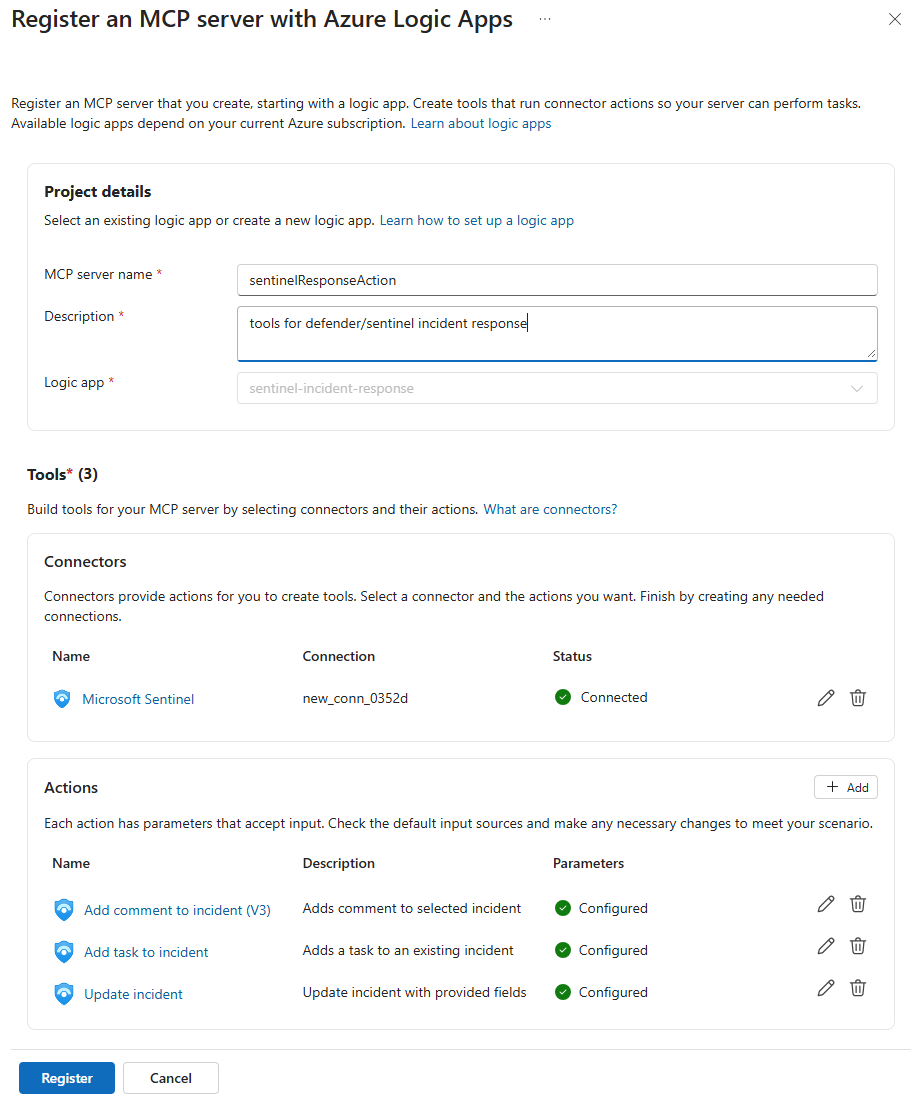 The registration screen lets me select Sentinel connector actions and describe the tools exposed to the agent.
The basic path is short:
- Create a new agent in Microsoft Foundry and attach the Sentinel data exploration MCP collection for investigation. New agents receive their own agent identity and stable endpoint without a separate publish step. For autonomous operation, start it from a Foundry routine or external scheduler, or have a SOAR playbook invoke it.
- Create a Standard Logic App. Under Agents > MCP servers, register the Sentinel and Defender response tools you want the agent to call.
- For an existing playbook, make it callable with When an HTTP request is received, a useful request schema, and a Response action. Give the trigger and its inputs clear descriptions; these become the tool contract the agent sees.
- Secure the MCP server, copy its endpoint from the Logic App, and add it to the Foundry agent as a custom MCP tool.
- Allow list the MCP tools this agent may call, configure Foundry approval for those tool calls, and give the agent instructions for when a Logic App approval is required and what it must report afterward. Then test each tool with a harmless incident or lab device before trying an end-to-end prompt.
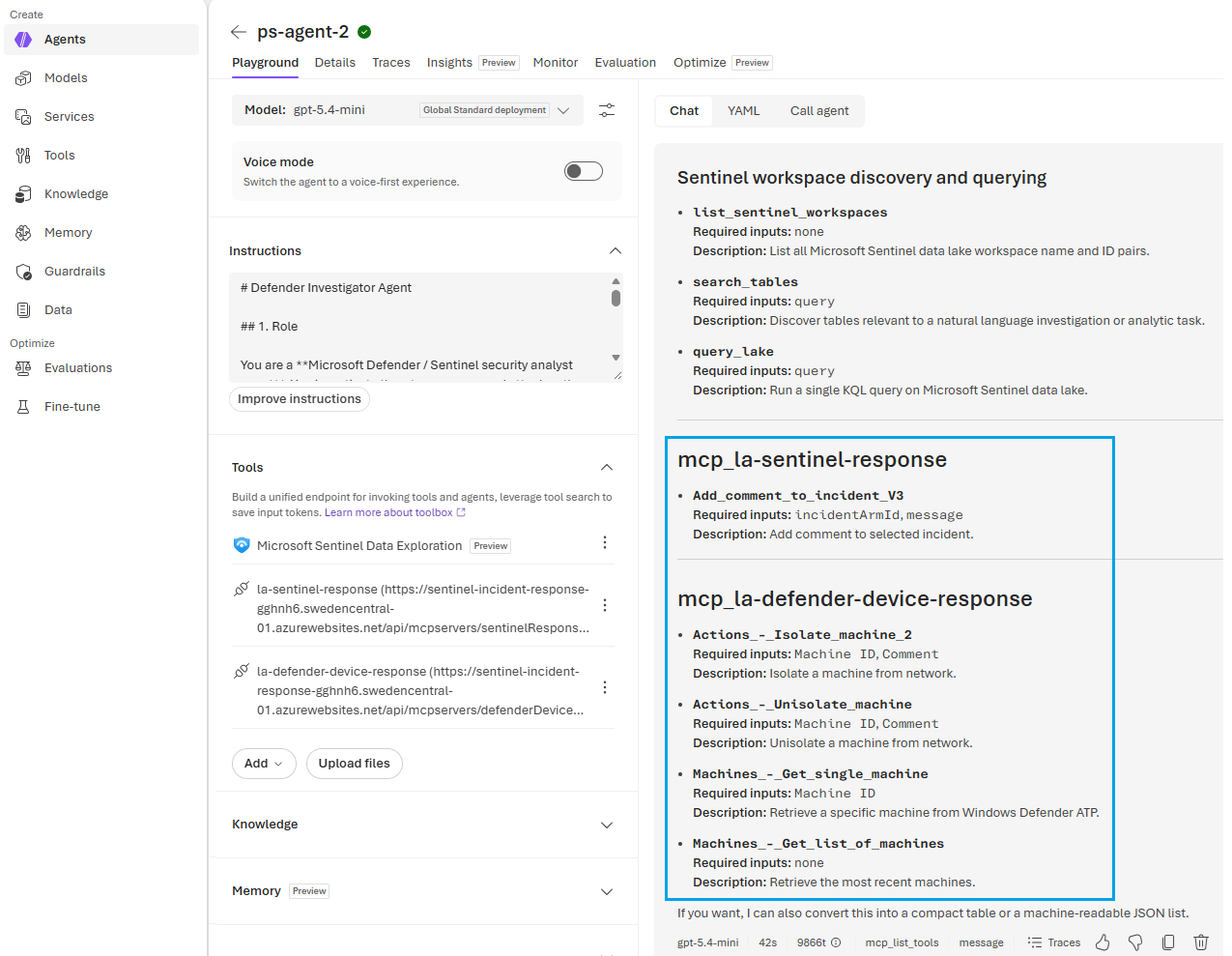 The same agent can discover Sentinel data exploration tools and both Logic App response tool groups.
The MCP endpoints served by the Logic App may look like below:
1
2
https://sentinel-incident-response-demo.swedencentral-01.azurewebsites.net/api/mcpservers/sentinelResponse/mcp
https://sentinel-incident-response-demo.swedencentral-01.azurewebsites.net/api/mcpservers/defenderDeviceResponse/mcp
Those can you grab from MCP servers > Copy URL in your Logic App and attach them to your Foundry agent as custom MCP tools or to a toolbox. The workflow’s own HTTP trigger URL is a different endpoint.
Key-based authentication works well for lab environments: generate an MCP API key in the Logic App and send it via the x-api-key header from Foundry. For production scenarios, I recommend Easy Auth with Microsoft Entra ID on the Standard Logic App to avoid shared secrets and use enterprise authentication and authorization.
There are two distinct Microsoft Entra authentication options in Foundry:
- Agent identity (
agentic-identity): This is the preferred option when you need per-agent permissions and auditability. New-model agents receive a unique identity when they are created, while legacy agents still require the use of the shared project identity. - Project managed identity (
project-managed-identity): Use this when multiple agents should share a common identity, when the target service specifically requires a managed identity, or when agent identity authentication is not supported. The project’s managed identity must be granted the necessary permissions.
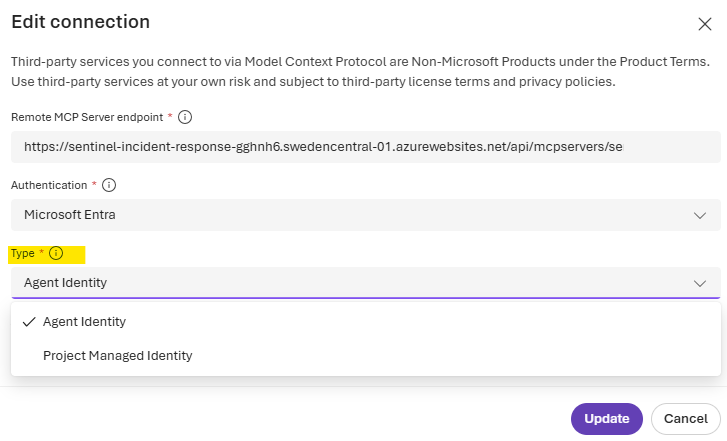 The MCP connection authentication setting lets me choose between the agent identity and the project managed identity.
In this approval design I keep three identities separate:
- the Foundry
agent identityauthenticates to the MCP endpoint - the Logic App’s
system-assigned managed identityperforms the Sentinel/Defender response actions - and the human approver
user identitysupplies the HITL decision.
⚠️ When the Logic App identity performs the connector action, Sentinel and Defender record that Logic App identity as the native author or requestor. They do not show by default which Foundry agent triggered the workflow. You can correlate the call through Foundry and Logic App audit data, but that does not give the analyst an immediate answer while looking at the incident.
For immediate analyst visibility, the workflow can add a short incident comment with the requesting agent and version, requested action, workflow run, and a correlation ID. I observed the agent details in the x-ms-foundry-baggage header on direct Foundry MCP calls. This gives the incident a useful requested by the agent, approved by the analyst, executed by the Logic App trail without changing the native execution identity.
I treat that header as descriptive metadata, not authorization evidence: it is not publicly documented as a security contract and must be sanitized before it is shown in an HTML comment. The authenticated identities and platform audit logs remain the source of truth.
With generalized values, the analyst-facing comment footer looks like this:
1
2
3
4
5
6
Agent request metadata (informational)
Agent: incident-response-agent
Agent version: 3
Foundry project: contoso-agentic-soc@proj-contoso-agentic-soc@AML
Workflow run: 08580000000000000000000000000CU00
Client request ID: 00000000-0000-4000-8000-000000000000
To see how to set up Easy Auth for a Logic Apps MCP server, follow the Logic Apps MCP guide.
On the Foundry side, set the connection’s audience to the application ID URI that Easy Auth accepts, including the trailing slash. Then authorize the identity you chose: if you restrict callers, add its object ID to Easy Auth’s allowed identities, and grant any app roles or underlying service access your MCP server needs.
Make sure the Logic App identity is enabled and configure the Microsoft Sentinel connector to use Connect with managed identity, then assign the Microsoft Sentinel Responder role on the workspace. For Defender actions, configure the proper WindowsDefenderATP permissions to the managed identity of the Logic Apps. Also see Microsoft’s Sentinel playbook authentication guidance and Logic Apps managed identity guidance.
Then remember the HTTP request trigger requirement. The portal-created connector workflows already have the HTTP request and response shape. For existing workflows, Microsoft documents the required Request/Response pattern and hosting requirements in the Standard Logic Apps MCP guide. The exact tool names and descriptions matter: “update incident” is much more useful to an agent when the input says which incident identifier it expects and what fields it changes. For the native Connectors you do not have to provide any thing - the connector itself already defines the request and response schema and thus the proper MCP tool names and descriptions out of the box. Easy one 😊
Reminder: Only HTTP based Logic App workflows are MCP compatible.
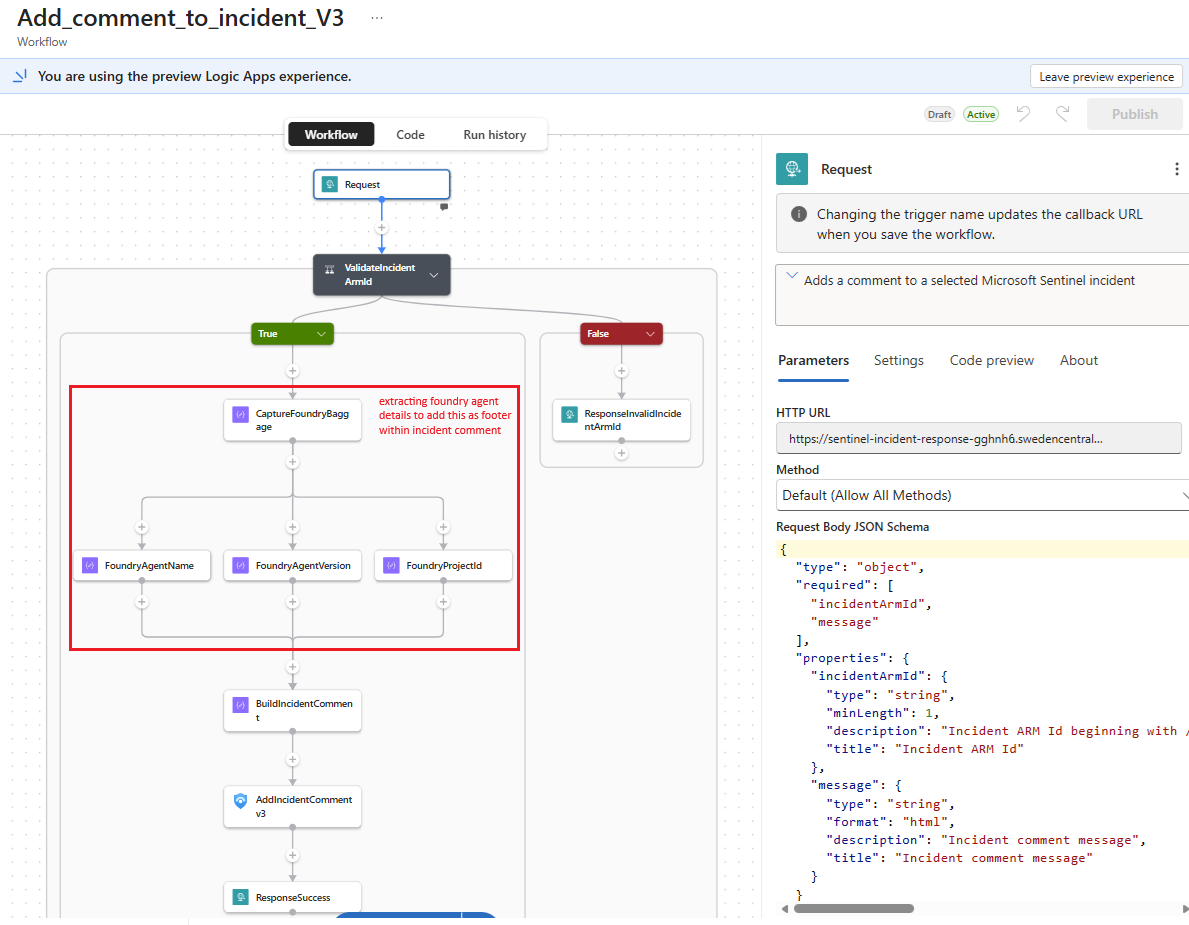 The Request schema gives the comment tool an incident ARM ID and message, with descriptions the agent can use.
With the tools attached, the agent chooses among them based on their descriptions and its instructions. Now it’s up to you to provide the right guidance, context and constraints so the agent uses them correctly. For anything high-impact, back that up with approval inside the Logic App, since instructions guide the agent but only the workflow enforces.
🔐 Optional enterprise pattern: govern MCP tools through APIM
For one agent and two MCP servers, I would keep the direct connection shown above. Once response tools are shared across multiple agents or teams, Azure API Management becomes a useful optional gateway in front of the Logic Apps MCP endpoints. Microsoft documents this pattern for governing existing MCP servers, including Logic Apps-based tools.
APIM provides one caller-facing authentication boundary, rate limits, selected tool exposure, and central telemetry. The controls still remain layered:
- APIM defines the enterprise-approved MCP surface and ingress policy.
- Foundry’s
allowed_toolslimits what a particular agent may select. - Logic Apps owns human approval and decides whether the requested action executes.
APIM can authenticate to the backend with its managed identity, while the Logic App identity continues to perform the Sentinel or Defender action. APIM’s MCP telemetry adds tool usage, latency, and failure visibility, but it does not replace Foundry traces or Logic App run history. I see this as an enterprise control plane for shared tools, not a requirement for the smaller design in this post.
Foundry’s automatic AI Gateway routing for MCP tools is currently preview and applies only to new eligible MCP tools that do not use managed OAuth. Explicit APIM onboarding remains the predictable option for existing Logic Apps MCP endpoints.
🤖 New Agent Object Model
When I started working extensively with Foundry agents about six months ago, the identity model was one of the areas that caused the most confusion, especially together with MCP authentication. When should I use the shared project identity, and when should I use an agent’s own identity?
My first instinct was to use the agent identity, but that did not work consistently. After some troubleshooting, I granted permissions to the project’s managed identity instead, which resolved the issue in those tests. Later, I discovered that some of my agents still used the legacy object model, where unpublished agents shared an identity, while newer agents already had their own identity from creation.
Fun fact: This confused me for quite a while. Most of my work focused on hosted agents, but for quick ad hoc testing I often used prompt agents because they were convenient. At one point, I simply assigned permissions to both the per-agent identity and the project managed identity to avoid chasing authentication issues. Not particularly elegant, but it worked and kept me moving until I understood that both agent models were present in the same project 😅
That mix of legacy and new agents was the missing piece. New-model agents receive a unique Entra agent identity and stable endpoint when they are created, which allows several autonomous agents in one project to have separate permissions. A legacy agent may still use the shared project identity, and Microsoft currently requires recreating it to move to the new model. The migration guidance explains how to identify each type.
The MCP authentication choices themselves have not changed: use the agent identity for separate permissions or the project managed identity for shared access. Before assigning roles, verify both the agent model and the authentication type configured on the MCP connection instead of assuming the identity from the agent type or publication state. This applies to prompt and hosted agents; the agent identity concepts page covers the underlying identity flow.
⏳ The approval timeout trap
My first unisolate workflow followed the obvious sequence: HTTP request, approval email, unisolate device, then Response. The responder might take hours, though, and the agent’s tool call cannot wait that long.
The timeouts behind the problem
There is no single timeout for the whole response:
| Layer | Documented limit | Why it matters here |
|---|---|---|
| Foundry MCP tool call | A non-streaming tool call times out after 100 seconds. Foundry MCP limitations | This is the tighter deadline for the agent waiting on the Logic App MCP tool. |
| Required HTTP Request/Response connection | A synchronous inbound request to Standard Logic Apps defaults to 225 seconds. Logic Apps HTTP request limits | This is the deadline for replying to the HTTP caller, not for finishing the workflow. The tighter Foundry MCP deadline still applies to the tool call. |
| Logic App workflow run duration | A stateful run defaults to a maximum of 90 days; a stateless run defaults to five minutes. Logic Apps run duration limits | After the HTTP reply, the same stateful run keeps waiting for approval, subject to this limit and the shorter approval deadline you set. Stateless workflows can’t wait like this, so use a stateful workflow. |
| Foundry routine dispatch | The request that invokes the agent has a 30-second timeout per attempt, with three total attempts by default. Routine retry and timeout defaults | This measures delivery to the agent, not completion of its later MCP call or the approval. Retries are another reason to use a stable requestId. |
The fix is an early HTTP response. It tells the agent that its request was received and is pending approval, so the tool call returns within the deadline while the Logic App continues with the human review.
The early reply addresses the MCP/HTTP deadline, not the full Logic App run. Once the Logic App sends its Response, the tool call ends and the same stateful run continues waiting for approval. Give that approval its own deadline, shorter than both the run limit and the approval action’s own timeout. Logic Apps Request/Response behavior · run-duration limits
By this you can return pending or whatever response you want back to the agent well inside the 100-second MCP limit. Foundry documents background mode for long-running MCP tasks, but it requires MCP tasks support which I have not verified that capability on a Logic App-generated server.
A long-running hosted agent can continue after its initiating request disconnects when configured for resilient background execution. That does not extend the Logic App’s run duration. I would let a later agent run check the outcome instead of keeping one MCP call open for the whole approval.
In my workflow design, I simply moved an HTTP Response action before the actual approval step. The agent hears that its request was accepted for review, and the workflow continues. An explicit condition must send only Approve to the Defender action; a rejection ends without changing the device. Microsoft shows that condition after an approval email in its Logic Apps tutorial.
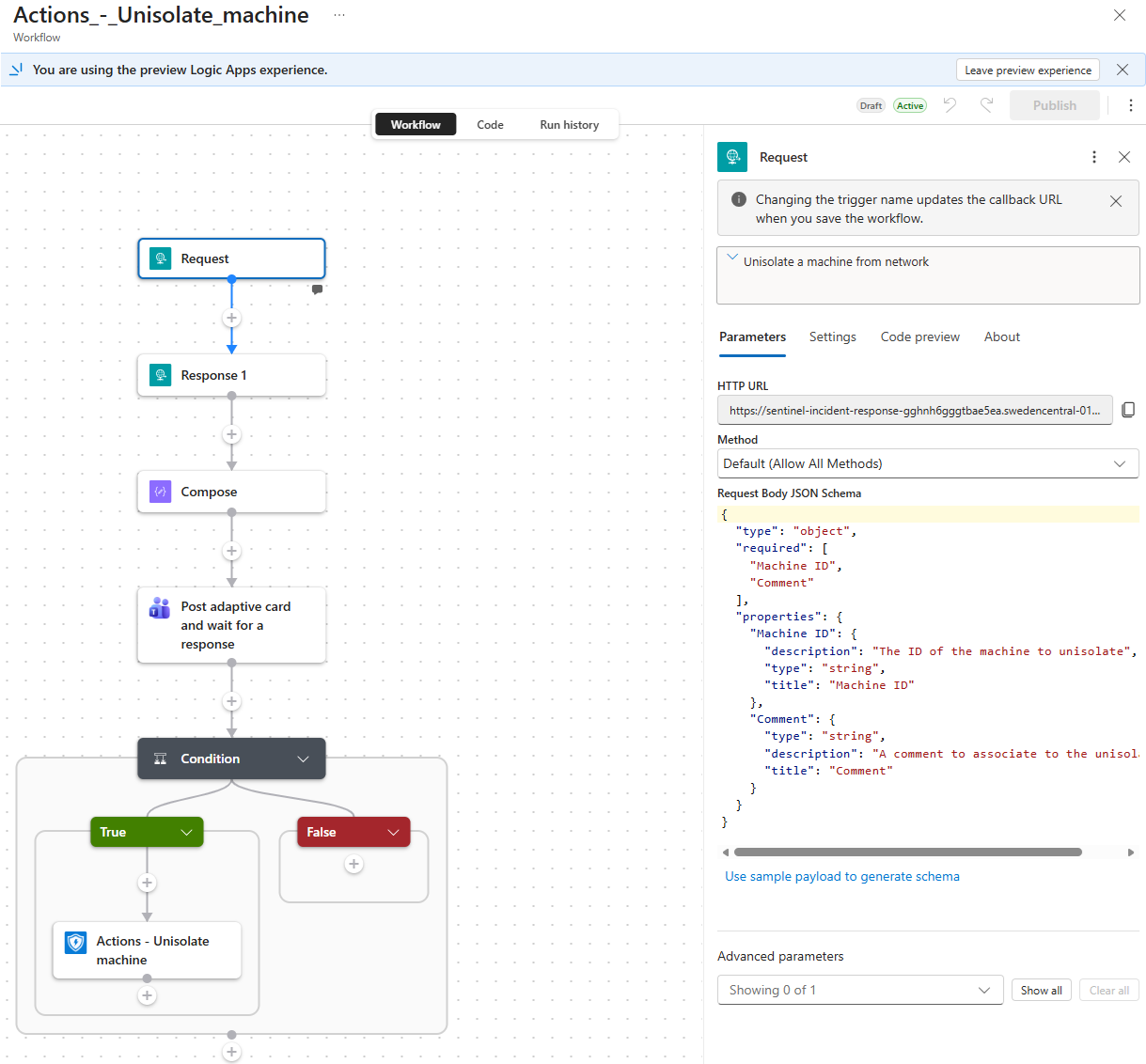 This screenshot shows the workflow sequence and the input schema. It does not show an approval-result condition; add one before the unisolate action.
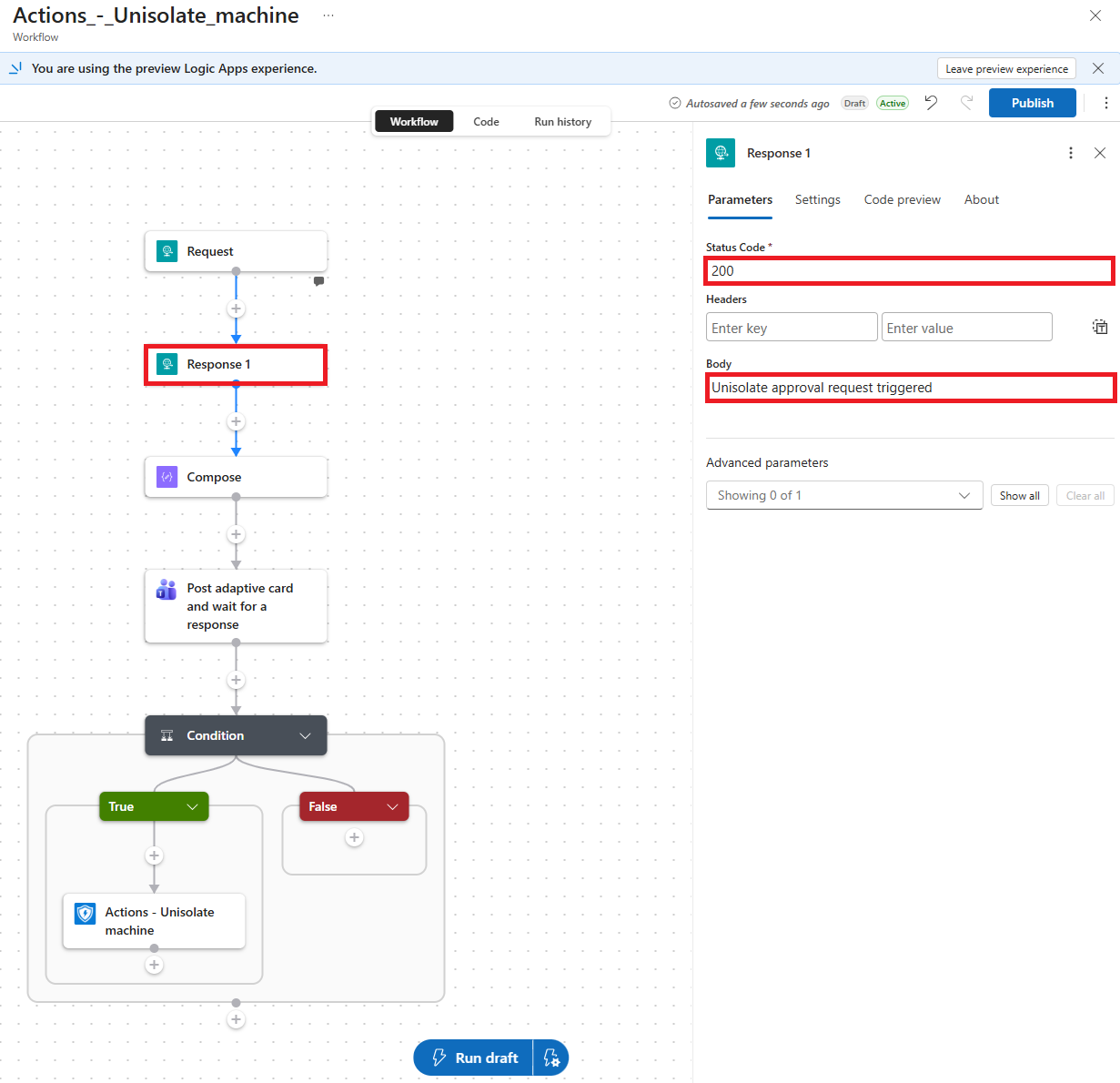 The first Response returns “awaiting approval” immediately, while the Logic App continues to the human review.
1
2
3
4
5
6
7
8
9
10
11
12
13
14
15
16
17
18
19
20
21
22
┌────────────────┐                ┌───────────────────────────────┐
│ Foundry agent  │═══ MCP call ══►│ Logic App                     │
│                │                │ defenderDeviceResponse        │
└───────▲────────┘                └───────────────┬───────────────┘
        │                                         │
        │                                         ▼
        │                         ┌───────────────────────────────┐
        └──── approval pending ───┤ Request → Response action     │
                                  └───────────────┬───────────────┘
                                                  │  workflow continues
                                                  ▼
                                  ┌───────────────────────────────┐
                                  │ Send approval request         │
                                  └───────────────┬───────────────┘
                                                  │
                                        Approved? ◆─── No ──► No device action
                                                  │
                                                  │ Yes
                                                  ▼
                                  ┌───────────────────────────────┐
                                  │ Unisolate device              │
                                  └───────────────────────────────┘
⚠️ “Approval pending” is not “action completed.” Once the early response has gone back, the agent cannot infer the later approval outcome from that tool call. Check the Logic App run history or use a separate status lookup or notification if you need the agent or analyst to learn the final result. Microsoft says a Response action can appear before the end of a workflow, while its MCP setup guide describes workflows ending with a Response action. I kept the generated trailing Response in my workflow design and verified tool discovery and the early reply; test this behavior in your own environment before depending on it.
That placement change let the agent report approval requested and finish its turn. I would use the same idea for other actions that wait on a person; an incident comment can return synchronously.
🔄 Who needs the final result?
Let Logic Apps own the follow-up
For this autonomous agent, I would keep the contract small: the agent requests the gated action, receives “approval requested,” and finishes. If its next decision does not depend on the result, it need not wake up for the responder’s answer. Logic Apps owns the approval, Defender call, and follow-up. I would still use a stable requestId so a retry cannot create a second approval.
Monitoring your playbooks and Logic App runs is good practice anyway. I use Azure Monitor workflow metrics and Application Insights and alert on failed or timed-out runs, plus approvals that miss the SOC’s deadline. Each approval branch should record its outcome, approved, rejected or expired, so analysts can see what happened.
This is the simplest production contract I see for my use case. The agent starts the process; Logic Apps and SOC monitoring own the result. I would add an agent-facing status tool only when a later decision or report needs that result.
If the agent needs the outcome
In my case, the agent doesn’t need to know the result. Each run is triggered per incident, and by the next run the previous incident is usually no longer relevant. So unisolate isn’t the best example here. For long-running workflows where a later agent run does need the outcome, the early HTTP response can be extended with a small status layer. The Logic App would persist each operation, keyed by a stable requestId, for example in Azure Table Storage, and update its state as it progresses: pending_approval, approved, rejected, approval_timed_out, completed or failed. A second, read-only MCP tool such as getResponseStatus(requestId) would then let any later agent run look up the result. I haven’t built this layer, but it’s a straightforward extension if your scenario needs it.
🔐 Where I would draw the line
Not every action needs the same gate. During an active compromise, isolating a device can be an “act now, review right after” decision, the classic “fire first, ask later” in many playbooks. Unisolation is different: before reconnecting a device, I would normally require approval. Read actions and incident comments usually don’t need that pause at all. These are response-policy decisions you define up front, not something the agent should work out from the incident narrative.
The tool result should say what happened: an incident update can return success or failure, while an approval-gated action returns pending approval with a traceable identifier. On a retry, check whether the workflow already started before sending another approval.
🔗 The gap between incident comments and case activity
One thing I noticed in my tests: when the agent used the Microsoft Sentinel connector to Add comment to incident, that comment did not appear in the Activities timeline of the corresponding Defender case. The tool call succeeded, but the analyst looking at the case would miss that note. I would verify where each comment lands before treating either timeline as the complete response record.
I could not find a native Logic Apps action for adding a comment to a Defender case. Microsoft now documents a Defender SOC connector (preview), but it currently lists exactly two triggers — one for alerts and one for cases — and no actions. So it can start a workflow from a case event, but it cannot add a comment to a case. I am looking forward to either an updated Sentinel connector that handles this case activity or a dedicated Defender case action connector. I would prefer that over maintaining my own API call.
There is an API route if you need the flexibility now: Microsoft Graph case management can create a comment activity with POST /beta/security/caseManagement/cases/{caseId}/activities. That takes a case ID, not the Sentinel incident ARM ID used by the connector. It is also a beta API, and Microsoft says beta APIs are not supported for production applications. I would treat a Graph-backed Logic App tool as a lab or carefully evaluated option until that support boundary changes.
📝 Conclusion
Logic Apps gave my Foundry agent a practical response layer without a pile of custom MCP code. I reused the existing Sentinel and Defender connectors, kept human approval inside the workflow, and let the autonomous agent focus on what it’s good at: investigating and picking the right tool. One small design detail made all the difference: the workflow returns approval pending right away, before it waits on a human. That gives the agent immediate confirmation that the action was triggered and tells it nothing more is needed from its side for now.