Defender for Cloud - Syncing the Missing Informational Alerts into XDR
Microsoft Defender for Cloud deliberately keeps informational alerts out of the Microsoft Defender portal. The reason is sensible: focus the incident queue on the signals that need attention and reduce alert fatigue.
That decision was made for a SOC where every alert is reviewed by a human. I am less convinced it is still the right default for an increasingly agentic SOC. An AI-assisted triage flow can discard a low-fidelity signal cheaply. Reconstructing that same signal later - after its context has disappeared upstream - is much harder.
So I built a small workaround that uses Sentinel as the vehicle. It exports Defender for Cloud alerts to Log Analytics, selects only the informational ones with a Sentinel analytics rule, and makes the resulting Sentinel alerts and incidents available in the Defender XDR portal where the rest is then carried by the Defender correlation engine.
The goal is not to make informational alerts urgent. It is to make them available as context when an agent, analyst, or correlation engine needs them.
🧭 What Defender for Cloud sends to XDR
With Microsoft Sentinel onboarded to the Defender portal, Defender for Cloud alerts are natively available through Defender XDR, so the legacy subscription-based Sentinel connector is no longer the preferred path and required to avoid duplicated alerts. However, the XDR/tenant-based integration still excludes Informational Defender for Cloud alerts. The tenant-based Defender Cloud connector may also remain necessary to populate Sentinel incidents with the associated alerts and entities as before, but it does not change the fact that the informational tier is missing. It is plausible that this connector dependency disappears entirely as the unified SOC experience matures, but for now it remains a documented requirement.
Microsoft documents the reason directly:
Informational alerts from Defender for Cloud aren’t integrated to the Microsoft Defender portal to allow focus on the relevant and high severity alerts. This strategy streamlines management of incidents and reduces alert fatigue.
This creates an awkward asymmetry in my opinion. The data still exists in Defender for Cloud, but the signal is unavailable in the place where the rest of the SOC is correlating cloud, identity, endpoint and email activity.
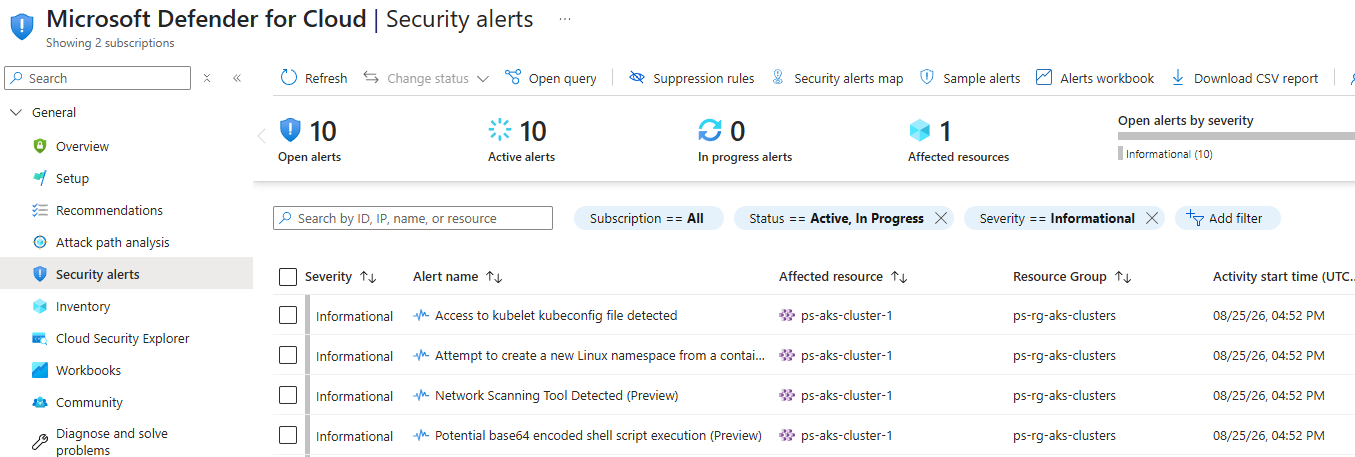
Below is a sample of Defender for Cloud informational alerts which by default are not sent to Microsoft Defender XDR:
🧩 The workaround - Sentinel as the vehicle
The whole pattern fits in one picture. On the left, the native routes that already work. On the right, the route I had to build:
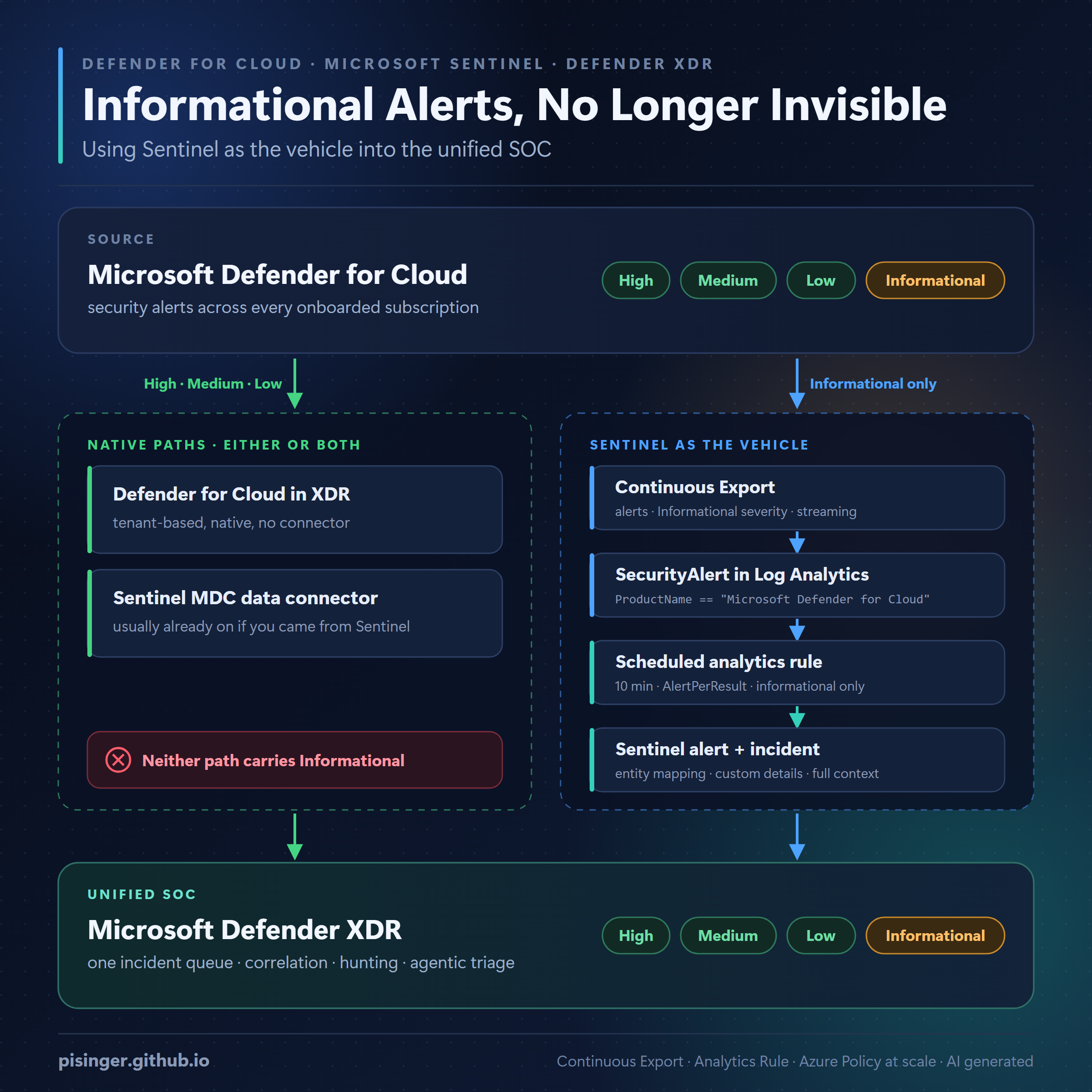
Two native paths can carry Defender for Cloud alerts into the Defender portal, and in practice you often have both: the native Defender for Cloud integration in XDR, and the Defender for Cloud data connector in Sentinel - which is usually already enabled if you arrived here from Sentinel. Either way, neither of them carries the Informational tier. That is not a connector you configured wrongly; it is the documented product behaviour.
So the informational alerts need their own route, and Sentinel is the vehicle: Continuous Export lands them in SecurityAlert, a scheduled analytics rule turns only that tier into Sentinel alerts, and the Sentinel/XDR integration carries the resulting incidents into the unified portal.
The important detail is that the existing connector configuration stays untouched. Two things keep the Informational tier from being duplicated: continuous export is scoped to Informational alerts only, and the analytics rule is scoped to the same tier. Neither touches what already arrives through the native paths.
This requires Defender for Cloud Continuous Export to a Log Analytics workspace connected to Microsoft Sentinel. The tenant-based XDR connector is not a route for informational alerts - it only exposes the higher severities.
The workspace also needs to be onboarded to the Microsoft Defender portal, or connected through the Microsoft Defender XDR integration when Sentinel is still being managed in the Azure portal. That is what makes Sentinel incidents visible in the unified Defender experience and keeps the incident records synchronised.
See Microsoft Defender XDR integration with Microsoft Sentinel for the two integration models and their connector requirements.
📡 Exporting the informational tier
Defender for Cloud Continuous Export can stream alerts, recommendations, security findings (CVEs) or Attack Paths to a Log Analytics workspace or Azure Event Hubs. For this pattern, the destination must be Log Analytics because the Sentinel analytics rule queries the SecurityAlert table.
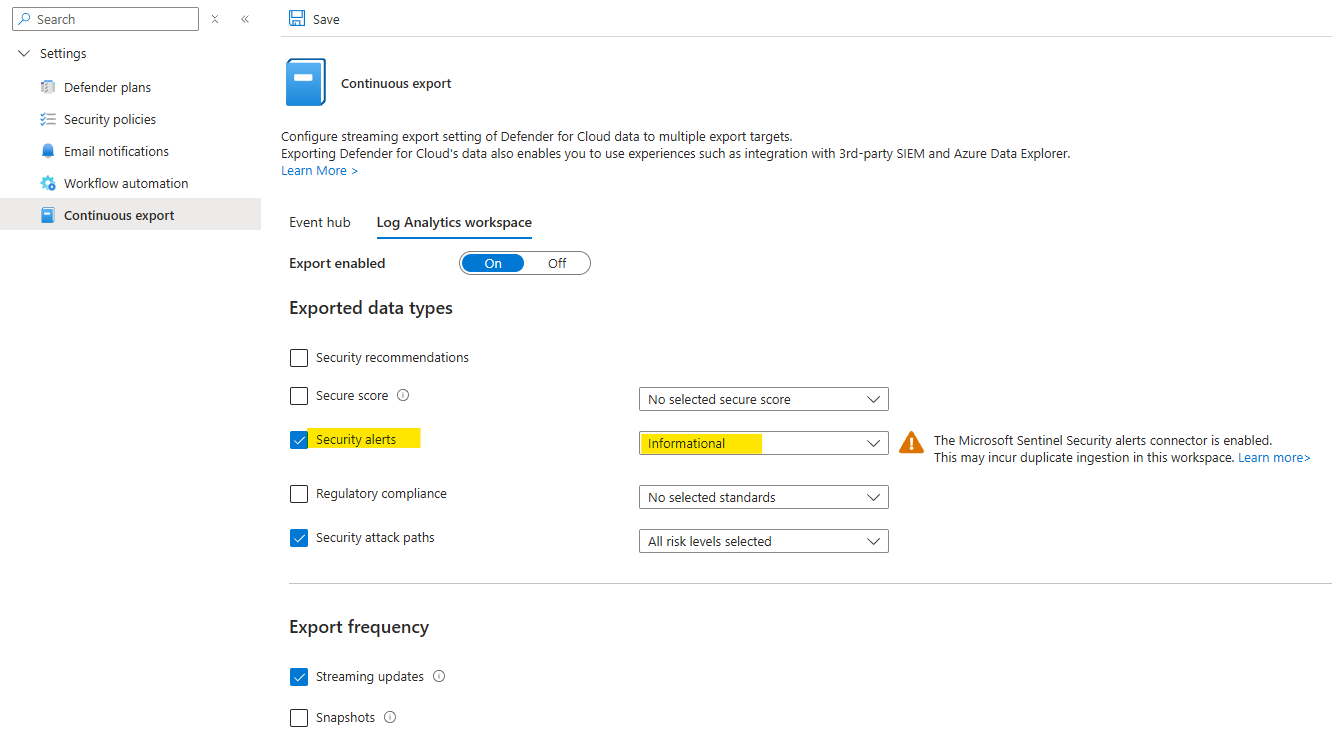
In the Azure portal, the configuration is under Defender for Cloud > Environment settings > subscription > Continuous export. Choose Log Analytics as the target, select alerts as the data type, and include the Informational severity.
The export can be configured for streaming or snapshots. Streaming is the useful choice here: data is sent as the relevant resource health or alert state is updated, rather than waiting for a snapshot. It is the mode that fits an alert-to-incident pipeline.
Microsoft documents the exported Log Analytics tables and the Continuous Export configuration here:
- Set up Continuous Export in the Azure portal
- View exported Defender for Cloud data in Azure Monitor
- Defender for Cloud alert schemas
The last link is useful when building entity mappings and custom details. Continuous Export writes the alerts into SecurityAlert; it does not turn them into Sentinel incidents on its own.
🗺️ Looking up alerts in Azure Resource Graph
There is also a useful default lookup path that does not require Continuous Export. Defender for Cloud alerts are represented in Azure Resource Graph under microsoft.security/locations/alerts, so you can query them across subscriptions with the securityresources table.
This is useful for checking whether an alert exists, reviewing its current state, and building subscription-wide inventory queries. It is not a replacement for Continuous Export: an ARG query does not stream the alert into SecurityAlert, create a Sentinel incident, or make the signal available to the unified SOC.
1
2
3
4
5
6
7
8
9
10
11
12
13
securityresources
| where type == "microsoft.security/locations/alerts"
| project
    TimeGeneratedUtc = todatetime(properties.TimeGeneratedUtc),
    alertId = name,
    ResourceId = tolower(tostring(properties.ResourceIdentifiers[0].AzureResourceId)),
    AlertName = tostring(properties.AlertDisplayName),
    Severity = tostring(properties.Severity),
    Intent = tostring(properties.Intent),
    Status = tostring(properties.Status),
    AlertURL = tostring(properties.AlertUri)
| project TimeGeneratedUtc, alertId, ResourceId, AlertName, Severity, Intent, Status, AlertURL
| sort by TimeGeneratedUtc
The query deliberately does not filter out Informational, which makes it a handy way to verify that the alerts exist in Defender for Cloud even though they are omitted from the native XDR integration. Microsoft’s Defender for Cloud Resource Graph samples show the same securityresources alert resource type.
🎯 The analytics rule
The rule only selects unresolved informational alerts from Defender for Cloud:
1
2
3
4
5
6
SecurityAlert
//| where ProductName == "Azure Security Center"
| where ProductName == "Microsoft Defender for Cloud"
| where AlertSeverity has "informational"
| where Status != "Resolved"
| extend ProductComponentName = parse_json(ExtendedProperties).ProductComponentName
The commented line is not just historical. It identifies the other ingestion path. Alerts populated by the Defender for Cloud connector in Sentinel use ProductName == "Azure Security Center", while alerts written by Defender for Cloud Continuous Export use ProductName == "Microsoft Defender for Cloud". This rule must select the latter because it is specifically processing the Continuous Export copy.
I use a 10-min frequency and lookback, with AlertPerResult grouping. That keeps each source alert as its own Sentinel alert, which is important when the downstream XDR view needs to retain the original alert identity and context.
The rule maps ResourceId to an Azure resource and carries the useful source fields into custom details: the compromised entity, extended properties, subscription, product component and original alert type. The alert title is also made more useful by adding the Defender for Cloud product component.
Here is the complete rule definition:
1
2
3
4
5
6
7
8
9
10
11
12
13
14
15
16
17
18
19
20
21
22
23
24
25
26
27
28
29
30
31
32
33
34
35
36
37
38
39
40
41
42
43
44
45
46
47
48
49
50
51
52
53
54
55
56
57
58
59
60
61
id: "65f0de55-b152-4461-8e15-d3d4ae535936"
name: "PS - Transform MDC informational alerts into Sentinel ones to get streamed into xdr"
description: |
  Defender for Cloud (MDC) only propagates Low/Medium/High alerts to Defender XDR.
  Informational alerts are intentionally dropped upstream to limit alert fatigue, so they
  never reach XDR correlation, incident graph, or Advanced Hunting.

  This rule re-materialises those informational MDC alerts as Sentinel alerts/incidents.
  Because Sentinel (unified SOC) incidents sync into Defender XDR, the signals become
  available for correlation and enrichment instead of being lost.

  Rationale - with agentic/AI-assisted triage, raw alert volume is no longer the limiting
  factor - context is. Low-fidelity informational signals are cheap for an agent to
  discard but expensive to reconstruct after the fact, so full-fidelity ingestion is now
  preferred over upstream suppression.

  Prerequisite - MDC Continuous Export (alerts -> Log Analytics) must be enabled. The
  tenant-based Defender for Cloud connector in XDR syncs Low/Medium/High only, so the
  informational tier is not available through that path.
severity: "Informational"
status: "Available"
requiredDataConnectors: []
dataTypes:
  - "SecurityAlert"
queryFrequency: "10m"
queryPeriod: "10m"
triggerOperator: "gt"
triggerThreshold: 0
query: |
  SecurityAlert
  //| where ProductName == "Azure Security Center"
  | where ProductName == "Microsoft Defender for Cloud"
  | where AlertSeverity has "informational"
  | where Status != "Resolved"
  | extend ProductComponentName = parse_json(ExtendedProperties).ProductComponentName
entityMappings:
  - entityType: "AzureResource"
    fieldMappings:
      - identifier: "ResourceId"
        columnName: "ResourceId"
customDetails:
  CompromisedEntity: "CompromisedEntity"
  ExtendedProperties: "ExtendedProperties"
  SubscriptionId: "WorkspaceSubscriptionId"
  TriggerProduct: "ProductComponentName"
  AlertType: "AlertType"
alertDetailsOverride:
  alertDisplayNameFormat: " {{DisplayName}} (mdc/{{ProductComponentName}})"
  alertDescriptionFormat: "{{Description}}"
  alertTacticsColumnName: "Tactics"
  alertDynamicProperties:
    - alertProperty: "Techniques"
      value: "Techniques"
    - alertProperty: "RemediationSteps"
      value: "RemediationSteps"
sentinelEntitiesMappings:
  - columnName: "Entities"
eventGroupingSettings:
  aggregationKind: "AlertPerResult"
version: "1.0.0"
kind: "Scheduled"
The result is still an informational alert. The rule is not upgrading the severity or pretending that Defender for Cloud has found a high-confidence attack. It is moving the signal across a product boundary so it can be evaluated alongside stronger evidence. It also does not create a new raw-event table in Defender XDR Advanced Hunting; the extra visibility is the Sentinel/XDR alert and incident context.
State does not sync back. Resolving the copied alert or incident in Defender XDR leaves the originating Informational alert active in Defender for Cloud. This is expected: the sync behavior documented for the native integration applies to alerts that traveled that path, and these did not - they arrived via continuous export. For this use case I accept the split. XDR is the triage and correlation object; Defender for Cloud stays the source record and remains visible to the workload owner. A Logic App or some other automation could close the loop later if you want strict parity.
🔗 Avoiding duplicate alerts
There are now two routes involved - the native one (either integration, or both) and the Sentinel one:
| Alert severity | Native paths | Continuous Export + rule |
|---|---|---|
| Low | ✅ Yes | ⛔ No |
| Medium | ✅ Yes | ⛔ No |
| High | ✅ Yes | ⛔ No |
| Informational | ⛔ No | ✅ Yes |
That split is intentional. If Continuous Export is configured for Low, Medium and High as well, the same source alerts can enter Sentinel through both the native connector and this analytics-rule path. The rule should remain informational-only unless there is a specific reason to duplicate the other severities.
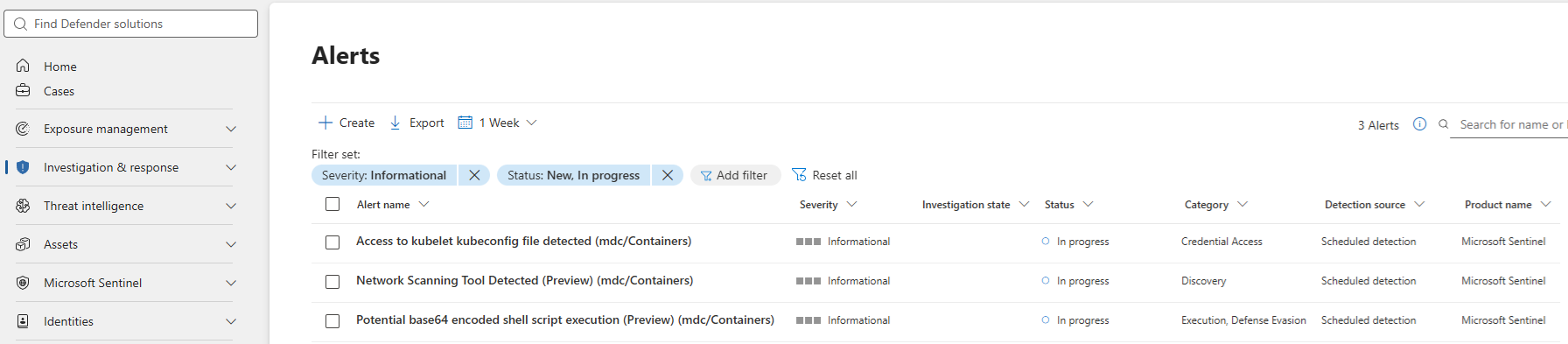
When having everything in place you will then see those alerts synced into Defender XDR, which is the goal of this workaround. The informational alerts are now available for correlation and enrichment in the unified SOC, instead of being dropped before they reach the XDR portal.
To check for proper working Analytics Rule, check Sentinel Health:
1
2
3
4
SentinelHealth
| where SentinelResourceName startswith "PS - Transform MDC"
| extend AlertsGeneratedAmount = parse_json(ExtendedProperties).AlertsGeneratedAmount
| where AlertsGeneratedAmount > 0
🛠️ Scaling Continuous Export with Azure Policy
For a handful of subscriptions, configuring Continuous Export in the portal is manageable. At scale, Microsoft provides built-in DeployIfNotExist policies for exporting Defender for Cloud alerts and recommendations to Log Analytics or Event Hubs.
The built-in Log Analytics policy is:
ffb6f416-7bd2-4488-8828-56585fef2be9 - Deploy export to Log Analytics workspace for Microsoft Defender for Cloud alerts and recommendations
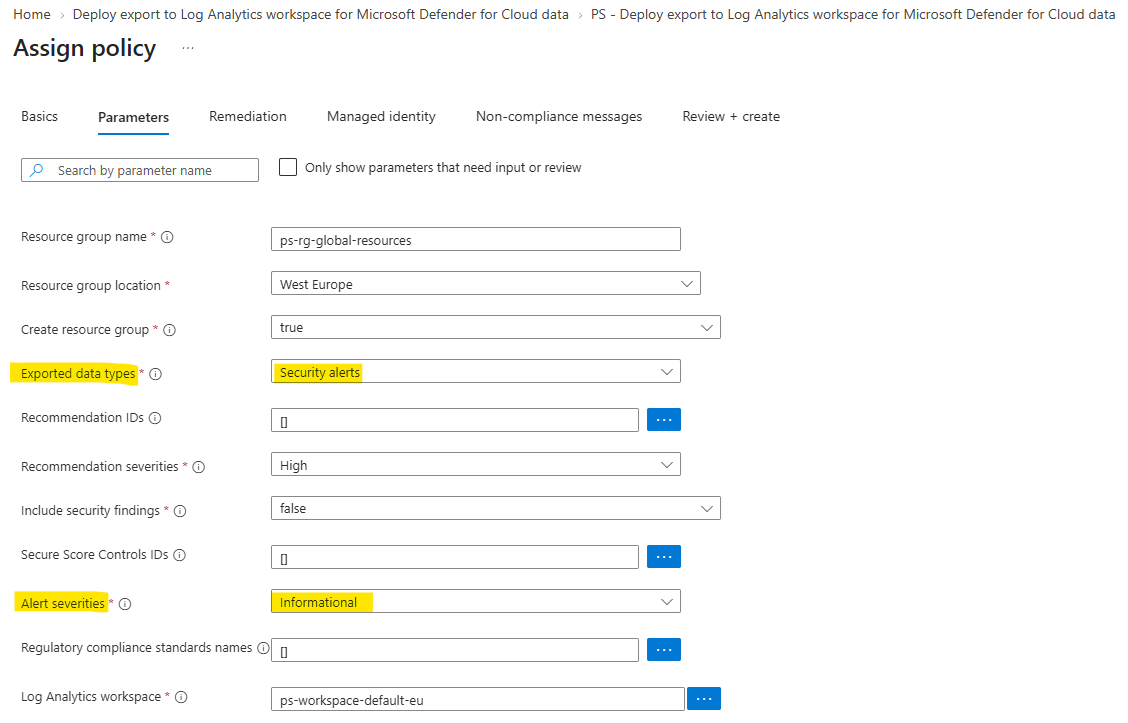
Assigning it at management-group scope and creating a remediation task is the practical way to cover existing subscriptions as well as new ones. The policy route is also where the configuration detail becomes important: the default severity selection is normally Low, Medium and High, so the policy parameters must include Informational too.
By default, the built-in policy does not include Informational as alert severity option. To change this behavior you have to duplicate and customize the policy. Otherwise, the exported alerts will be identical to what the native XDR integration already provides, and this workaround will not deliver any new signals.
🔍 When the portal stops showing the setting
There is another operational wrinkle. With a single export configuration, the portal exposes the severity selection in a fairly friendly way. Once a subscription has multiple export configurations, the portal no longer gives the complete picture and may no longer expose the setting you need to change.
At that point, inspect the Defender for Cloud Automations API. This is the small PowerShell function I use to retrieve either all export configurations or one named configuration:
1
2
3
4
5
6
7
8
9
10
11
12
13
14
15
16
17
18
19
20
21
function Get-DefenderCloudExportSettings {
    param(
        [Parameter(Mandatory)]
        [guid]$subId,

        [Parameter(Mandatory)]
        [string]$resourceGroup,

        [string]$automationName
    )

    $baseUri = "https://management.azure.com/subscriptions/$subId/resourceGroups/$resourceGroup/providers/Microsoft.Security/automations"
    $uri = if ($automationName) {
        $($baseUri + "/" + $automationName + "?api-version=2023-12-01-preview")
    } else {
        $($baseUri + "?api-version=2023-12-01-preview")
    }

    $result = (Invoke-AzRestMethod -Uri $uri -Method GET).Content | ConvertFrom-Json
    if ($automationName) { $result } else { $result.value }
}
For example, retrieve every export configuration in a resource group with:
1
2
3
Get-DefenderCloudExportSettings `
    -subId "00000000-0000-0000-0000-000000000000" `
    -resourceGroup "defender-export-config"
The resource group is required because the Automations API scopes these configurations beneath a subscription and resource group. It is only the container for the export configuration - you should not expect to see a normal, separately created Continuous Export resource in the Azure portal. When multiple configurations exist, the portal may show only a banner or incomplete view, so the API is the reliable place to inspect them.
Microsoft documents the Automations API here:
The API is the reliable place to verify that the relevant export configuration actually contains the informational severity when multiple configurations exist.
🤖 Why this makes more sense with agentic SOC operations
The old trade-off was easy to state: informational alerts create volume, and volume creates alert fatigue. Drop the least urgent signals before they enter the unified experience.
Agentic triage changes the cost curve. An agent can use an informational alert as a cheap piece of supporting evidence, correlate it with the affected resource and nearby activity, and discard it when it adds no value. The expensive operation is recovering context that was never retained.
That does not mean every informational alert should page an analyst or create an automated response. It means the suppression point should move closer to triage, where context-aware logic can make the decision. Sentinel is a useful place for that boundary because the signal can be stored, grouped, enriched and synchronised into Defender XDR without changing the original Defender for Cloud severity.
⚠️ Limitations and operational boundaries
This is a workaround around an intentional product behaviour, not a change to the native Defender for Cloud integration. A few boundaries matter:
- Alert volume: The rule is designed to preserve fidelity, so tune or suppress it later if a particular informational alert becomes operational noise.
- Status handling: The query excludes alerts with
Status == "Resolved", but resolving the Sentinel or XDR copy does not resolve the original Defender for Cloud informational alert. The source alert remains active in Defender for Cloud and visible to workload owners, which is an accepted limitation of this workaround. - Schema drift: Validate
ProductName,AlertSeverityand the fields insideExtendedPropertiesin your workspace before deploying the rule broadly. - Duplicate paths: Do not export Low, Medium and High through this rule when the tenant-based connector already provides them.
- API configuration: When multiple automations exist, use the Automations API to inspect every configuration rather than relying on the portal view.
📝 Conclusion
Defender for Cloud intentionally drops informational alerts before they reach Defender XDR, and no native path gives them back. Continuous Export plus a scheduled rule makes Sentinel the vehicle instead: preserve the alerts in SecurityAlert, turn only the missing informational tier into Sentinel alerts, and let the unified SOC synchronise those incidents into XDR.
For a human-only SOC, the original suppression may still be the right choice. With agentic triage, I prefer keeping the full-fidelity signal and letting context-aware automation decide what deserves attention. The alert remains informational - it is simply no longer invisible.