Under the Hood - The Ports and Protocols Behind MDE Device Discovery
Microsoft Defender Endpoint’s standard (active) discovery probes hosts on the local subnet but it can be surprisingly difficult to trace, since it happens only once every three weeks. The good news: MDE’s own telemetry does help to get better visbility into this. Here’s what reverse engineering the device timeline and DeviceNetworkEvents reveals.
⚠️ One important clarification upfront: MDE does not perform a full subnet sweep. Active probing is targeted - it only scans hosts that have already been observed passively (e.g. via broadcast/multicast traffic, ARP, etc.). So don’t expect to see probes against every IP in the /24. It’s also worth noting that active probing is scoped exclusively to unmanaged and unknown devices - anything already onboarded to Defender is excluded from scanning.
Also worth checking: the Windows Event Log for SenseIR events, which can surface discovery activity on the device. More details here: https://pisinger.github.io/posts/defender-endpoint-air-local-senseir-events/
🔍 Extracting the Scan Activity from the Device Timeline
When a probe runs, MDE downloads a short-lived PSScript_ file into C:\ProgramData\Microsoft\Windows Defender Advanced Threat Protection\Downloads\ and executes it under NT AUTHORITY\LOCAL SERVICE. Each individual scan function appears as a PowerShellCommand event in the device timeline. Exporting the timeline as CSV and filtering for scan-related rows gives you already a good overview. That said, if you prefer to stay in the UI, searching directly within the Timeline works as well.
1
2
3
4
5
6
7
# count all events vs scan-related events
(Import-Csv .\timeline.csv).count
(Import-Csv .\timeline.csv | Where-Object { $_.PSObject.Properties.Value -match "scan-" }).count

# extract the actual scan commands with timing
$events = Import-Csv .\timeline.csv | Where-Object { $_.PSObject.Properties.Value -match "scan-" }
$events | Select "Event Time", "Computer Name", "Initiating Process File Name", "Additional Fields"
Output from a real probe run (ordered oldest to newest as they fire):
1
2
3
4
5
6
7
8
9
10
11
12
13
14
15
16
17
18
19
20
21
22
23
24
25
26
27
28
29
30
31
32
2026-04-02T20:42:18  {"Command":"$ScanResult = Scan-Device -LocalIp ... -RemoteIp ... -ScanGuid ... -CvesToScan ... -ScanFeatures ..."}
2026-04-02T20:42:18  {"Command":"$IcmpEvent.TTL = Scan-Icmp -RemoteIp $RemoteIP"}
2026-04-02T20:42:18  {"Command":"Scan-Banners -RemoteIP $RemoteIp -RemoteMac $Mac"}
2026-04-02T20:42:20  {"Command":"Scan-Ssh -RemoteIp $RemoteIp -RemoteMac $Mac"}
2026-04-02T20:42:20  {"Command":"$SshResult = Scan-SshPort -RemoteIp $RemoteIp -RemoteMac $Mac -RemotePort $Port"}
2026-04-02T20:42:23  {"Command":"Scan-Sip -RemoteIp $RemoteIp -RemoteMac $Mac"}
2026-04-02T20:42:23  {"Command":"Scan-Sip-Tcp -RemoteIp $RemoteIp -RemoteMac $Mac"}
2026-04-02T20:42:24  {"Command":"Scan-Sip-Tcp -RemoteIp $RemoteIp -RemoteMac $Mac -RemotePort 5061 -TlsRequired $true"}
2026-04-02T20:42:24  {"Command":"Scan-TelnetBanner -RemoteIP $RemoteIp -RemoteMac $Mac"}
2026-04-02T20:42:25  {"Command":"Scan-LLmnr -RemoteIp $RemoteIp -RemoteMac $Mac -LocalIP $LocalIp"}
2026-04-02T20:42:26  {"Command":"Scan-ReverseMDNS -RemoteIp $RemoteIp -RemoteMac $Mac -LocalIP $LocalIp"}
2026-04-02T20:42:26  {"Command":"$unicastGotResult = Scan-ReverseMDNSByAddress ... -ProtocolName \"ReverseMulticastDnsUnicastProbe\""}
2026-04-02T20:42:28  {"Command":"$DeviceName = Scan-NetBios -RemoteIP $RemoteIp -RemoteMac $Mac"}
2026-04-02T20:42:28  {"Command":"Scan-Smb -RemoteIp $RemoteIp -RemoteMac $Mac"}
2026-04-02T20:42:28  {"Command":"Scan-SmbV1 -RemoteIp $RemoteIp -RemoteMac $Mac"}
2026-04-02T20:42:29  {"Command":"Scan-Nbss -RemoteIp $RemoteIp -RemoteMac $Mac -RemoteName \"MSFT\""}
2026-04-02T20:42:29  {"Command":"Scan-NbssV1 -RemoteIp $RemoteIp -RemoteMac $Mac -RemoteName \"MSFT\""}
2026-04-02T20:42:30  {"Command":"$SnmpScanResult = Scan-Snmp -RemoteIp $RemoteIp -RemoteMac $Mac -ExtendedSnmpScan $ExtendedSnmpScan"}
2026-04-02T20:42:33  {"Command":"$isSupportsPJL = Scan-Ipp -RemoteIp $RemoteIp -RemoteMac $Mac"}
2026-04-02T20:42:36  {"Command":"Scan-CrestronIp $RemoteIp -RemoteMac $Mac"}
2026-04-02T20:42:36  {"Command":"Scan-Afp $RemoteIp -RemoteMac $Mac"}
2026-04-02T20:42:37  {"Command":"Scan-Rdp-Nla -RemoteIP $RemoteIp -RemoteMac $Mac"}
2026-04-02T20:42:37  {"Command":"Scan-Rpc -RemoteIP $RemoteIp -RemoteMac $Mac"}
2026-04-02T20:42:38  {"Command":"Scan-RpcInterfaceMapper -RemoteIP $RemoteIp -RemoteMac $Mac"}
2026-04-02T20:42:41  {"Command":"Scan-WinRm -RemoteIP $RemoteIp -RemoteMac $Mac"}
2026-04-02T20:42:42  {"Command":"Scan-SLP -RemoteIp $RemoteIp -RemoteMac $Mac"}
2026-04-02T20:42:44  {"Command":"Scan-Vnc -RemoteIp $RemoteIp -RemoteMac $Mac"}
2026-04-02T20:42:44  {"Command":"Scan-Http -RemoteIP $RemoteIp -RemoteMac $Mac"}
2026-04-02T20:42:44  {"Command":"Scan-HttpPort -RemoteIP $RemoteIp -RemoteMac $Mac -RemotePort $RemotePort"}
2026-04-02T20:42:51  {"Command":"Scan-HttpPort -RemoteIP $RemoteIp -RemoteMac $Mac -RemotePort $RemotePort -ForceSSL"}
2026-04-02T20:42:54  {"Command":"Scan-UdpTcpPorts -RemoteIp $RemoteIp -RemoteMac $Mac -TcpPorts $TcpPortsList -UdpPorts $UdpPortsList"}
2026-04-02T20:43:14  {"Command":"Scan-VirtualGW"}
That’s 20+ distinct scan functions firing against a single target in under a min.
📡 Protocols and Ports - The Full Picture
Mapping each scan function to its protocol and well-known ports.
Note that this list reflects what was observed in my own environment - it may not be exhaustive and could change as MDE evolves. The full list of supported protocols can be found here https://learn.microsoft.com/en-us/defender-endpoint/device-discovery#supported-protocols.
| Scan Function | Protocol | Typical Port(s) |
|---|---|---|
| Scan-Device | Orchestrator (calls all below) | — |
| Scan-Icmp | ICMP | — |
| Scan-Banners | Generic TCP banner grab | various |
| Scan-Ssh / Scan-SshPort | SSH | TCP 22 |
| Scan-Sip | SIP | UDP 5060 |
| Scan-Sip-Tcp | SIP over TCP | TCP 5060 |
| Scan-Sip-Tcp (-TlsRequired) | SIP/TLS | TCP 5061 |
| Scan-TelnetBanner | Telnet | TCP 23 |
| Scan-LLmnr | LLMNR | UDP 5355 |
| Scan-ReverseMDNS / Scan-ReverseMDNSByAddress | mDNS | UDP 5353 |
| Scan-NetBios | NetBIOS Name Service | UDP 137 |
| Scan-Smb | SMB | TCP 445 |
| Scan-SmbV1 | SMBv1 | TCP 445 |
| Scan-Nbss / Scan-NbssV1 | NetBIOS Session Service | TCP 139 |
| Scan-Snmp | SNMP | UDP 161 |
| Scan-Ipp | Internet Printing Protocol | TCP 631 |
| Scan-CrestronIp | Crestron control | TCP 41794 |
| Scan-Afp | Apple Filing Protocol | TCP 548 |
| Scan-Rdp-Nla | RDP with NLA | TCP 3389 |
| Scan-Rpc | RPC (dynamic) | TCP 135, 49152–65535 |
| Scan-RpcInterfaceMapper | RPC Endpoint Mapper | TCP 135 |
| Scan-WinRm | WinRM / WSMan | TCP 5985, 5986 |
| Scan-SLP | Service Location Protocol | UDP 427 |
| Scan-Vnc | VNC | TCP 5900 |
| Scan-Http | HTTP | TCP 80 |
| Scan-HttpPort | HTTP | TCP 80 |
| Scan-HttpPort (-ForceSSL) | HTTPS | TCP 443 |
| Scan-UdpTcpPorts | Variable (target-dependent) | dynamic |
| Scan-VirtualGW | Virtual gateway detection | — |
The actual ports probed by
Scan-UdpTcpPortsdepend on the target device type identified earlier in the scan sequence - use the KQL query further below to see exactly what port sets MDE sends to each host in your environment.
🔭 Detecting This Activity Across Your Fleet
DeviceNetworkEvents is where this becomes operationally useful at scale. The query below uses the PSScript_ path as the signal, decorates results with connection outcomes, and summarises by minute per prober device and target - giving you the exact port sets MDE hit against each host:
1
2
3
4
5
6
7
8
DeviceNetworkEvents
| where RemoteIPType in ("Private")
| where InitiatingProcessFileName == "powershell.exe" and InitiatingProcessCommandLine has @"Defender Advanced Threat Protection\Downloads\PSScript_"
| extend ActionType = iff(ActionType == "ConnectionFailed", "⛔ConnectionFailed", iff(ActionType == "ConnectionSuccess", "✅ConnectionSuccess", ActionType))
//| project TimeGenerated, DeviceName, ActionType, InitiatingProcessFileName, InitiatingProcessParentFileName, Protocol, LocalPort, RemoteIP, RemotePort, RemoteIPType
| summarize make_set(RemotePort), count() by bin(TimeGenerated, 1m), DeviceName, LocalIP, ActionType, InitiatingProcessFileName, Protocol, RemoteIP
| extend PortCount = array_length(set_RemotePort)
//| where PortCount > 10
The make_set(RemotePort) per target is particularly useful - it surfaces exactly which ports from Scan-UdpTcpPorts MDE actually probed, filling in the one gap the timeline export alone can’t answer.
Below a list of scanned ports in my enviornment
1
2
3
4
5
6
7
21, 22, 23, 25, 53, 80, 88, 106, 111, 135, 139,
389, 443, 445, 515, 548, 623, 631, 660, 808,
1433, 1434, 1500, 1501, 1521, 1720, 2049, 2222, 2869,
3074, 3283, 3306, 3387, 3389, 4022, 5000, 5040, 5060,
5061, 5355, 5357, 5432, 5900, 5985, 6466, 6467, 7000,
7100, 7680, 8008, 8009, 8022, 8080, 8181, 8443, 8770,
9090, 9100, 9293, 17990, 22443, 32111, 49443, 62078
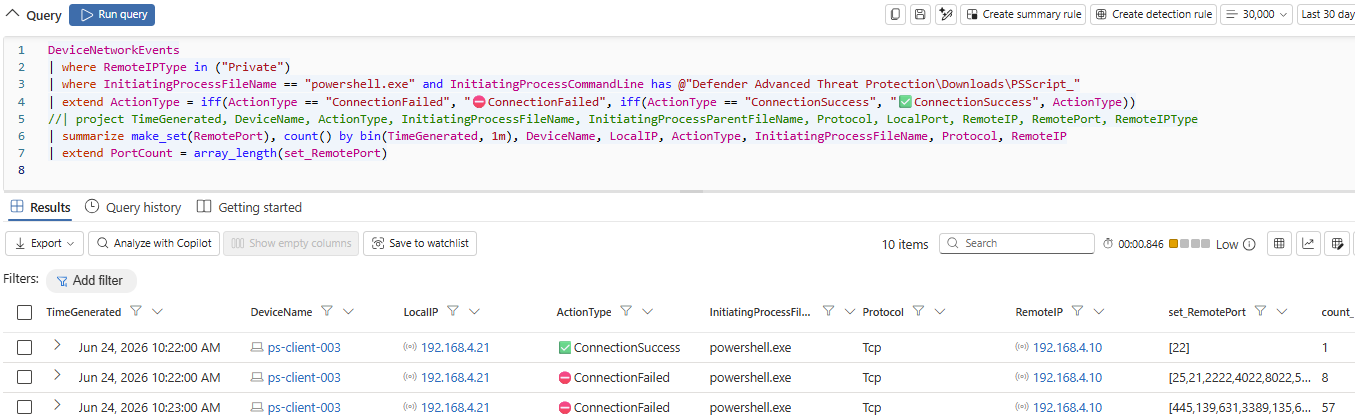
Keep in mind that
DeviceNetworkEventsis not a full packet capture. From my own testing it aligned well with what a dedicated network monitoring solution captured when looking to active probing through device discovery feature.
🔐 Decoding the ScannerArgs
The PSScript_ is launched with its parameters as a base64 blob. To decode and inspect the scan parameters run below:
1
2
$bytes = [System.Convert]::FromBase64String($Base64String)
([System.Text.Encoding]::UTF8.GetString($bytes) | ConvertFrom-Json).ScannerArgs | ConvertFrom-Json
The decoded JSON reveals target IP and MAC, the probing machine’s network adapters, a CvesToScan array, and a ScanFeatures field. When CvesToScan is empty, it’s a pure discovery run - no CVE probing:
1
2
3
4
5
6
7
8
9
10
IpsToScan          : 10.40.0.112,10.40.0.115
Guid               : 0b2caa18-11ff-43eb-b304-a74078b586d2
MachineId          : 2e6d023b29a144ae9284e3eafc78aad234781e
MachineConnections : {@{DefaultGatewayMac=BC-24-11-43-CC-0E; AdapterId={DFE60A51-94A7-427F-A8E3-FAA6FDE8FFB1}; NetworkNames=System.Object[]}}
ScannedDeviceId    : abaf10bd7a664b79aa0c226fbe4af056b5c8e7
ExpirationDateTime : 07/04/2026 16:40:48
CvesToScan         : {}
TargetMacs         : BC-24-11-5C-DA-02,BC-24-11-62-EF-04
DeviceIdsToScan    : 344feb95d6e047c1b65d69f873b69382fe68f5,abaf10bd7a664b79aa0c226fbe4af056b5c8e7
ScanFeatures       : {System.Object[], System.Object[]}
If you want to have the ScannerArgs decoded directly via KQL, run the below query:
1
2
3
4
5
6
DeviceProcessEvents
| where ProcessCommandLine has "-ParamsAsBase64"
| extend Base64Value = extract(@"-ParamsAsBase64\s+(\S+)", 1, ProcessCommandLine)
| extend DecodedParams = parse_json(base64_decode_tostring(Base64Value))
| where isnotempty(DecodedParams)
| project TimeGenerated, DeviceName, ProcessCommandLine, Base64Value, DecodedParams
Conclusion
By correlating the device timeline export with DeviceNetworkEvents, the full picture becomes surprisingly clear. The probe set is far more extensive than most people assume: more than twenty protocol‑level checks spanning ICMP, NetBIOS, SNMP, SIP, Crestron, and others and the list may further evolve over time.
One nuance that’s easy to miss: this isn’t a blanket network sweep. Defender only performs active probes against hosts it has already observed through passive traffic analysis. In other words, your discovery coverage is shaped by what your endpoints actually talk to, not by the theoretical boundaries of your IP space.