Sentinel MCP Entity Analyzer in Logic Apps - Why Security Copilot Is Required
An incident usually arrives with more than one interesting object attached to it - a user, a URL, a device, perhaps an IP address as well. The useful question is rarely just “what alert fired?” It is “what do we already know about each entity, and what should the analyst do next?”
Enriching an incident like this is not new - we have been checking threat intelligence, IoCs, and sign-in activity for years to build a better evidence package. The question for me was whether the existing Sentinel and Logic Apps actions can make that workflow simpler, with part of the summarization moved into an agentic pattern.
My first instinct was to add one incident comment after every entity analysis as usual. That works, but an incident with several accounts and URLs quickly turns into a comment stream that is hard to read. The current workflow runs Microsoft Sentinel’s Entity Analyzer for linked accounts, URLs, and DNS entities, then lets the built-in Logic Apps Agent turn the findings into one consolidated update.
Devices and IP addresses are outside this loop and need separate enrichment paths - for example, a blast-radius or graph query, or a deterministic KQL workflow over device telemetry. There is no aquivalent entity analysis tool call for devices, yet.
There is one more design detail worth making explicit before adding this to SOAR: the entity analyzer consumes Security Compute Units (SCUs). That usage is attached to the analyzer operation, not to the user interface where somebody happens to invoke it.
Microsoft Sentinel’s MCP Entity Analyzer is powered by the Security Copilot platform behind the scenes and consumes SCUs as part of the Entity Analyzer capability itself. That applies regardless of whether the tool is invoked from a Logic App, GitHub Copilot, Visual Studio Code, or another agent. Existing Security Copilot entitlements may cover the usage; overages are charged according to the applicable terms.
Use the button to deploy the public ARM template directly to Azure. The template is tenant-agnostic, but it is not dependency-free - it creates the Logic App and its connections, and expects the following to be in place already:
- Onboarding - the workspace onboarded to both the Defender portal and the Microsoft Sentinel data lake, with the Sentinel SOAR Essentials solution installed.
- Automation rule -
Microsoft Sentinel Automation Contributoron the resource group for the Azure Security Insights service account, so an automation rule can run the playbook. - Analyzer access -
Security Readerfor Sentinel data andSecurity Copilot Contributorfor the reasoned analysis.Security Readeralone is not enough. - Comment access -
Microsoft Sentinel Responderon the workspace for the identity writing the incident update. - Connections - the workflow uses its system-assigned managed identity for both the Sentinel and the
sentinelmcpconnection. Check the connection status in the portal after deployment. - API version - the template pins the Entity Analyzer API version to
2025-08-01-preview.
The role assignments and the first-run checks are worth a closer look before enabling automation - see the deployment section further down.
Microsoft reference: https://learn.microsoft.com/en-us/azure/sentinel/datalake/sentinel-mcp-logic-apps
🧭 What the entity analyzer actually does
The Microsoft Sentinel data exploration collection exposes three relevant operations for entity analysis:
analyze_user_entitystarts an analysis for a Microsoft Entra user.analyze_url_entitystarts an analysis for a URL.get_entity_analysisretrieves the result using the analysis identifier returned by the first operation.
The analysis reasons over security data in the Microsoft Sentinel data lake and produces a verdict with supporting context. For a user, that can include authentication patterns, anomalous behavior, alerts, suspicious IP addresses, user agents, and remediation recommendations. For a URL, the analysis can combine the organization’s activity with threat-intelligence and prevalence context. The Microsoft Sentinel announcement lists Entity Analyzer as generally available from April 1, 2026, with SCU charging starting on that date. The Logic Apps integration page is still labeled preview and the template pins a preview API version. I would therefore treat the analyzer itself as GA and this deployment surface as subject to preview changes.
This is different from asking an MCP client to run one KQL query. The analyzer is a packaged reasoning workflow which combines multiple data points and returns an assessment. The data exploration collection can also search tables and run KQL, but those are separate operations with a different billing description.
📡 Data requirements and analysis limits
The analyzer is only as useful as the data available in the Sentinel data lake. Microsoft documents the following tables and limits in the Additional information section of the data exploration tool documentation.
For analyze_user_entity, the following tables are required:
AlertEvidenceSigninLogsCloudAppEventsIdentityInfo
All four tables are required to ensure an accurate analysis. If one is missing, the tool returns an error listing the missing tables and links to onboarding documentation.
The following tables are recommended for user analysis. The analyzer continues to work and assess risk if they are unavailable:
AADNonInteractiveUserSignInLogsBehaviorAnalytics
The following tables are recommended for analyze_url_entity. The analyzer continues to work and assess risk if they are unavailable, but the response includes a disclaimer listing missing tables and onboarding links:
EmailUrlInfoUrlClickEventsThreatIntelIndicatorsWatchlistDeviceNetworkEvents
Microsoft’s IdentityInfo schema documentation says the table is available only to tenants with Microsoft Defender for Identity, Microsoft Defender for Cloud Apps, or Microsoft Defender for Endpoint Plan 2 licensing. Because the Entity Analyzer also lists IdentityInfo as required for user analysis, this is both a licensing and data-onboarding dependency - not merely an optional enrichment table. The license does not by itself guarantee successful analysis; the relevant product must be onboarded and the table must be present in the Sentinel data lake.
There are two other limits I would make visible in the playbook design:
analyze_user_entitysupports a maximum analysis window of seven days.- Users must have a Microsoft Entra object ID. On-premises Active Directory-only users aren’t supported for user analysis.
The Logic Apps connector documentation shows a UPN as an accepted user input, but the analyzer’s additional-information guidance specifically calls out the Microsoft Entra object ID requirement. I would pass the object ID whenever possible and treat UPN handling as something to validate in the target tenant.
The official documentation describes the analyzer as a user and URL capability. A device appearing as an entity in a Sentinel incident does not make it a supported input to
analyze_user_entityoranalyze_url_entity.
For the detailed tool description, see Explore Microsoft Sentinel data lake with data exploration collection.
🔐 The SCU boundary
This is the part I would put directly into the design documentation. Microsoft Sentinel MCP is a hosted interface, so there is no MCP server for the Logic App team to deploy and maintain. That does not make every tool in the interface cost-neutral.
Microsoft documents the data exploration MCP interface as having no additional interface charge, while queries that retrieve data from the Sentinel data lake are billed according to the data-lake model. The Entity Analyzer has a separate cost path: you pay for the KQL work it performs and the SCUs required to produce the reasoned entity-risk analysis. The current Sentinel billing guidance is the page I would use for the entitlement and overage details.
In my own tests, analyzing three entities resulted in up to ten underlying Security Copilot calls. Each call was reported as consuming less than 0.1 SCU. I treat this as an observation from my test environment, not as a per-entity pricing model. The actual consumption can vary with tenant size, the amount and type of data available, and the analysis being performed. The tenant’s measured SCU usage is the number to trust.
The look-back window is another cost and scope control. The Entity Analyzer documentation documents a maximum seven-day window for analyze_user_entity, so the template defaults to lookBackDays: 7. The ARM parameter currently accepts values up to 30, which is broader than the documented user-analysis limit. I would cap it at 7 for a playbook that can process users. Microsoft does not document an equivalent maximum for URL analysis. A longer user retrospective should use separate data-lake queries or another investigation workflow rather than passing a larger value to Entity Analyzer.
That means these calls belong in the same cost conversation:
1
2
3
4
Logic App connector ─────────────┐
GitHub Copilot + Sentinel MCP ───┼─> Entity Analyzer ─> SCU usage
VS Code + Sentinel MCP ──────────┤
Hosted or custom agent ──────────┘
The client changes. The analyzer operation does not.
This matters for manual investigation as well. An analyst can run an analysis from GitHub Copilot or VS Code and experience it as “just another MCP tool call”. Operationally, it is still invoking the same Sentinel entity-analysis capability and should be included in usage monitoring, access reviews, and cost controls.
The documentation also distinguishes the role used to run entity analysis from the optional owner role used to view and monitor SCU usage. I would validate the effective permissions in the target tenant rather than assuming that the interactive user’s permissions transfer to the managed identity.
🛠️ The practical SOAR pattern
My Logic App follows a simple incident-enrichment loop:
1
2
3
4
5
6
7
8
9
10
11
12
13
14
15
16
17
18
19
20
21
22
23
24
25
26
27
28
29
30
31
32
Manual run from the incident in Microsoft Defender / Sentinel
        │
        ▼
┌───────────────────────────────────────────────────────────────┐
│ Incident-triggered Logic App playbook                        │
└───────────────────────────────────────────────────────────────┘
        │
        ├─ Read the incident entities
        │
        ├─ Read entities linked through the incident's alerts
        │
        └─ Normalize and classify entities
                │
                ▼
        ┌─────────────────────────────────────┐
        │ Analyze users, URLs, and DNS domains │
        │ Report IPs as skipped                │
        └─────────────────────────────────────┘
             │
             └─ For each entity
                  ├─ Start the appropriate analysis
                  ├─ Parse verdict, evidence, and sources
                  └─ Append one normalized finding
                                │
                                ▼
        ┌──────────────────────────────────────┐
        │ One no-tools Agent action summarizes  │
        │ the findings into one HTML fragment   │
        └──────────────────────────────────────┘
                         │
                         ▼
        Add one summary or fallback comment
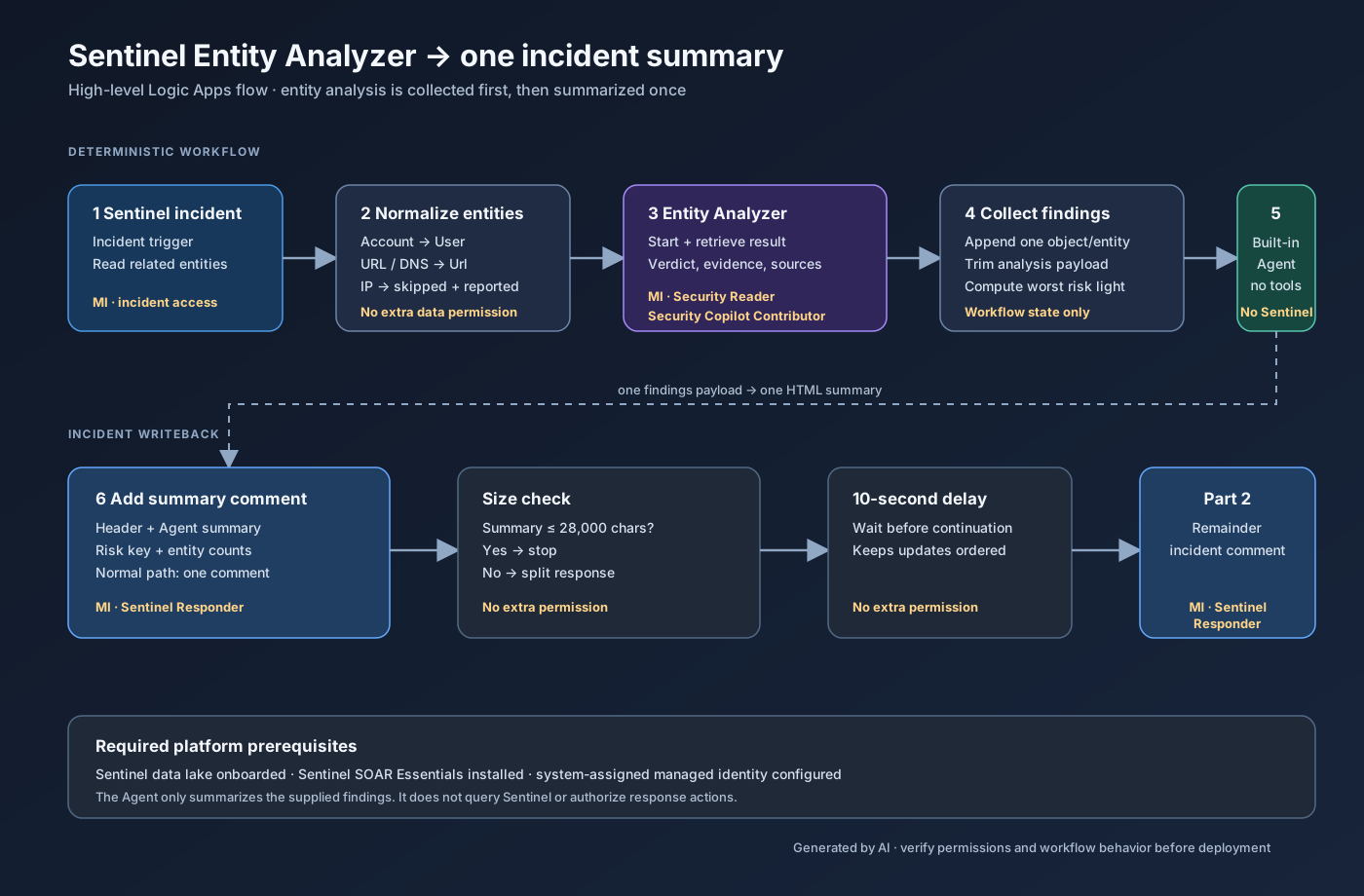 High-level flow with the permissions used by each workflow stage.
The implementation choice I care about most is keeping the entity types separate. The workflow extracts related entities from the incident, normalizes Account and User to a user analysis, Url to a URL analysis, and DnsResolution/Dns to a URL analysis using the domain value. Each filtered entity produces one normalized finding, including skipped and failed items, so the final counts remain visible.
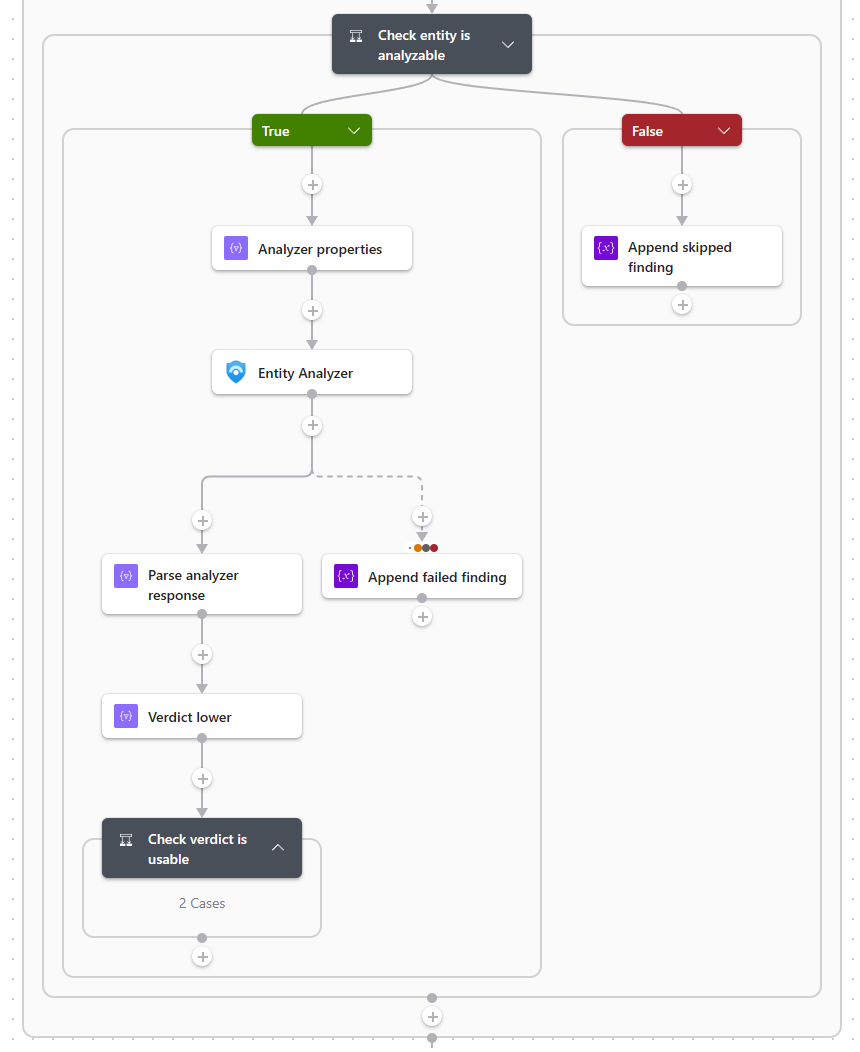 The per-entity loop analyzes supported entities and records skipped or failed findings.
IP entities are deliberately retained as skipped findings when reportIpEntities is enabled. That makes the comment say “this IP was present but not analyzed” instead of silently changing the incident counts. They are never sent to the analyzer; in my tests, submitting an IP address returned InvalidField.
For users and URLs, the connector action accepts the entity properties, a Microsoft Sentinel data lake workspace ID, and a look-back period. The equivalent JSON shape from the Microsoft documentation is small enough to show the idea:
1
2
3
4
{
  "entityType": "Url",
  "url": "https://example.invalid/login"
}
For a user, the connector documentation shows a Microsoft Entra object ID or UPN as input. I would prefer the object ID where it is available, because the analyzer guidance specifically calls out Microsoft Entra-backed users:
1
2
3
4
{
  "entityType": "User",
  "userId": "00000000-0000-0000-0000-000000000000"
}
The underlying analyzer is asynchronous - the MCP tool starts an analysis and retrieves it with get_entity_analysis - but the Logic Apps Entity Analyzer action wraps both phases into one connector call. The loop therefore collects normalized findings instead of writing a Sentinel comment for every entity. After the loop, the workflow sends a trimmed payload and the incident context to one native Logic Apps Agent action with no tools, then writes one comment containing the summary, risk key, and counts of analyzed, skipped, and unresolved entities.
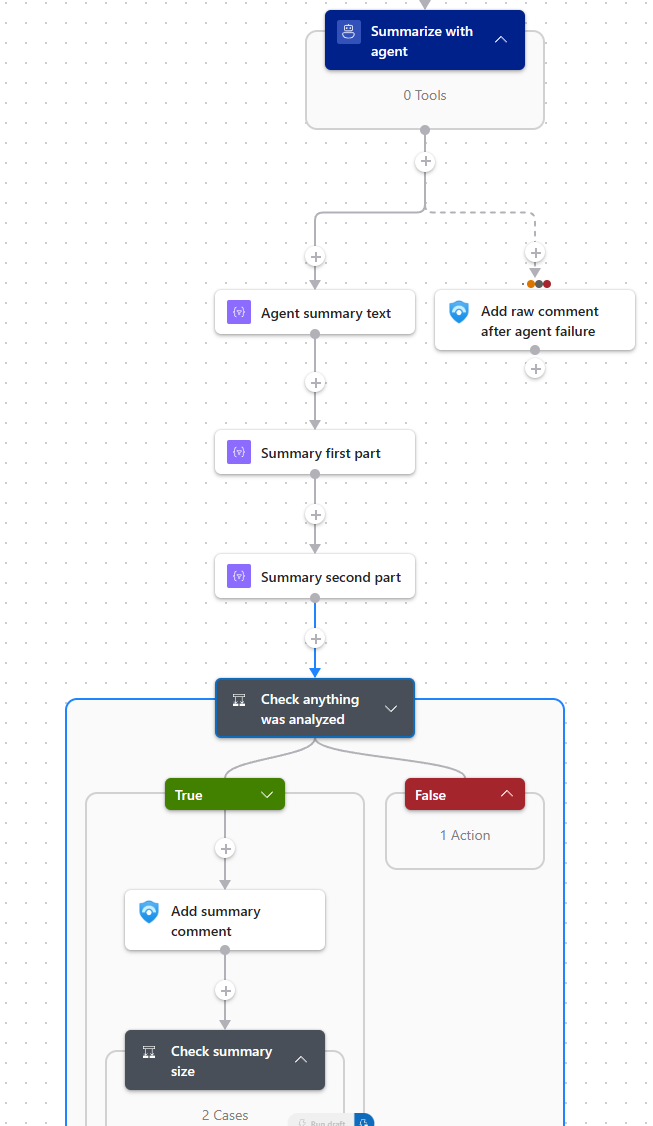 The no-tools Agent produces the summary, with a raw-comment fallback if the agent fails or returns no content.
If the Agent fails, times out, or returns empty content, the workflow posts pre-rendered HTML blocks from the same findings array. The model improves readability; it is not the system of record.
Two guardrails keep the run predictable: each entity’s analysis is trimmed to maxAnalysisCharsPerEntity (default 4000) before it enters the prompt, and the traffic-light emoji is computed from the worst finding in the workflow rather than by the model. A run with nothing reportable posts no comment at all.
The template is playbook-entity-analyzer-agent-summary.template.json. Deploy it disabled first, run it manually against a representative incident, and inspect both the
Summarize_with_agentoutput and the final comment before enabling automation.
The same repository also contains permission-setup.sh alongside playbook.json. Use it to configure the permissions for the playbook’s system-assigned managed identity.
🤖 The no-tools summarization agent
The Agent action is not a Security Copilot connector call. It is a native Consumption Logic Apps autonomous agent action with an Azure OpenAI model chosen by the service in the workflow region - no model connection, no
deploymentId, and an emptytoolsobject.
Entity analysis remains the SCU-backed security operation; this agent only formats the findings already collected. It cannot look up more data, run KQL, or take response actions.
One ARM detail is worth knowing before editing the template: the Agent action sits at the top level of the workflow definition and cannot be nested inside a Condition. The comment actions stay conditional, so an incident with only skipped entities still invokes the agent with an empty payload.
The model is responsible for wording, not risk classification. The workflow computes the header traffic light and supplies the per-entity emoji. If the model changes an emoji, the body can disagree with the header - verify the first real comments and tighten the prompt if needed.
🎯 Targeted user playbooks in Defender XDR
There is a second entry point that fits a different investigation workflow. In the Microsoft Defender portal, you can run a playbook from a user entity in an incident, from the investigation graph, or from the entity behavior view. The playbook must use the Microsoft Sentinel Entity Logic Apps trigger configured for the user entity type.
That allows a small playbook whose only input is the selected user - useful when an analyst has already identified the account they want to validate, or when rechecking one entity beats replaying the whole incident enrichment.
| Entry point | Scope | Good fit |
|---|---|---|
| Incident-triggered playbook | All linked users, URLs, and DNS domains | Consistent enrichment when an incident opens |
| User-entity playbook | One selected user | On-demand validation or a focused re-check |
Microsoft documents this as an entity-trigger playbook using the Microsoft Sentinel Entity trigger. The playbook list shown for a selected user is filtered to playbooks configured for that entity type.
See Run a playbook on an entity and Create and manage Microsoft Sentinel playbooks for the current Defender portal flow.
🔗 Use cases beyond an agentic SOC
The entity analyzer does not need an agent in the middle. The Logic App connector is enough for deterministic, auditable workflows where the desired behavior is known in advance.
A few practical patterns beyond the incident-enrichment flow above:
Focused analyst recheck - the Defender XDR user-entity playbook runs one analyze_user_entity operation for one selected account and writes the result to the incident or investigation notes. Useful when new evidence arrives and the analyst wants a clean before-and-after checkpoint without replaying the full enrichment.
URL triage from email or web detections - a URL-triggered playbook analyzes a URL from a phishing alert, a user-reported message, or a web-proxy detection, keeping the original alert ID, message ID, sender, and affected user next to the verdict. Blocking or deleting the message belongs in a separate branch.
Post-incident evidence pack - at case closure, a workflow runs a final analysis for the key user and URL entities and attaches the evidence, recommendations, source list, look-back window, and timestamp to the case record. Analyzer results live for only one hour, so store the output at closure instead of planning to rerun it later.
The common design principle is to keep the trigger and scope explicit:
| Workflow | Trigger | Scope | Agent required? |
|---|---|---|---|
| Targeted user check | User entity action in Defender XDR | One user | No |
| URL triage | Phishing, proxy, or user-report workflow | One or more URLs | No |
| Post-incident evidence | Case closure or review | Key users and URLs | No |
In all of these the analyzer is enrichment and decision support. Destructive actions - disabling an account, blocking a URL, isolating a device - belong behind a separate policy and approval branch. A verdict can inform that decision; it should not silently become the authorization to take it.
🎯 Handling devices separately
The fact that the analyzer covers users and URLs does not make devices unimportant; it means the enrichment method has to match the question.
What follows is a potential enhancement to my playbook, not part of the current implementation. If Microsoft adds a Device variant to the connector, the playbook could extend its entity-type split with a third loop. Until then I would keep the device branch separate from the SCU-backed analyzer loop and add a graph, blast-radius, or device-timeline action as an independent enrichment step.
The current connector documentation shows
entityType: "User"andentityType: "Url"; it does not documententityType: "Device". Treat device analysis as a future connector capability or a separate integration, not as a supported input to the current Entity Analyzer action.
For a device, I would split the decision into two tracks as part of a dedicated playbook or agentic scenario:
Blast radius and relationships - If the question is “what could this device reach?” or “what paths lead from this device to important assets?”, the Sentinel graph tooling and blast-radius style analysis are a natural fit. This is a relationship problem rather than an entity-verdict problem.
Device activity and timeline - If the question is “what did this device do around the alert?”, use a bounded KQL query over the available device tables, such as process, network, logon, and alert-evidence data. This produces a deterministic evidence package that can be attached to the incident.
🧩 What deployment needs to get right
Security Copilot Contributor is the awkward prerequisite. It is neither an Azure RBAC role nor a Microsoft Entra role - Microsoft documents it as a Security Copilot role assigned from the Security Copilot settings under Role assignment, and the authentication guidance describes only the portal flow. Treat it as a manual step after the Logic App identity exists.
For a quick proof of concept, authenticate the connector with your own user account first - that separates workflow problems from identity-configuration problems. Switch to the system-assigned managed identity before production, so the workflow depends on a stable, reviewable identity rather than on a person’s account.
The parameters I would change for a first deployment are intentionally small:
1
2
3
4
5
6
7
{
  "workspaceId": "00000000-0000-0000-0000-000000000000",
  "entityConcurrency": 5,
  "workflowState": "Disabled",
  "reportIpEntities": true,
  "maxAnalysisCharsPerEntity": 4000
}
The workspace value is the Sentinel workspace ID, not the full Azure resource ID. I would leave the agent instructions and risk emoji map at their defaults until the first comment has been reviewed.
⚡ Controlling playbook concurrency
An incident can contain several users and URLs, and several incidents can trigger at the same time. A For each loop that launches every analyzer operation concurrently is a quick way to increase latency and run into tenant limits.
Microsoft gives a specific number for this. The Sentinel MCP Logic Apps guidance tells you to turn on Concurrency control in the For each action and start with a degree of parallelism of 5, then adjust it to how often the playbook is triggered in your organization. That is advice for the entity analyzer loop itself, not generic loop tuning. The documented tenant limits are 200 runs per hour, 500 runs per day, and around 15 concurrent runs every five minutes based on available service capacity, with results available for one hour.
entityConcurrency maps straight to the loop’s degree of parallelism. Both the ARM template and the published deployment-parameters file now default to 5, matching Microsoft’s guidance to start with a maximum of five concurrent analyses. This setting still needs to be tuned against Security Copilot capacity and the risk of losing an append to an array variable inside a concurrent loop. The comment footer prints N of M entities analyzed so incomplete results remain visible if concurrency causes an update to be lost.
I would therefore make the following settings explicit in the playbook:
- Concurrency: start at
5with concurrency control enabled, then tune from measured incident volume. - Look-back: keep user analysis within the documented seven-day maximum; URL analysis has no equivalent published limit.
- Retries: retry result retrieval separately from starting a new analysis.
- Idempotency: avoid launching a second analysis for the same entity and incident unless the first result expired or failed.
- Comments: label the entity type and analysis timestamp so stale enrichment is visible.
Do not confuse a failed result retrieval with a failed analysis.
get_entity_analysismay need to be called again if the analysis is still running, while the result itself expires after one hour.
📝 Conclusion
The Sentinel MCP Entity Analyzer is a useful SOAR enrichment action for users and URLs. Use it to turn linked entities into concise, evidence-backed incident context, while devices follow a separate graph or KQL investigation path.
The deployment decision is straightforward: treat Security Copilot access and SCU consumption as prerequisites, then use the analyzer where user and URL enrichment adds value. Keep response authorization and destructive actions in a separate, explicit policy branch.
The cost boundary belongs in the same design. Whether the call originates from a Logic App, GitHub Copilot, Visual Studio Code, or an agent, the Entity Analyzer consumes SCUs. The client changes; the meter does not.