Two Protocols and a Rust Bridge: How Windows Intelligent Terminal Works
The most interesting part: Intelligent Terminal isn’t about putting AI everywhere. It makes the terminal itself the context source, so the same agent can work with local shells, WSL and even remote servers over
ssh. The important object is the pane output, not where the process producing it happens to run.
That works because Intelligent Terminal ships without an AI model of its own. It is a Windows Terminal fork that acts as a local transport, speaking ACP to whatever agent CLI you already use - Copilot, Claude, Codex or Gemini - and driving the terminal over a private COM interface. The rest of the architecture follows from that decision: be a transport, not a brain.
This is also how I use it in practice. I rely on it heavily from SSH sessions, where the machines I am troubleshooting do not have any AI capability installed locally. The agent runs on my Windows side and works from the output already visible in the terminal, which makes it useful for investigation on locked-down servers and other systems where installing an AI CLI would be impractical. I use the same pattern in WSL, even though Copilot CLI is available natively there: keeping the agent in Intelligent Terminal means it can see and work with the terminal pane directly.
Imagine a capable mechanic next to your car who, every time a warning appears, still needs you to read the dashboard aloud - they know exactly what to do, but can’t see the warning light or reach the controls. That’s roughly how an AI coding agent and your terminal normally relate: the agent runs in its own session but can’t see the failed command in your other pane, pick up its output or open a tab in your window. You carry the context between the two.
Microsoft’s Intelligent Terminal sets out to remove that gap - giving the mechanic an intercom and a controlled set of switches. What pulled me in was one line in the README: it is “a local transport layer” that “does not call any cloud APIs itself”. That is an unusual thing for an AI product to say out loud, and a useful clue to how the whole system works.
Intelligent Terminal is an experimental, separate app that installs next to your existing Windows Terminal and can run side by side - it does not replace it. Source and announcement: https://github.com/microsoft/intelligent-terminal and https://devblogs.microsoft.com/commandline/announcing-intelligent-terminal-version-0-1/
🖥️ What using Intelligent Terminal actually looks like
The first launch is deliberately uneventful. Intelligent Terminal detects supported ACP-compatible agent CLIs such as Copilot, Claude, Codex and Gemini, lets you choose one, and handles sign-in inside the agent pane. GitHub Copilot CLI is the default. From there the workflow is built around a few shortcuts:
| Shortcut | What it does |
|---|---|
Ctrl+Shift+. | Toggle the agent pane for the current tab |
Ctrl+Shift+I | Move focus between the shell and agent pane |
Ctrl+Shift+/ | Show active agents and previous sessions |
Alt+Shift+/ | Open the command palette directly in prompt mode |
Ctrl+Alt+. | Ask agent to handle autofix |
Ctrl+Shift+P | Report a bug (collect logs) |
The agent pane is only one entry point. Prefix a prompt with
?in the Command Palette and Intelligent Terminal injects context from the active pane, then works in a background tab so your shell stays usable. It asks before an agent runs a command in your shell, and error detection and automatic suggestions are separate toggles - a better boundary than treating every failure as permission to start changing things.
The current preview installs next to Windows Terminal and requires Windows 10 2004 or later. The shortest path is WinGet:
1
winget install --id Microsoft.IntelligentTerminal -e
🔗 ACP: the common language between clients and agents
The Agent Client Protocol (ACP) did not originate with Intelligent Terminal - Zed introduced it in August 2025 to bring Gemini CLI into its editor. The problem it solves: every editor was building one-off integrations for every agent, while every agent needed different code for every editor. ACP puts a common contract between the two sides - think of it as the Language Server Protocol for agents: an agent implements one protocol and works with many clients; a client implements it once and offers many agents. If Intelligent Terminal is the intercom, ACP is the language spoken over it.
For a local agent, the client launches it as a subprocess and exchanges JSON-RPC messages over standard input and output. A session roughly follows this lifecycle:
| ACP operation | Purpose |
|---|---|
initialize | Negotiate the protocol version and supported capabilities |
session/new | Create a conversation with its working directory and available services |
session/prompt | Send the user’s request and context to the agent |
session/update | Stream text, plans and tool activity back to the client |
session/request_permission | Ask the client to approve an action |
ACP also defines client-side capabilities an agent can call back into - terminal creation, file operations - reusing MCP’s JSON shapes where it helps. But the two solve different problems. MCP connects a model to tools and data; ACP connects an agent to the app hosting its UI (and an ACP agent can still use MCP servers behind the scenes). This is why ACP fits: Microsoft embeds no Copilot-specific logic into Windows Terminal, and another agent needs no custom terminal plugin. WTA is the ACP client (the app hosting the UI), the selected CLI is the ACP agent (the brain being driven), and both evolve independently.
JetBrains joined ACP’s development in October 2025; the protocol and schema are open source under Apache 2.0: https://zed.dev/blog/bring-your-own-agent-to-zed and https://agentclientprotocol.com/get-started/introduction
🧭 The one idea that shapes everything: it is a transport, not a brain
It’s tempting to assume Microsoft built an AI model into the terminal. They did not. Intelligent Terminal ships no model, no cloud endpoint and no inference of its own - it speaks to whatever agent CLI you have installed over ACP. Because the terminal is just a transport, it needs exactly two things:
- A way to talk to the agent - send your prompt and shell context, stream the answer back. This is ACP.
- A way to let the agent drive the terminal - open tabs, split panes, run commands, read scrollback. This is a private COM interface.
Almost every design choice in the repo follows from keeping those two channels clean and separate. The mental model to hold for the rest of this post:
1
2
3
4
5
6
   You  ──prompt──►  Intelligent Terminal  ──ACP──►  Agent CLI (the "brain")
                            ▲                              │
                            │                              │ wants to run a command,
                            │                              │ read a pane, open a tab
                            │                              ▼
                            └──────  COM control  ◄──  wtcli / wta
The agent is a separate process the terminal launches and pipes to. Your prompt and recent shell output pass through the terminal in memory, but where that content actually goes depends on which CLI you picked - Copilot to GitHub, Claude to Anthropic, a custom agent wherever its vendor decides. Intelligent Terminal itself doesn’t call the model’s cloud API or keep the conversation as its own history (diagnostic logs and telemetry are separate matters).
🧩 WTA: the Rust bridge doing the real work
The C++ Windows Terminal codebase barely knows what an agent is. Nearly all the agent logic lives in a companion Rust binary called WTA (Windows Terminal Agent), under tools/wta/. WTA speaks ACP to the agent CLI and translates between the agent’s intentions and the terminal’s capabilities. It never runs as a single tidy process - it runs as a helper + master pair, and that split is the key to the whole system.
1
2
3
4
5
6
7
8
9
10
11
12
13
  WindowsTerminal.exe  (one process, N windows/tabs)
        │
        │ spawns once (SharedWta)         spawns one per agent pane
        ▼                                 ▼
  ┌──────────────┐   named pipe    ┌──────────────────┐
  │  wta-master  │◄──ACP/JSON-RPC─►│   wta-helper     │  (one per pane)
  │ (singleton)  │                 │  ratatui chat UI │
  └──────┬───────┘                 └────────┬─────────┘
         │ ACP over stdio                   │ create_terminal /
         ▼                                  │ permission prompts
   Agent CLI                                ▼
 (copilot / claude /                   wtcli.exe ──► COM ──► Windows Terminal
  gemini / codex)                      (drive tabs, panes, input)
Source: https://github.com/microsoft/intelligent-terminal
wta-masteris a headless singleton, spawned once per terminal process. It owns the single connection to the agent CLI and multiplexes it, so the CLI is spawned exactly once no matter how many panes you open.wta-helperis spawned once per agent pane. It renders the chat UI (aratatuiTUI inside the pane) and connects back to master over a named pipe. From the helper’s point of view, master is the agent.
So ACP is actually spoken over two hops: helper to master over a named pipe, then master to the agent CLI over stdio. Master plays “client” to the real CLI and “agent” to each helper, forwarding requests down and fanning notifications back up to whichever helper owns each session - the reason one Copilot process can serve five panes at once. The expensive part is shared; the TUI bound to each tab is not. You can trace a single prompt across both hops in wta-main_master.log, and the docs put the debugging rule plainly - “if any step is missing, the failure is at the previous step” - so a hung prompt has a ladder you climb down rather than a black box you restart.
Notably, there is no MCP server: the terminal is reached through
wtcli, not through MCP. (An earlierwta mcpmode and single-process TUI were both removed.)
🪟 Why COM is used for terminal control
COM - the Component Object Model - is Windows’ long-established mechanism for one process to call a structured interface implemented by another. It may look old-school, but still widely used. Here both processes remain local: wtcli.exe is the caller and the running WindowsTerminal.exe is the server - local inter-process communication, not a network service and not a cloud API.
Think of a bank teller. You never walk into the vault and count the cash yourself - you slide a slip across the counter (“balance of account 3”, “move money out of account 5”, “open a new account”), and the teller acts against the ledger the bank already owns. You only get served if your ID checks out. COM is the teller window, IProtocolServer is the fixed set of slips it will accept, and the running WindowsTerminal.exe is the bank that actually holds the accounts. That fits a terminal well:
The design point is ownership: scrollback, pane layout, focus and shell metadata already live inside Windows Terminal, so exposing operations from that process beats having WTA scrape pixels or keep a second copy of the same state.
When the agent wants to do something, it goes through a small interface (IProtocolServer) that WindowsTerminal.exe implements itself: a compact set of queries (list windows, tabs and panes, read a pane’s output), mutations (create a tab, split or close a pane, send input, focus a pane) and push-based events you subscribe to. You’ll meet the friendlier wtcli spelling of these same operations shortly.
What comes back is rich. Each pane is addressed by an opaque SessionId GUID and carries its working directory (harvested from OSC 9;9) and shell identity - pwsh, bash, wsl:Ubuntu. Hold onto that shell field: it’s why the WSL story works out cleanly later.
How a caller finds the running terminal is neat: there’s no hardcoded CLSID. At startup Windows Terminal registers its COM server and drops the class ID into an environment variable, WT_COM_CLSID. Every process launched inside a pane inherits that environment, so any child - shell, script, agent CLI, wta, wtcli - just reads it and calls CoCreateInstance to reach the terminal that launched it. The env var is the discovery mechanism.
WTA could call COM itself, but wrapping it in wtcli keeps the Rust agent layer independent from the Windows COM ABI, and leaves a command-line control surface for other agents and scripts. WTA’s Rust code launches wtcli.exe, and wtcli is the actual COM client.
So WTA uses COM indirectly through
wtcli, not directly.
🕹️ wtcli: a tmux-style control surface for agents
One distinction worth fixing in your head before the commands: wta and wtcli are two different things, easy to conflate because they ship together. Think of it as:
wta- the brain-facing side (ACP, the agent, the chat UI)wtcli- the terminal-facing side (COM, driving panes)
wta is the long-lived bridge; wtcli is the short-lived command you can actually type. It wraps IProtocolServer in a command surface that looks a lot like tmux:
1
2
3
4
5
6
7
wtcli --json list-panes                      # what panes exist
wtcli --json capture-pane                    # read a pane's scrollback
wtcli --json capture-pane --last-prompt      # read a pane's last command output
wtcli --json new-tab -c "pwsh" -n "build"    # open a tab
wtcli split-pane -t 3 -d right -s 0.4 -c "tail -f log"
wtcli send-keys -t 3 "cargo test"            # type into a pane
wtcli listen --event "agent.*"               # stream events
There’s a real design decision in capture-pane. Its --last-prompt flag returns only the most recent completed command’s output, not a blind line-count grab of scrollback. That works because Windows Terminal understands OSC 133 shell-integration marks - invisible escape sequences a configured shell emits to say where a prompt starts, a command starts, and where it exited with code N. So the agent gets this command failed rather than here are the last 50 lines, good luck. When marks aren’t available it falls back to a line-count read and flags it (HasMarks: false) so the agent knows how much to trust the context.
OSC 133 in one breath.
OSC(Operating System Command) is a class of invisible terminal escape sequence. A shell with integration enabled wraps every command in four133marks:A(prompt starts),B(command input starts),C(output starts) andD;<exit_code>(command finished, with its exit code). That last one is the important bit here -OSC 133;D;1is literally how the shell announces “I failed with code 1,” which is what powers both--last-promptcapture and autofix. No marks, no signal.
📤 How terminal output reaches the agent
This is easiest to explain with the WSL case I care about most. I’m in an Ubuntu pane and sudo apt upgrade fails with E: Could not get lock /var/lib/dpkg/lock-frontend. I open the agent pane and ask “What does this error mean?” - without pasting either the command or its output.
The path is short. Windows Terminal is already rendering that text and keeping it in the pane scrollback. WTA resolves the active pane and its SessionId, calls wtcli capture-pane (→ COM ReadPaneOutput), and OSC 133 marks isolate the latest command and its output. WTA combines my question with that context and sends it as session/prompt over the existing ACP session; master forwards it over stdio to the selected CLI, which reasons over both pieces.
The WSL twist: apt runs inside Linux, but its output already flows through the conpty hosted by Windows Terminal - so WTA never enters the distro or asks apt to repeat itself, it reads the same buffer I’m looking at. With OSC 133 marks present, that capture is the latest completed command as one clean unit, keeping an older git status from joining the question; without them it falls back to a bounded slice of scrollback. Either way the terminal does the capture, and the agent vendor controls the next hop.
Rather than take that on trust from the source, I asked the running agent to check my homework - “explain this and tell me how you fetched the terminal output” - after leaving an ipconfig result on screen. It was blunt about the direction of travel: it hadn’t fetched anything.
I didn’t fetch it. The Windows Terminal Agent runtime injected it directly into my context as part of the Terminal Context JSON. […] WTA pushes this JSON to me at startup, not the other way around. I read it from my runtime context, never by running commands myself.
It even enumerated the shape of that context object - activeTarget (the active pane’s ID), cwd, shell, buffer (the last N lines of pane output), plus window_title and locale. That maps cleanly onto the path above and settles a subtlety worth stating plainly: the terminal does the capturing through COM, then hands the agent a finished JSON blob. The agent is a passive recipient - it never re-runs ipconfig or scrapes the screen to reconstruct what I saw; the buffer is already sitting in its prompt the moment the conversation opens. It is a tidy confirmation of the “transport, not a brain” split seen from the inside: the model does the reasoning, the terminal does the seeing.
Nice side-effect: this is not limited to local shells. If you are connected to a server over
ssh, the remote command output is still rendered in your local Windows Terminal pane. That means the agent can explain a failed command from a remote machine that has no AI tooling installed at all - because the only thing it needs is the terminal buffer you are already looking at.
Below an example for a SSH session to troubleshoot a remote machine where the defender agent has stopped for some reason.
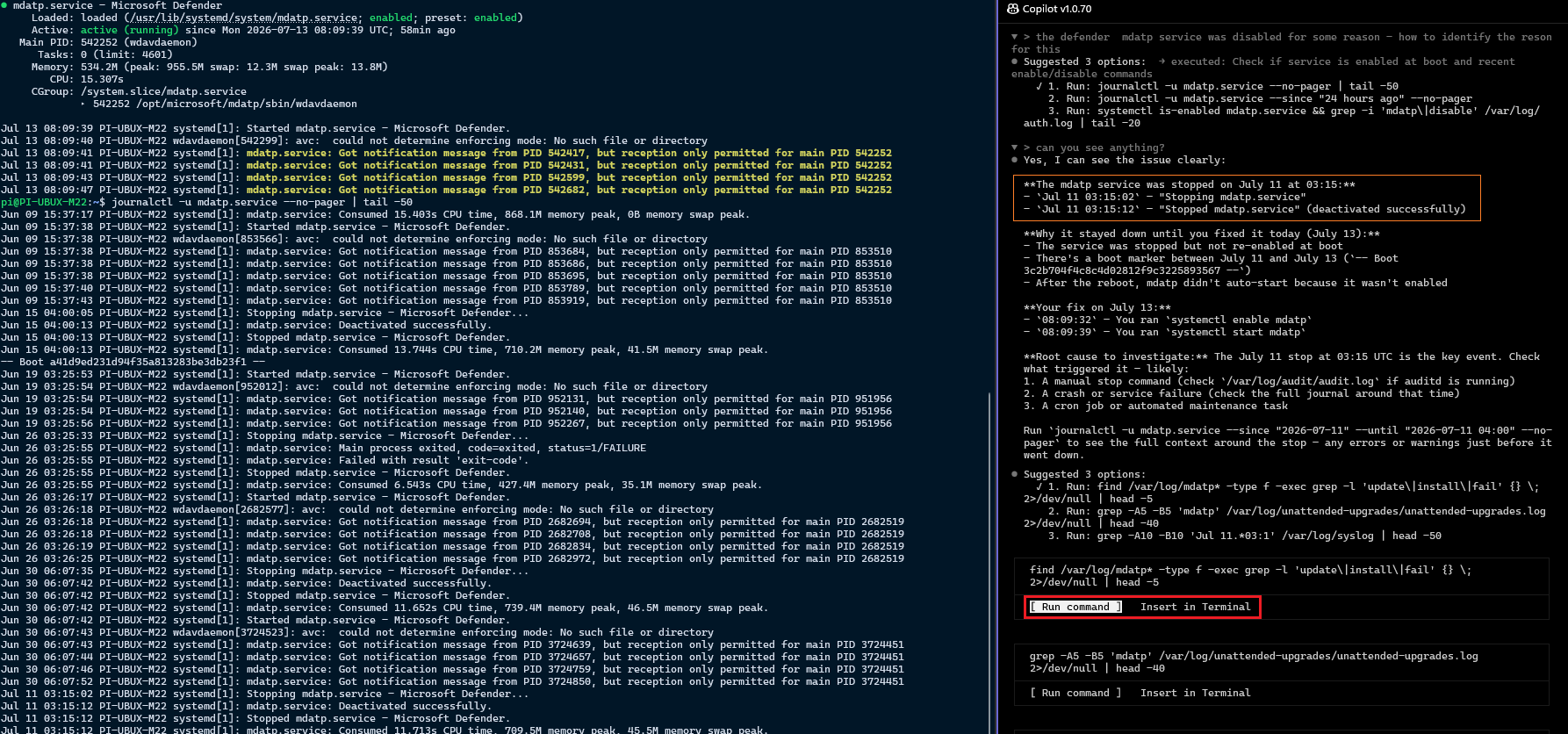
I later came across the same shape from a different angle, when Defender AV blocked one of the commands and exposed the process command line behind the scenes. The interesting part was not the block itself, but the command that had been launched: wtcli.exe emitting a local terminal event with a JSON payload.
1
2
3
C:\Program Files\WindowsApps\Microsoft.IntelligentTerminal_0.1.1681.0_x64__8wekyb3d8bbwe\wtcli.exe send-event `
  -e agent.session.start `
  {"agent_session_id":"9def46ec-4fbe-4d83-ac39-cea816c958c3","payload":{"session_id":"9def46ec-4fbe-4d83-ac39-cea816c958c3","timestamp":"2026-07-09T19:20:51.758Z","cwd":"C:\\WINDOWS\\system32","initial_prompt":"# Terminal Agent\n\nYou are Terminal Agent, a capable terminal-native assistant inside Windows Terminal..."}}
That initial_prompt field - truncated here - is the behind-the-scenes version of what the agent later sees as its system-style instructions: mode routing, runtime context, shell state and the “smallest direct path” behaviour. I did not capture this through Procmon during the demo, so treat it as an observed command line from the Defender AV event rather than a full process-trace walkthrough. Still, it lines up with the transport model: the startup state is carried as a send-event payload through wtcli, not by the model reaching back into Windows Terminal on its own.
There’s a second confirmation sitting on disk. WTA’s prompt templates live under LocalState\IntelligentTerminal\prompts\, and the agent-pane one (terminal-agent.md) ends with a literal <!-- WTA_RUNTIME_CONTEXT --> marker, documenting the injected block as “terminal context JSON (fields: activeTarget, window_title, cwd, shell, locale, buffer)” - the same six fields the agent reported, now seen from the template that assembles them rather than the model that receives them. It even tells the model to trust them over its own guesses: “The runtime sections below are authoritative… Do not guess.”
That folder also settles why autofix and the agent pane feel so different: they are two separate prompts. auto-fix.md is tightly constrained - it must return one JSON object, either a fix (a single-line command you apply with a keystroke) or an explain - so an autofix arrives as a terse card, never a conversation. terminal-agent.md is a full mode-router that lets the pane agent chat, recommend a command, run its own tools, or delegate to a new tab. Same injected context, two very different jobs.
1
2
3
4
5
6
7
8
Directory: C:\Users\pit\AppData\Local\Packages\Microsoft.IntelligentTerminal_8wekyb3d8bbwe\LocalState\IntelligentTerminal\prompts

Mode                 LastWriteTime         Length Name
----                 -------------         ------ ----
-a---          21/06/2026    11:00           2880 auto-fix.default.md
-a---          07/07/2026    13:53           2880 auto-fix.md
-a---          21/06/2026    10:55          11541 terminal-agent.default.md
-a---          07/07/2026    14:25          11541 terminal-agent.md
📚 When shell history and other local files are used
Terminal scrollback and shell history sound similar but are separate sources. Scrollback is the in-memory text Windows Terminal owns; PSReadLine history, ~/.bash_history and ~/.zsh_history are files the shell maintains for cross-session recall. I checked the WTA source: Intelligent Terminal does not automatically read those history files when it builds context for a normal prompt. The runtime context is the active pane, current directory, shell identity and a bounded buffer. That distinction matters - a history file holds previous command lines, not the output needed to explain why the latest apt upgrade failed.
| Local data | Used automatically? | Purpose |
|---|---|---|
| Terminal scrollback | Yes | Current command and output supplied as prompt context, including output shown from WSL or ssh sessions |
| OSC 133 marks | Yes, when shell integration is enabled | Identify command boundaries and exit status |
| PSReadLine history | No | PowerShell’s own cross-session command recall |
~/.bash_history / ~/.zsh_history | No | Shell-managed command recall inside Windows or WSL |
PowerShell profile / ~/.bashrc | Yes, for setup | Sources the Intelligent Terminal shell-integration script |
| Agent CLI session files | Yes, for session management | Discover, label and resume previous agent conversations |
There is one place Intelligent Terminal deliberately touches local shell configuration: to make autofix reliable, setup drops a small shell-integration script beside your profile and adds a single line to source it. On Windows PowerShell that’s:
1
2
Documents\PowerShell\Microsoft.PowerShell_profile.ps1   # sources the script below
Documents\PowerShell\shell-integration_v1.ps1           # emits the marks
For Linux shells inside WSL, the same pair lives inside the distro:
1
2
~/.bashrc                                        # sources the script below
~/.intelligent-terminal/shell-integration_v1.sh  # emits the marks
Those scripts emit OSC 133 prompt/command/completion marks plus working-directory metadata; they do not upload the profile or copy history into the prompt. The only other local files WTA reads belong to the agent CLIs themselves (each keeps its own session state under ~/.copilot/, ~/.claude/, ~/.codex/, ~/.gemini/) - read to populate the session view and resume conversations, not for prompt context.
🔧 Autofix: how a failed command reaches the agent by itself
The feature people notice first is autofix - a command fails, an indicator lights up, and the agent already has the error loaded with a fix ready. It rides on those same shell-integration marks, and the trigger is genuinely just the exit code arriving as an escape sequence: the shell emits OSC 133;D;<exit_code> when a command finishes, Windows Terminal turns it into an event, the COM server forwards it to subscribers, and wta (subscribed via wtcli listen) classifies it - a non-zero exit is what hands the agent the error as context. No polling, no screen-scraping for the word “error”.
The clever part: autofix works on a pane you have never opened. Every time you create a new tab, Intelligent Terminal quietly spawns a stashed agent pane in the background - the helper starts, connects to master and establishes its ACP session, all while hidden. So when a command fails in a tab whose agent pane you never touched, the helper is already connected and can act immediately.
Autofix needs three things lined up: PowerShell shell integration so OSC 133 marks are emitted, a helper whose ACP session has reached
Connected, andwtclionPATH. Miss the shell integration and the whole pipeline is silent, because the exit code never becomes an event in the first place.
🐧 Why this all works for WSL and SSH too
If you live in WSL like I do, the obvious question is whether any of this cares that half your work happens inside a Linux distro. Mostly it doesn’t. Every pane is addressed by an opaque SessionId GUID, so nothing in the control path knows what shell runs inside - capture-pane, send-keys and split-pane behave identically whether it’s pwsh or wsl:Ubuntu (the PaneInfo.Shell field just lets the agent see which). It works in reverse too: the CLI runs on the Windows host but its working directory can point into the distro over \\wsl$\..., and the code tolerates those UNC paths - so “open Copilot against my WSL project” needs only the host CLI and a Linux cwd, no agent install inside the distro. That is the arrangement I use even when Copilot CLI is available natively inside WSL: the terminal-hosted agent gets the pane context without needing to be installed in the distro.
The same mental model makes SSH a genuinely useful scenario. Suppose you are on a plain Linux VM, network appliance or locked-down jump box over ssh, and a command fails with some package manager, systemd or permission error. This is one of my main uses for Intelligent Terminal: the remote machines do not need an agent, Python, Node, Copilot, Codex or any other AI capability installed locally. The remote process writes text to the SSH session, SSH carries it back to your Windows Terminal pane, and WTA captures that pane output locally.
That is a pretty strong operational use case: bring the AI helper to the terminal, not to every server. You can ask “what does this error mean?” against a remote failure and the agent reasons over the exact output you saw, while the remote machine remains just a normal SSH endpoint. For locked-down environments, old appliances, short-lived troubleshooting sessions and customer machines where you cannot install extra tooling, that boundary matters.
There is one caveat. Explaining visible output works because scrollback is local. Fully automatic error handling still depends on command-boundary and exit-code signals being visible to Windows Terminal. With a local shell or a configured WSL shell, OSC 133 marks make that clean. Over a basic SSH session, you should assume the agent can read and explain the displayed output, but not necessarily get the same rich “this exact command exited with code N” signal unless the remote shell/session is emitting compatible marks.
The reverse - running the agent CLI itself inside the distro by pointing Intelligent Terminal at an agent such as
wsl -d Ubuntu -- codex --acp --stdio- looks plausible on paper: the terminal-control channel stays host-side in WTA, so the agent only has to speak ACP over stdio, whichwsl.exebridges. I have not tested this, and there are open questions (Windows→Linuxcwdtranslation, the exact per-CLI ACP invocation, and no in-distro hooks for live session status). Treat it as a maybe, not a supported path.
🔍 Troubleshooting the mechanics with local logs
When you need to see why something misbehaved - a hung prompt, a dropped autofix, a helper that never connected - the built-in logs are the place to look. They show the logical protocols flowing through the system: ACP request/response, terminal-control commands, session routing and package-identity failures. Production builds keep them under the package’s local cache:
1
%LOCALAPPDATA%\Packages\<PackageFamilyName>\LocalCache\Local\IntelligentTerminal\logs\<version>\
| Log | What it helps with |
|---|---|
wta-main_master.log | Agent CLI startup, helper connections and session routing |
wta-main_helper-<pid>.log | ACP initialisation, prompts, responses and pane lifecycle |
wta-acp-debug.log | Low-level ACP JSON-RPC traffic |
wta-cli.log | capture-pane, list-panes and other terminal-control commands |
wta-ensure-host.log | WTA lifecycle, autofix events and package-identity failures |
The cleanest collection path is Ctrl+Shift+P → Report a bug (collect logs), which builds a ZIP and opens its location. For a detailed repro, WTA_LOG=debug or WTA_LOG=trace raises Rust-side logging after a full restart.
Diagnostic bundles and trace logs may contain prompts, terminal output, paths and agent details. Review and redact them before attaching them to a public GitHub issue.
🔭 What the architecture tells you about where this is going
Step back and the shape is clear. Intelligent Terminal is not trying to be an AI; it is the substrate connecting the terminal you already use to the agent you already pay for - two clean protocols (ACP facing the agent, COM facing the terminal) and a Rust bridge multiplexing between them. A few things follow:
- The agent stays swappable. Because the contract is ACP, not a Microsoft-specific SDK, any conforming CLI plugs in - including local or custom ones via
custom:<cmd>. That’s a deliberately open door, the opposite of a walled garden. - The target machine does not need AI tooling. For
ssh, the remote system only has to print output into the terminal. The agent runs on your side, reads the local pane buffer and explains what happened there. wtcliis a public surface, not just an internal one. Several of its commands (send-event,set-env,wait-for) aren’t called anywhere inside the repo - they exist as a documented control surface for external agents and scripts. The terminal is being positioned as something other tools automate, not just something Copilot talks to.
The load-bearing sources behind this walkthrough are the overviews in
AGENTS.mdandtools/wta/OVERVIEW.md, the helper+master design specification, thewtclicommand reference, and the official announcement.
🧾 Conclusion
Commit to being a local transport and a surprising amount follows: the agent stays swappable, the model connection remains with the selected CLI, and the terminal integration fits in one Rust binary speaking two protocols. The helper-and-master split, shared agent process, stashed panes, SSH usefulness and OSC 133 autofix pipeline all trace back to that choice.