Defender Advanced Hunting - Tracking AI Tool URL Clicks and Git Repo Targets
UrlClickEvents is a great table when you care about Safe Links-wrapped clicks. The catch is in that sentence though: it is about the Safe Links surface.
The moment a user opens a URL from somewhere else - Copilot, Claude Desktop, GitHub Copilot, Visual Studio Code, a shortcut, or any other local application - the browser handoff often shows up in a different place. On Windows, and to some extent Linux, the full URL is passed to the default browser as a command-line argument. That handoff lands in DeviceProcessEvents.
That makes DeviceProcessEvents surprisingly useful for visibility into links that Safe Links never touched.
Queries can be found here: https://github.com/pisinger/hunting
🔍 Why UrlClickEvents Is Not Enough
UrlClickEvents answers a very specific question: what links were clicked through Microsoft Defender for Office 365 Safe Links handling?
That is still valuable, and I would not replace it. But AI tooling changes the click surface a bit. Users are increasingly opening links from assistant responses, local coding tools, editor extensions, terminals, markdown previews, and generated task output. Those links may never be rewritten by Safe Links in the first place.
The useful bit is that the operating system still has to start the browser somehow. When that happens, the target URL is commonly passed in the process command line.
The bonus: InitiatingProcessParentFileName often tells you where the handoff came from. In my testing:
| Source | Parent signal observed |
|---|---|
| Copilot click-through | cmd.exe |
| Claude Desktop | claude.exe |
| Visual Studio Code | Code.exe |
| Browser / local app handoff | varies by source app |
That gives you click attribution for AI-assisted workflows, and actually for many other local application workflows too.
⚠️ Scope note: this catches browser handoffs where the URL is present on the command line. It does not replace
UrlClickEvents. Use both, because they cover different surfaces.
🧭 Hunting Browser Handoffs
The base idea is simple: look for browser process creation where the initiating process command line contains a URL, extract the full URL, parse the domain, then keep the parent process around for attribution.
1
2
3
4
5
6
7
8
9
10
11
12
13
14
15
16
17
18
19
20
21
22
23
24
25
26
27
28
29
30
31
32
DeviceProcessEvents
| where InitiatingProcessFileName has_any("brave", "msedge", "chrome")
| where InitiatingProcessCommandLine contains "https://"
| extend Urls = extract_all(@"(https?://[^\s""']+)", InitiatingProcessCommandLine)
| project
    TimeGenerated,
    DeviceName,
    AccountName,
    FileName,
    FolderPath,
    InitiatingProcessParentFileName,
    InitiatingProcessCommandLine,
    Urls
| mv-expand Urls = Urls to typeof(string)
| extend UrlDomain = tostring(parse_url(Urls).Host)
| project-away InitiatingProcessCommandLine, FolderPath
| summarize count()
    by bin(TimeGenerated, 1h),
       DeviceName,
       AccountName,
       FileName,
       InitiatingProcessParentFileName,
       UrlDomain,
       tostring(Urls)
| project-reorder
    TimeGenerated,
    DeviceName,
    AccountName,
    FileName,
    InitiatingProcessParentFileName,
    UrlDomain,
    Urls
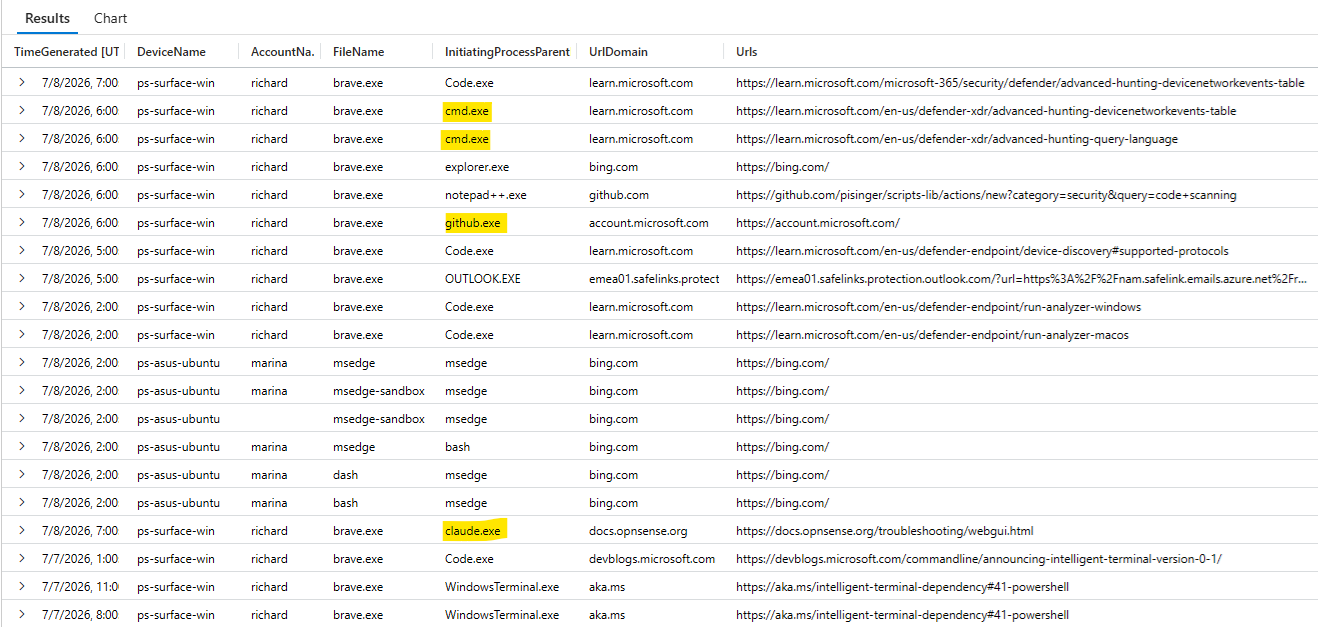
The result is not just “a user opened something in Chrome”. You get the full URL, the domain, the browser process, the user, the device, and the parent process that caused the handoff.
That last column is where this becomes more than another URL list. If InitiatingProcessParentFileName points back to claude.exe, Code.exe, cmd.exe, or another known assistant/editor process, you have a workable attribution trail for links surfaced through AI-assisted workflows.
This is also a useful enrichment point. Once the URLs are extracted, join the domains or full URLs against your own threat intelligence tables, watchlists, or Defender TI data. IoC matching on links surfaced by AI assistants is the interesting part here, because those links may never appear in Safe Links telemetry.
🧩 The Git Repo Angle
There is another small but useful variation: git.
If you only look at network events, Git activity often collapses into broad destinations such as github.com, gitlab.com, dev.azure.com, or an internal Git server. That can be enough for allow/block decisions, but it is not always enough for investigations. Sometimes you want the actual repository URL that was fetched, cloned, pulled, or otherwise touched.
The pattern is Git hosting agnostic. GitHub is just the easy example below. The same idea works for GitLab, Azure Repos in Azure DevOps, Bitbucket, Gitea, or internal Git hosting as long as the remote URL is present in the initiating command line.
My first instinct was to stay in DeviceProcessEvents, because that is where the browser handoff pattern lives. For git, DeviceNetworkEvents may actually be the better hunting table though: you still get the initiating command line, but you also get the actual outbound network context.
1
2
3
4
5
6
7
8
9
10
11
12
13
14
15
16
17
18
19
20
21
22
23
DeviceNetworkEvents
| where TimeGenerated > ago(7d)
| where InitiatingProcessFileName has "git"
| where LocalIPType != "Loopback" and LocalIP != "127.0.0.1"
| extend GitRepoUrl = extract_all(@"(https?://[^\s""']+)", InitiatingProcessCommandLine)
| mv-expand GitRepoUrl to typeof(string)
| project
    TimeGenerated,
    DeviceId,
    DeviceName,
    InitiatingProcessFileName,
    LocalIP,
    RemoteIP,
    RemotePort,
    GitRepoUrl
| sort by TimeGenerated desc
| where isnotempty(GitRepoUrl)
//----------
// GitHub example:
| where GitRepoUrl startswith "https://github.com/microsoft"
//| where GitRepoUrl startswith "https://gitlab.com/group"
//| where GitRepoUrl startswith "https://dev.azure.com/org"
//| where GitRepoUrl contains "git.internal.example"
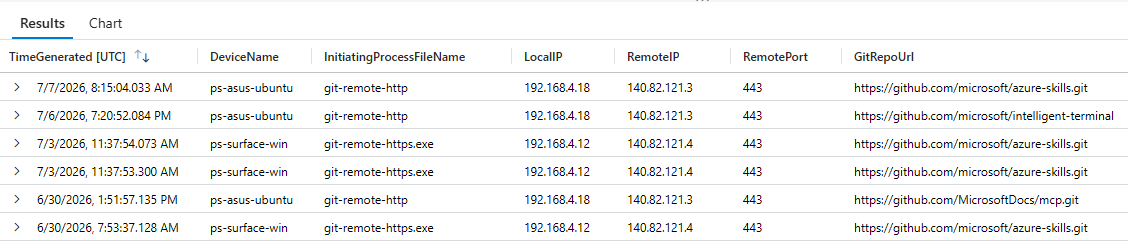
This version is nice because it answers two questions at once: which repo URL was present in the git command line, and which remote network endpoint was involved at the time. The GitRepoUrl value is still extracted from InitiatingProcessCommandLine, but the surrounding event is network telemetry.
For example, the difference between these investigation views matters:
| View | What you learn |
|---|---|
| Network destination | Device connected to github.com, gitlab.com, or dev.azure.com |
| Process command line | Device accessed https://github.com/org/repo.git or https://gitlab.com/group/repo.git |
| Network event plus command line | Device connected out while git referenced a specific repo URL |
That third view is the strongest one for this use case. You still avoid the “platform domain only” problem, but you keep RemoteIP, RemotePort, LocalIP, DeviceId, and DeviceName in the result for follow-up pivots.
If you want a broader first pass, comment out the provider-specific GitRepoUrl filter and summarize by GitRepoUrl, DeviceName, or InitiatingProcessFileName. Once you know the organisation, project, or repo namespace you care about, put the filter back.
One limitation: the sample extracts
httpandhttpsremotes. If your organisation primarily uses SSH-style remotes such asgit@github.com:org/repo.git, extend the extraction pattern for that format as well.
If you do not need network metadata and only want the process creation view, the DeviceProcessEvents version is still useful. It is also a nice fallback when you are already pivoting through process, account, or parent-process context.
1
2
3
4
5
6
7
8
9
10
11
12
13
14
15
16
17
18
19
20
21
22
23
24
25
26
DeviceProcessEvents
| where InitiatingProcessFileName has_any("git")
| where InitiatingProcessCommandLine contains "https://"
| extend GitRepoUrl = extract_all(@"(https?://[^\s""']+)", InitiatingProcessCommandLine)
| mv-expand GitRepoUrl = GitRepoUrl to typeof(string)
| extend GitRepoDomain = tostring(parse_url(GitRepoUrl).Host)
| project
    TimeGenerated,
    DeviceName,
    AccountName,
    FileName,
    InitiatingProcessParentFileName,
    GitRepoDomain,
    GitRepoUrl
// Provider-specific examples:
//| where GitRepoUrl startswith "https://github.com/microsoft"
//| where GitRepoUrl startswith "https://gitlab.com/group"
//| where GitRepoUrl startswith "https://dev.azure.com/org"
| summarize count()
    by bin(TimeGenerated, 1h),
       DeviceName,
       AccountName,
       FileName,
       GitRepoDomain,
       tostring(GitRepoUrl)
| sort by TimeGenerated desc
Be careful with privacy and credential handling here. Full URLs can occasionally contain sensitive query strings, tokens, or internal repository names. Treat the extracted URL field as investigation data, not as something to casually export everywhere.
🛡️ Where This Fits
I would use this as an additional hunting pattern, not as a single source of truth.
- Use
UrlClickEventsfor Safe Links-click telemetry and the email/collaboration security context around it. - Use
DeviceProcessEventsfor local process handoffs, AI tooling, editor-driven clicks, shortcuts, and command-line URL usage. - Join extracted URLs with threat intelligence when you want to catch suspicious links that never passed through Safe Links.
- Pivot on
InitiatingProcessParentFileNamewhen attribution matters more than the browser itself. - Use the
gitvariation when repository-level visibility matters more than just seeing a broad Git hosting domain.
This is also one of those cases where the telemetry is not magic. It works because a URL had to be handed from one process to another, and Defender for Endpoint records that process creation context.
📝 Conclusion
UrlClickEvents still has its place, but it is not the whole URL-click story anymore. As users open more links from AI assistants, editors, terminals, and local tools, DeviceProcessEvents gives you a practical way to recover both the full URL and the local application context that caused the handoff.
The same trick is useful for git activity as well. Seeing a Git hosting domain is fine; seeing the actual repo URL is better when you are trying to understand what really happened on an endpoint.