Bring Your Own Harness: Running Security Investigator as Foundry Hosted Agent with GitHub Copilot
Hi there!
I am a big fan of SCStelz/security-investigator. It combines GitHub Copilot, MCP, reusable KQL, and specialized SOC skills - and shows how much domain knowledge can live in .github/copilot-instructions.md and SKILL.md instead of application code.
My hosted example derives its skills and instructions from that project, then narrows the runtime: Sentinel Data Exploration is primary, direct Graph calls are disabled, and missing Triage tools fall back to Data Lake KQL.
👉 The code lives in my repo: pisinger/security-investigator → foundry-agents. This post walks through the Copilot SDK build (
agent-security-investigator-github-copilot); the Microsoft Agent Framework sibling (agent-security-investigator-agent-framework) sits next to it and shares the same skills, queries, and toolbox.
If you want to jump directly to the deployment, see Deploy the example below. The rest of this post explains the design choices and how to bring your own harness into a Foundry hosted agent.
I already use those skills heavily in VS Code and, more recently, in the GitHub Copilot CLI. The next question was how to make the same capability available as a standalone agent - with its own identity and endpoint, ready for automation, other applications, or Teams as a new SOC team member. The twist: rather than rebuild it on a Microsoft-native stack, I wanted to bring my own harness and keep as close as possible to the GitHub Copilot loop I already run locally.
This operationalizes rather than replaces the interactive experience. Copying skills is not enough: they describe behavior, but provide no production endpoint, identity, isolation, scaling, or observability. The complete agent must become a container image on an agent platform.
This is where Foundry hosted agents come in. I just push the image; Foundry provides deployment, identity, sessions, stable invocation, scale-to-zero, and monitoring, while the container only implements the Responses protocol - so its reasoning harness remains my choice. The GitHub Copilot SDK runs the Copilot loop inside that container, and the same .github folder is used in both places:
What you will get: the same Copilot skills locally and hosted, a managed Foundry endpoint and identity, an independently versioned toolbox, and a repeatable
.env-driven deployment.
1
2
3
4
5
6
7
8
9
10
11
12
13
14
15
16
17
18
19
20
21
Microsoft Foundry managed runtime
├─ stable Responses endpoint
├─ managed identity, sessions, scaling, monitoring
└─ hosted container image
   │
   └─ ResponsesAgentServerHost
      │
      └─ GitHub Copilot SDK harness
         ├─ Azure OpenAI model (BYOK)
         ├─ .github/copilot-instructions.md
         ├─ .github/skills/
         │  ├─ incident-investigation/SKILL.md
         │  ├─ threat-pulse/SKILL.md
         │  └─ ...
         └─ MCP client
            │
            └─ Foundry Toolbox consumer endpoint
               └─ default_version → toolbox version x
                  ├─ Microsoft Learn MCP
                  ├─ Sentinel Data Exploration MCP
                  └─ optional compatible Triage/custom MCP
For local iteration, edit at the repository root and run copilot there. For hosted execution, deploy.sh mirrors that same root .github/, queries/, and config.json into agent/, which becomes the SDK working directory baked into the image. There is no second prompt or skill format to keep synchronized - and no second copy to edit, because the agent folder’s copies are generated, not authored.
🧩 Bring your own harness
A Foundry hosted container only needs to implement the OpenAI Responses protocol. Microsoft Agent Framework is the natural Microsoft-native choice - Microsoft’s official hosted-agent samples show that path with the protocol libraries and sample Dockerfiles - but Foundry also supports bring your own harness: keep the hosting contract and replace the agent loop inside the image.
Since I already use GitHub Copilot locally, the obvious harness is its SDK. The copilot CLI I run on my machine and the SDK I host in the container share the same engine, so this is one harness with two entry points - interactive locally, programmatic in the container. azure-ai-agentserver-responses owns the HTTP contract - port binding, health checks, request models, and streaming - while the Copilot SDK owns reasoning and tool calling.
The relevant session configuration is small:
1
2
3
4
5
6
7
8
9
10
async with await client.create_session(
    model=model_deployment,
    provider=azure_openai_provider,
    mcp_servers=toolbox_servers,
    streaming=True,
    enable_skills=True,
    enable_config_discovery=True,
    on_permission_request=PermissionHandler.approve_all,
) as session:
    await session.send(prompt)
enable_skills=True enables skills, and enable_config_discovery=True discovers .github/skills/ relative to the configured working directory. .github/copilot-instructions.md is loaded as additive Copilot instructions, so the SDK’s built-in agent behavior remains intact.
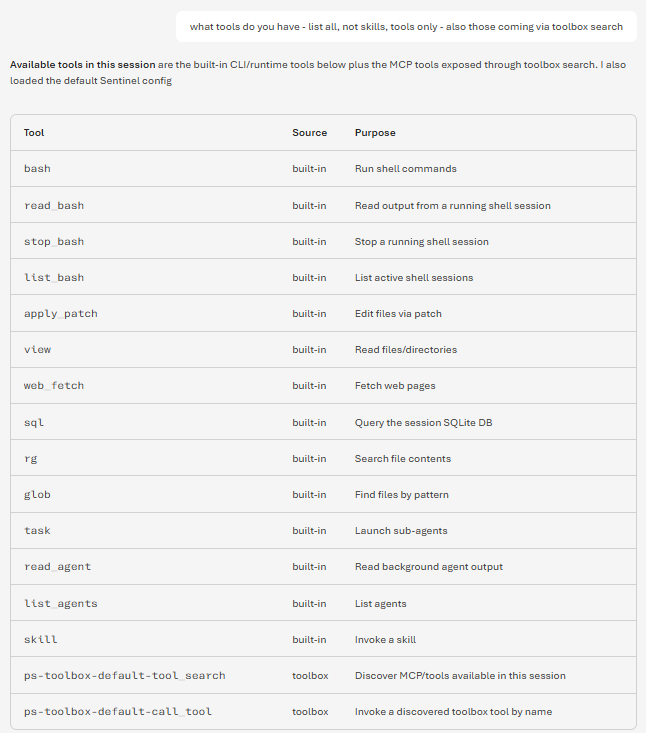 The GitHub Copilot SDK brings its own built-in tools; the Sentinel data access is layered on top through the Foundry toolbox.
The response handler is only an adapter. It forwards Copilot text deltas as Responses output_text.delta events and completes the normal created → in_progress → completed lifecycle. The business logic remains in the Copilot instructions, skills, model, and tools.
Teaser: Microsoft Agent Framework works just as well. I built a sibling implementation with
agent_framework.Agent,FoundryChatClient, andSkillsProvider- same skills and toolbox, but it uses the Foundry project endpoint and avoids the Copilot BYOK account-level role. This article stays with Copilot because local-to-hosted runtime parity is the experiment I wanted to explore.
🧰 Keep the agent stable - change its tools independently
One operational property is worth getting right: how the agent consumes its tools, and which endpoint you point it at.
The hosted agent is configured with a toolbox consumer endpoint:
1
https://<account>.services.ai.azure.com/api/projects/<project>/toolboxes/<toolbox>/mcp?api-version=v1
This endpoint carries no version - it always resolves to whatever the toolbox’s default_version points at right now. There is also a version-specific endpoint that pins one immutable version:
1
.../toolboxes/<toolbox>/versions/<version>/mcp?api-version=v1
Treat these like container image tags. The versionless endpoint is the toolbox’s :latest - convenient, but mutable: a promotion changes what a running agent calls, with no deploy and no review. So for production, pin the version-specific endpoint and bump it deliberately, exactly as you’d ship myimage:1.4.2 rather than :latest. Toolbox versions are immutable, so a pinned agent has a reproducible tool surface and an obvious rollback - point it back at the previous version.
The release flow is the one you already use for images: create version x with the new tools, validate it through its version-specific endpoint on a test agent, then bump the agents you control to x (a one-line config change plus a redeploy or restart).
Promoting x to the toolbox default_version is the exception, not the rule:
1
azd ai toolbox publish <toolbox-name> <version>   # moves default_version
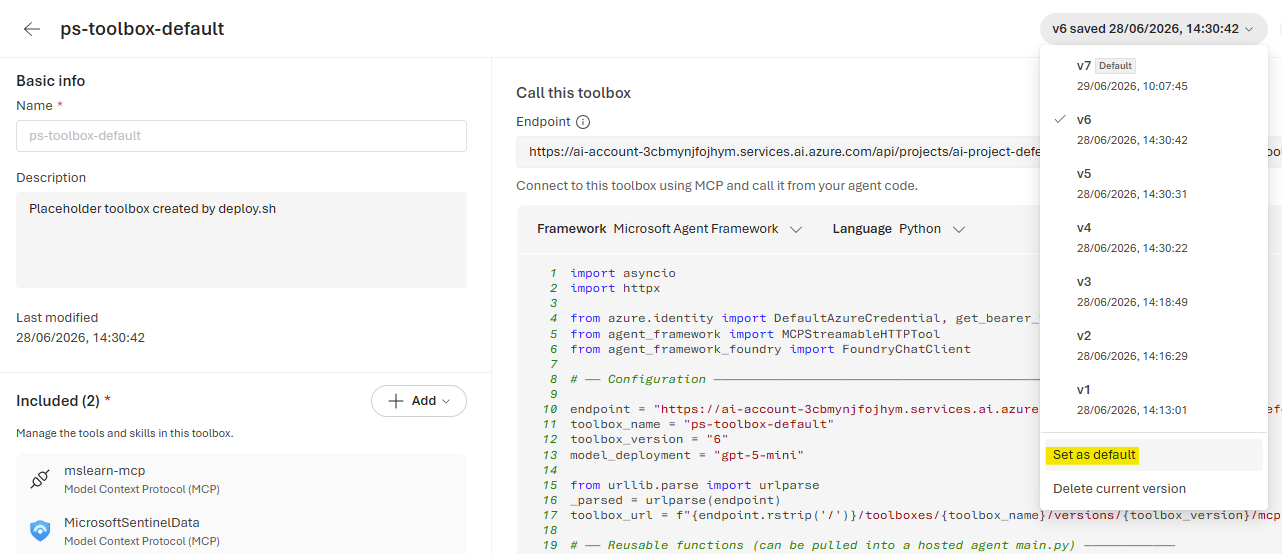 Setting a specific toolbox version as the default - the
 :latest-style move that shifts every versionless consumer at once.
It earns its place only when you genuinely want a tier of agents to track tool changes centrally without touching each deployment - every versionless consumer moves on promotion, and rollback is re-promoting the previous version. That’s useful for non-production or an opt-in “auto-tracking” fleet. Just make the choice knowingly: it’s the same trade-off as running :latest, where one promotion shifts everything at once.
👉 Pin the version-specific endpoint for production agents, the way you pin image tags. Reserve the versionless
default_versionfor tiers where you want central, no-redeploy tool updates and accept the mutability.
Microsoft’s toolbox documentation covers the consumer and version-specific endpoints, version creation, validation, and promotion.
The toolbox API is currently preview functionality. MCP requests must include
Foundry-Features: Toolboxes=V1Previewand use an Entra token forhttps://ai.azure.com/.default.
The Copilot SDK registration looks like this:
1
2
3
4
5
6
7
8
9
10
11
mcp_servers = {
    "sentinel-tools": {
        "type": "http",
        "url": toolbox_consumer_endpoint,
        "tools": ["*"],
        "headers": {
            "Authorization": f"Bearer {toolbox_token}",
            "Foundry-Features": "Toolboxes=V1Preview",
        },
    }
}
⚠️ Do not omit
tools. The server can connect successfully while exposing zero tools to Copilot. Use["*"]for everything in the curated toolbox or an explicit allow-list. In my tests, toolbox sources also behaved atomically: one source that failed tool enumeration caused the complete toolbox to surface zero tools. Treat that as an observed preview behavior, not a guaranteed platform contract. When discovery returns nothing, calltools/listagainst the toolbox endpoint before debugging the agent.
🔐 My intentionally small MCP scope
The original security-investigator project can use a broad set of MCP servers and APIs. For this hosted version, I deliberately reduced the initial data-access surface. It currently relies on the Microsoft Sentinel Data Exploration MCP collection and does not make direct Microsoft Graph API calls.
I slightly modified .github/copilot-instructions.md for that environment. Every session enumerates the toolbox tools first. Sentinel Data Exploration is the baseline; Defender/Sentinel Triage capabilities are treated as optional. If a skill expects a Triage or Advanced Hunting tool that is not available, the agent must not stop the investigation. It instead translates the investigative question into Data Lake KQL, discovers the relevant table and schema, runs the query through query_lake, and reports any remaining telemetry gap as degraded enrichment rather than a failed investigation.
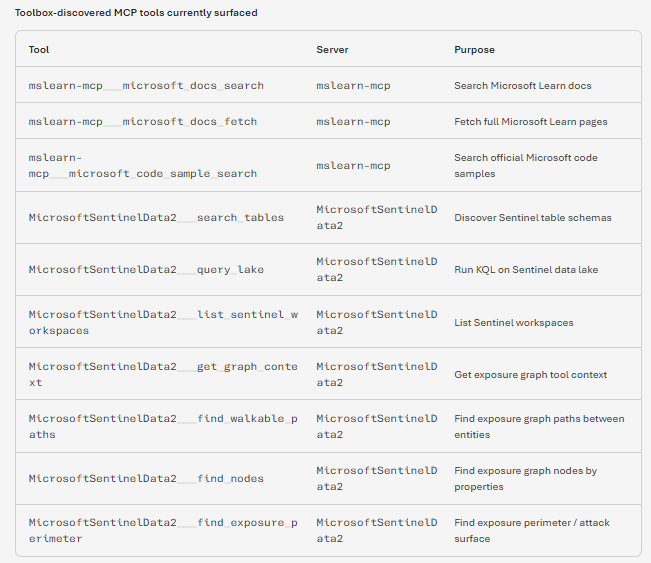 What the agent enumerates first: the Sentinel data-exploration tools surfaced by the connected toolbox.
Concretely, the hosted instructions disable every channel that needs its own credentials and route it to a Sentinel/Defender table instead:
| Channel | Repo-root instructions | Hosted agent |
|---|---|---|
Sentinel Data Lake MCP (query_lake, search_tables) | Primary | Primary - the one guaranteed path |
Triage MCP (incidents, RunAdvancedHuntingQuery) | Available | Only if enumerated, else query_lake KQL |
| Microsoft Graph API | Available | Off → IdentityInfo, AuditLogs, SigninLogs |
Azure MCP / az CLI | Available | Off → query_lake, AzureActivity |
KQL Search MCP (validate_kql_query) | Available | Off → inline getschema + kql skill |
| IP enrichment (ipinfo/AbuseIPDB/Shodan) | Available | Off → ThreatIntelligenceIndicator |
| Heatmap/geomap viz (VS Code MCP) | Available | Off → Markdown table from KQL |
The rule that makes this safe is “do not error, ignore and substitute”: when a skill reaches for a disabled channel, the agent silently swaps in the closest Sentinel-data equivalent and notes any genuine telemetry gap, rather than failing the run.
⚠️ Sentinel Triage MCP did not work through Toolbox in my setup. The collection is available in preview, but I could not get its tools to enumerate reliably, so this example does not depend on it. One practical alternative is your own MCP implementation backed by the Defender and Microsoft Graph APIs. Mirror the official Triage MCP tool names and input contracts - effectively a compatible Triage MCP - and attach that server to the toolbox. This worked in my tests and lets the existing security-investigator skills use richer incident, alert, entity, and Advanced Hunting capabilities without rewriting their tool references.
Direct Graph access is also intentionally disabled. Signals that can be obtained from SigninLogs, AuditLogs, IdentityInfo, DeviceInfo, SecurityIncident, SecurityAlert, and other available lake tables are retrieved there instead. This keeps the hosted identity and credential model small and gives the example one well-understood security-data path.
This is a design choice, not a harness limitation. The custom MCP owns API authentication, permissions, and the tool contract, while the hosted agent continues to consume one governed toolbox endpoint.
🛠️ One manual toolbox step - attach Sentinel via the UI
This is the one step the script does not do for you, so it’s worth calling out clearly.
On a new environment, agent/deploy.sh only attaches the public Microsoft Learn MCP connection and enables Tool Search (toolbox_search_preview). A toolbox version must contain at least one source, and Learn is a useful, credential-free placeholder - but it provides no security data. The script deliberately stops there: wiring Microsoft Sentinel – Data exploration to a specific workspace is an access-scoped decision I’d rather make explicitly in the portal than bury in a script.
So after the first deployment, attach Sentinel by hand in the Foundry UI:
- Open the toolbox in the Foundry portal.
- Add the Microsoft Sentinel – Data exploration MCP collection.
- Configure access to the intended Sentinel workspace.
- Create a new toolbox version and roll your agent onto it - pin its version-specific endpoint (see above), or promote it to
default_versionif this is a tier you’ve deliberately chosen to auto-track.
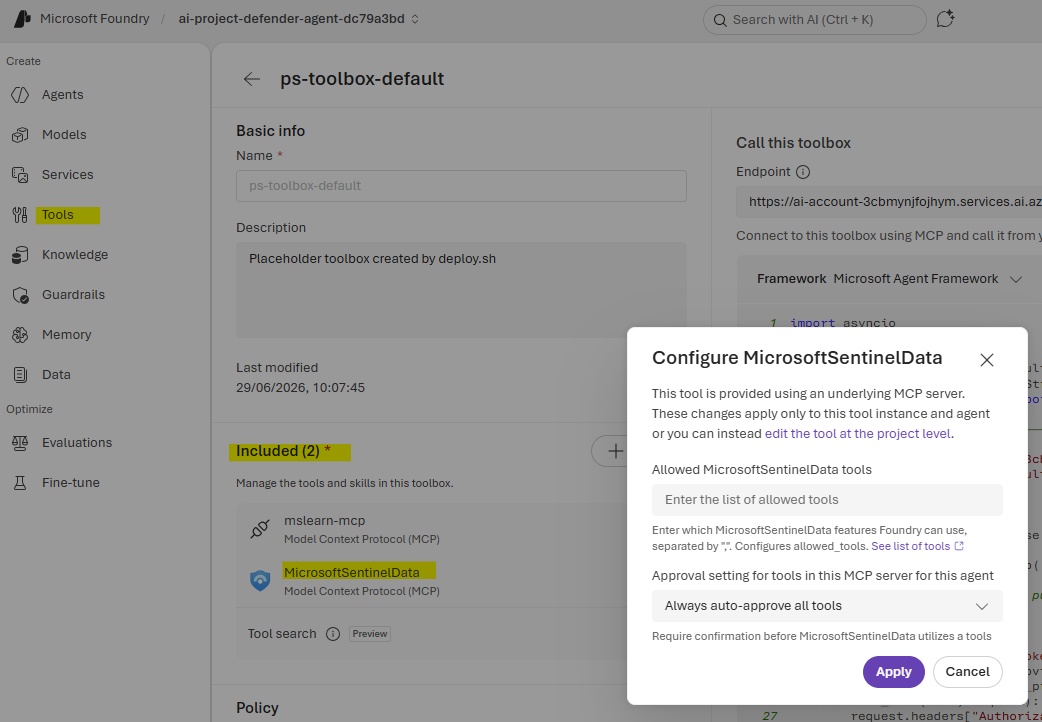 Attaching the Sentinel Data exploration collection to the toolbox in the Foundry UI - the one step
 deploy.sh leaves to you.
Microsoft’s Foundry integration guide documents the current preview UI flow for adding Sentinel MCP collections.
👉 Microsoft Learn creates a valid initial toolbox but provides no security data. Attach Sentinel Data Exploration before running the SOC skills -
deploy.shwill not do it for you.
🚀 Deploy the example
The example deployment wraps provisioning and deployment in agent/deploy.sh. You need Azure CLI, Python 3.10+, and the Azure Developer CLI (azd).
After installing azd, clone the repository, work from the example root, and make sure the active Azure CLI subscription is the one you want to deploy into:
1
2
3
4
5
6
7
git clone https://github.com/pisinger/security-investigator.git
cd security-investigator/foundry-agents/agent-security-investigator-github-copilot

az login
az account set --subscription <subscription-id>

./agent/deploy.sh
That is the complete command path. The active az account context is authoritative: the script reads the subscription and tenant from it, writes them back into .env, and ignores any AZURE_SUBSCRIPTION_ID/AZURE_TENANT_ID you may have exported. There is no separate azd env new step - the script reuses the selected azd environment, adopts the single existing one, or creates defender-agent-<hash>. It also runs az login/azd auth login and installs the azure.ai.agents extension if needed, provisions missing infrastructure, builds the image remotely in ACR, deploys the agent, and applies the runtime role assignments.
Configuration lives in agent/.env (a committed .env.example is the fallback, so a fresh checkout can deploy as-is). Do not maintain a parallel collection of azd env set commands or shell exports: the file is loaded on every run, wins over any matching shell export so a stale export can’t shadow it, and is synchronized into the selected azd environment. The one exception is AZURE_SUBSCRIPTION_ID and AZURE_TENANT_ID, which always follow the active az account context and are written back into the file. A compact starting point is:
1
2
3
4
5
6
7
8
9
10
11
12
13
14
15
16
17
18
19
20
AZURE_RESOURCE_GROUP="ps-rg-foundry-1"
AZURE_LOCATION="germanywestcentral"

# Hosted-agent name and Foundry project name
# (project is reused if found in the resource group, otherwise provisioned)
AZURE_AI_AGENT_NAME="security-investigator-copilot-agent"
AZURE_AI_PROJECT_NAME="ps-default"

# Model deployment: set these five together when changing model, so an
# existing model's format/version/capacity is not mixed with the new one
AZURE_AI_MODEL_DEPLOYMENT_NAME="gpt-5.4-mini"
AZURE_AI_MODEL_NAME="gpt-5.4-mini"
AZURE_AI_MODEL_FORMAT="OpenAI"
AZURE_AI_MODEL_DEPLOYMENT_VERSION="2026-03-17"
AZURE_AI_MODEL_DEPLOYMENT_CAPACITY="500"

TOOLBOX_MCP_NAME="ps-toolbox-default"

AGENT_CPU=2
AGENT_MEMORY=4Gi
⚠️ These model values are examples from my test environment. Model names, formats, versions, regions, and available capacity change over time and depend on your subscription quota. Confirm the currently available catalog version and quota in your target region before deploying.
👉 Edit
agent/.env, set the active subscription withaz account set, and run the script. The file overrides stale shell exports; subscription and tenant follow the activeaz accountcontext.
Changing the model is therefore an environment change, not a manual YAML edit. Set those five AZURE_AI_MODEL_* values together so the deployment alias, catalog model, and quota stay consistent - leaving one empty lets an existing model’s format, version, or capacity leak into the new deployment. Before provisioning, deploy.sh validates them and rewrites the matching deployment block in azure.yaml. If that deployment does not yet exist on the selected Foundry account, provisioning creates it from the updated YAML. Run the regular ./agent/deploy.sh after changing models; --no-provision is only for code-only updates after the required model deployment already exists.
The same precedence applies to other useful settings:
.env setting | What deploy.sh does with it |
|---|---|
AZURE_SUBSCRIPTION_ID, AZURE_TENANT_ID | Not set by hand - derived from the active az account context and written back into .env |
AZURE_LOCATION, AZURE_RESOURCE_GROUP | Selects and synchronizes the Azure deployment context into the active azd environment |
AZURE_AI_AGENT_NAME | Required hosted-agent/service name; synchronized across azure.yaml, agent.yaml, and agent.manifest.yaml |
AZURE_AI_PROJECT_NAME | Required exact project name - reused if present in the resource group, otherwise provisioned |
AZURE_AI_ACCOUNT_NAME | Optional account selector; leave empty to search all Foundry accounts in the resource group |
AZURE_CONTAINER_REGISTRY_NAME | Reuses or creates that ACR inside the target resource group and wires the project connection/RBAC |
TOOLBOX_MCP_NAME | Selects the toolbox; its consumer endpoint is derived from the resolved project |
ENABLE_MONITORING, APPLICATIONINSIGHTS_NAME | Enables/disables monitoring or selects an existing Application Insights component |
AGENT_CPU, AGENT_MEMORY | Rewrites the container resources in both agent/agent.yaml and azure.yaml before deployment |
AZURE_OPENAI_ENDPOINT, AZURE_OPENAI_API_VERSION | Optionally overrides the Copilot BYOK model endpoint/API version; the endpoint is normally derived |
COPILOT_WIRE_API, COPILOT_LOG_LEVEL | Controls Copilot SDK transport and logging behavior |
Beyond .env, the repo-root config.json carries per-environment runtime defaults (Sentinel workspace, tenant/subscription, optional enrichment tokens) and is mirrored into the agent dir by the same sync step covered in One source of truth below.
ℹ️ The script intentionally mutates
azure.yamlandagent/agent.yamlon disk so the files handed toazdmatch.env. Seeing those files change after a deployment is expected;.envand the repo-root assets remain the source of truth.
The resource group is the deployment source of truth. The script searches only that group and then follows a simple rule for each dependency: reuse it when it exists there; otherwise create it there. It resolves the Foundry account and project, ACR, Application Insights, model deployment, project endpoint, OpenAI endpoint, toolbox endpoint, and RBAC scopes from that target.
This matters when switching environments. A stale project or toolbox endpoint from another resource group must not silently redirect part of the deployment. The script rejects or replaces those values with endpoints derived from the selected resource group.
If the group already contains one unambiguous Foundry project, it is reused. If no project exists, the regular deployment provisions one. Once infrastructure exists, use the faster code-only path:
1
./agent/deploy.sh --no-provision
Then verify the result:
1
2
3
azd ai agent show
azd ai agent invoke "Run a threat pulse for the last 7 days"
azd ai agent monitor
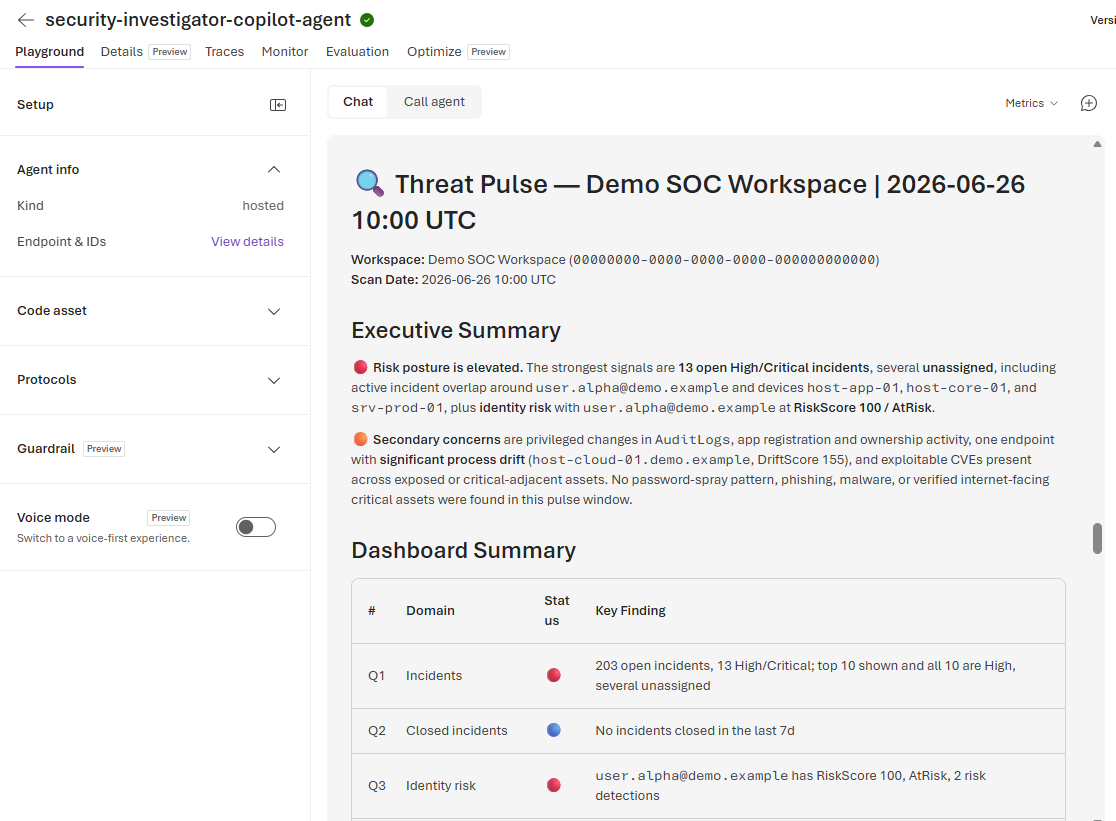 The hosted agent responding to an invocation - the same skills that run locally with
 copilot, now behind a managed Foundry endpoint.
📦 One source of truth - skills, queries, and config synced from the repo root
The skills, reusable KQL, and per-environment config are not maintained inside the agent folder. They live once at the repository root, and deploy.sh mirrors them into agent/ right before the image is built - so the file you edit and the file the container runs are byte-for-byte identical.
Early in both bootstrap and deploy, sync_github_assets() walks up to the repository root (the nearest ancestor whose .github holds skills/) and copies a fixed set of assets into the agent directory:
1
2
3
4
5
6
7
SYNCED_ASSETS=(
    ".github/skills:.github/skills"
    ".github/manifests:.github/manifests"
    "queries:queries"
    "config.json.template:config.json.template"
    "config.json:config.json"
)
Each entry is repo-root-source:agent-dest. Directories are mirrored with rsync --delete, so a skill removed at the root also disappears from the agent; single files such as config.json are copied in place. The only .github content the agent folder owns outright is copilot-instructions.md - everything else is a managed copy.
Because the root is authoritative, those copies are gitignored in the agent folder (.github/skills/, .github/manifests/, queries/, config.json, config.json.template). They are never committed twice, cannot drift, and exist in the agent tree only so the Dockerfile’s COPY . user_agent/ bakes them into the image. The sibling Agent Framework agent uses the same mechanism but flattens the destinations to its own root (skills/, manifests/, queries/), because it does not read from .github/ - the same sync function, only the SYNCED_ASSETS targets differ.
config.json carries per-environment defaults: the Sentinel workspace, tenant and subscription, optional enrichment tokens, and the report output directory. main.py loads it from the agent working directory, exports the values as environment defaults (without clobbering anything already set), and folds them into a prompt preamble so the model targets the right workspace even when it has no file tool to read the JSON itself. config.json.template is the committed, secret-free shape; the real config.json stays local and gitignored at the repo root and in the agent copy alike.
ℹ️ Set your Sentinel workspace in the root
config.jsonbefore deploying. The workspace, tenant, and subscription you put there are what the runtime folds into the prompt preamble, so the agent automatically targets the correct workspace without being told in each invocation. Edit it once at the repository root -deploy.shcopies it into the container image, so an empty or wrong workspace there means the hosted agent has no default workspace to query.
👉 Edit skills, queries, and
config.jsonat the repository root, iterate locally withcopilot, and letdeploy.shmirror the exact same files into the image. The agent folder’s copies are generated, gitignored, and bundled - never the place to make changes.
🔑 Two identity audiences - and one easy-to-miss role
The agent calls two Azure data planes with different tokens:
- The Copilot SDK’s Azure OpenAI provider uses
https://cognitiveservices.azure.com/.default. - The Foundry toolbox uses
https://ai.azure.com/.default.
The distinction explains a confusing deployment symptom. Foundry grants the per-agent managed identity access at project scope, which covers the toolbox, but the Copilot SDK’s BYOK Azure provider calls the Azure OpenAI account endpoint directly. That identity therefore also needs Cognitive Services OpenAI User on the account.
The identity is created during agent deployment, so the role cannot be assigned beforehand. deploy.sh resolves the new identity after azd deploy and applies the account-scoped role idempotently. A toolbox call working while the model returns 401 Authentication failed with provider usually means this account-level role or token audience is wrong - not that the toolbox or model deployment is missing.
⚠️ A working toolbox does not prove model authentication works. If only the model returns
401, checkCognitive Services OpenAI Useron the Azure OpenAI account first.
The implementation also starts the Copilot runtime lazily on the first request. The HTTP server binds first, allowing Foundry readiness checks to pass before the SDK and remote services initialize.
🕵️ Where this becomes useful in a SOC
Publishing gives the investigator a stable endpoint for interactive and event-driven workflows.
Alert or incident enrichment from a Logic App. A Sentinel automation rule can pass an incident and its entities to the agent, then write the evidence summary and next steps back.
1
2
3
4
5
6
Sentinel incident
    → automation rule
    → Logic App
    → hosted agent endpoint
    → Toolbox tools
    → incident comment / analyst approval
Direct invocation from existing SOC systems. A case platform, SOC portal, notebook, or CLI can call the Responses endpoint and use the agent as a backend capability.
Scheduled hunting and posture reports - with native Foundry routines. This is where the new routines feature fits neatly. A routine is a project-scoped automation rule: a trigger plus an action that invokes one agent. The trigger is either schedule (a cron-style recurring run, minimum five-minute interval) or timer (a one-shot at a future time), and the action invokes the agent through its Responses or Invocations API - the same path you’d call yourself. So “run the threat-pulse skill every weekday at 7 AM and post the summary” becomes a routine with a cron trigger and a prompt, created right in the Foundry portal under Routines → New routine.
The appeal over wiring a Logic App or Function timer is that there’s no separate scheduler resource to provision: the schedule lives next to the agent, shares the project’s RBAC and connections, and each fire is recorded as a routine run linked to the agent’s response and traces - so you review scheduled hunts in the same place as interactive ones. A Logic App or pipeline still makes sense when you need fan-out, approvals, or delivery into a ticketing system; routines cover the “just run this agent on a schedule” case without the extra plumbing.
Routines are in preview as of writing this blog post. If Routines isn’t in the portal navigation, it isn’t enabled for your region/subscription yet. Note the preview limits: one trigger and one action per routine, a five-minute minimum interval, a 30-second per-attempt downstream timeout, and “delivery acknowledged” is not the same as “the agent finished its work” - watch the run state and traces, not just the dispatch response. See Automate agents with routines.
An agentic investigation stage. A coordinator can delegate identity investigation, endpoint analysis, or KQL generation to this specialist and combine its result with other agents.
Teams and Microsoft 365 Copilot. Publish the agent where analysts collaborate while API callers keep using its stable endpoint. Foundry handles the channel and Azure Bot Service flow; see publish hosted agents to Teams and Microsoft 365 Copilot.
A published agent application receives its own managed identity. Reapply the toolbox and Azure OpenAI role assignments to that identity; permissions from the development/project identity do not automatically transfer.
✅ The resulting workflow
The split is simple:
- Edit instructions, skills, queries, and
config.jsononce at the repository root, test them locally withcopilot, and letdeploy.shmirror the identical files into the image - the agent folder’s copies are generated and gitignored, never edited by hand. - Let Foundry operate the container, managed identity, sessions, and endpoint.
- Connect the agent once to the toolbox consumer endpoint.
- Evolve tools as immutable toolbox versions; pin the version-specific endpoint in production and bump it deliberately, the way you pin image tags rather than ship
:latest. - Treat
agent/.envas deployment configuration andAZURE_RESOURCE_GROUPas the authoritative resource boundary.
That gives me local-to-hosted parity without coupling tool updates to agent releases - the two properties I wanted from the start.
🧭 Conclusion
The interesting part of this build was never the Copilot SDK glue. It was realizing that a folder of SKILL.md files, reusable KQL, and a config.json is the actual product - and that “deploy” should mean bundle the exact files I edit and test locally, not maintain a second, drifting copy next to the container. The repo root stays the single source of truth, deploy.sh mirrors it into the image, and .env plus AZURE_RESOURCE_GROUP pin the deployment context with the same discipline. That is the whole trick - and the reason the local and hosted agent never disagree.