Defender for Containers - Gated Deployment - Blocking Vulnerable Container Images
One of the most useful places to stop a vulnerable container image is the Kubernetes API server - before a pod starts, before a node pulls more layers, and before the deployment becomes another incident to clean up.
Microsoft Defender for Containers gated deployment adds that admission-time decision. Defender evaluates vulnerability findings associated with the image and then audits or denies the deployment according to the rule in Defender for Cloud.
The feature has been rolling out since late 2025. The following table shows the timeline of the main milestones:
| Date | Status | Feature |
|---|---|---|
| Nov 26, 2025 | GA | Kubernetes gated deployment (GA) |
| Mar 12, 2026 | GA | Kubernetes gated deployment support for AKS Automatic (GA) |
| May 31, 2026 | Preview | Private clusters protection for gated deployment, binary drift detection, and malware detection |
The separate Kubernetes misconfiguration feature as part of Gated Deployment evaluates the workload object itself; I cover that in Defender for Containers - Blocking Kubernetes Misconfigurations with VAP.
🧭 What gated deployment evaluates
The image gate asks a narrow question:
Does this image have vulnerability findings that match the configured rule?
The deployment-time path is:
1
2
3
4
5
6
7
8
9
10
11
12
13
Image pushed to supported registry
          │
          ▼
Defender publishes vulnerability findings
          │
          ▼
Kubernetes API receives deployment request
          │
          ▼
Defender admission controller evaluates image artifacts and policy
          │
          ├── Audit ──► request continues and an event is generated
          └── Deny  ──► request is rejected before pod admission
✅ Enable Image gating
The current support matrix lists gated deployment as generally available for AKS, EKS and GKE on Kubernetes 1.31 and later, with ACR, ECR and Google Artifact Registry respectively. Azure Arc-enabled Kubernetes clusters are also covered. The required components are Defender sensor, Security Gating, Security Findings and Registry Access. See the current support matrix for changes.
| Environment | Gated image deployment | Misconfiguration enforcement |
|---|---|---|
| AKS | GA on 1.31+ | GA |
| EKS | GA on 1.31+ with ECR | GA |
| GKE | GA on 1.31+ with Google Artifact Registry | GA |
| Arc | GA | GA |
For image gating, enable these Defender for Containers capabilities:
Defender sensorwithSecurity Gatingfor the clusterRegistry Accessfor the registrySecurity Findingsso vulnerability assessment artifacts are available
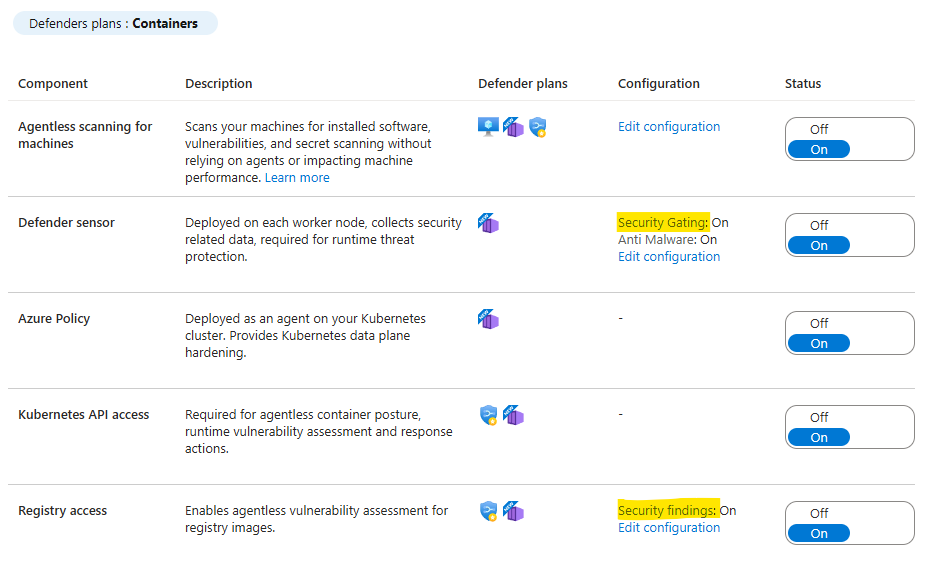
After the prerequisites are met, Defender creates a default audit rule for high or critical vulnerabilities. The rule is configured under Vulnerability assessment. Select “Add rule”, choose Audit or Deny, define the cloud and resource scope, add vulnerability conditions, and optionally configure missing-artifact behaviour, CVE exemptions and resource exemptions.
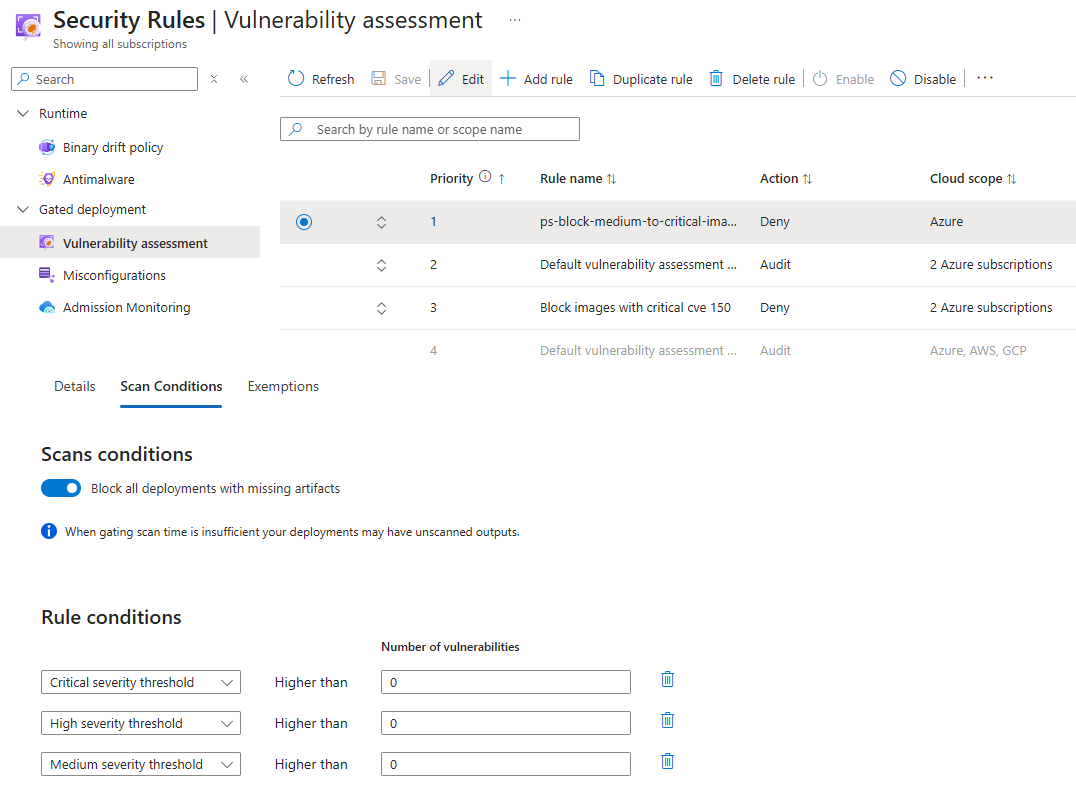
For AKS configured through the managed cluster API, the gated deployment agent also needs read access to the ACRs used by the cluster as described at https://learn.microsoft.com/en-us/azure/defender-for-cloud/gated-deployment-infrastructure-as-code. The federated subject for the Defender admission controller is:
system:serviceaccount:kube-system:defender-admission-controller-serviceaccount
🛠️ Manual Helm installation
Microsoft supports automatic provisioning as well as a public Helm-based installation. The Helm documentation covers AKS, EKS and GKE and states the trade-off directly: Helm gives you control over the sensor version and upgrade timing, automatic provisioning follows Microsoft’s rollout schedule.
I usually prefer Helm even for standard, non-AKS-Automatic clusters. It makes the deployment method explicit, keeps the chart values next to the rest of the platform configuration, and gives me a deliberate upgrade point. The price is that sensor upgrades become my responsibility — including the ones I would rather Microsoft had shipped for me.
For standard AKS, EKS and GKE clusters the public instructions use the
mdcnamespace. AKS Automatic is the exception: gated deployment requires the sensor to be installed with Helm inkube-system, and neither the add-on nor anmdcinstallation is supported there.
The two paths must not overlap. Before starting the Helm installation, exclude the cluster from automatic sensor provisioning, and do not remediate the automatic-installation recommendations afterwards. Without that exclusion, Defender can deploy its own sensor while you are managing a second one with Helm — two sensor deployments, conflicting resources, and no clear owner of the lifecycle. Pick Helm and make it the single source of truth for that cluster.
1
2
3
4
5
# Exclude a cluster from automatic sensor deployment
az tag update \
  --resource-id "$AZURE_RESOURCE_ID" \
  --operation merge \
  --tags "ms_defender_container_exclude_sensors=true"
Apply the tag before automatic provisioning deploys the sensor. It prevents future automatic deployment; it does not remove a sensor that is already installed. See the Microsoft Learn exclusion guidance for supported cluster types and limitations.
Before running Helm, confirm that Helm is installed, the cluster version and cloud-provider combination are supported, and the Defender components have the required permissions and outbound connectivity. The exact values below are environment-specific (AKS, EKS, GKE, Arc) and should be adapted to the current installation documentation.
To also enable misconfiguration policies, add the following flag:
–set defender-admission-controller.enableMisconfigurationPolicies=true
1
2
3
4
5
6
7
8
9
helm install defender-k8s \
  oci://mcr.microsoft.com/azuredefender/microsoft-defender-for-containers \
  --create-namespace \
  --namespace mdc \
  --set defender-admission-controller.enableMisconfigurationPolicies=true \
  --set global.cloudIdentifiers.Azure.subscriptionId="<subscription-id>" \
  --set global.cloudIdentifiers.Azure.resourceGroupName="<resource-group>" \
  --set global.cloudIdentifiers.Azure.clusterName="<cluster-name>" \
  --set global.cloudIdentifiers.Azure.region="<region>"
🔍 Inspecting the defender sensor and policy state
Check if the Defender admission controller pod is running. If it is not, the image gate will not work even when you have configured your rule to auto block unscanned images.
1
kubectl get pods -A | grep defender
An example from my test cluster:
1
2
3
4
5
mdc  defender-admission-controller-58c5646d48-dtbsx                    1/1  Running  0             34m
mdc  microsoft-defender-collectors-ds-cx65c                            3/3  Running  0             42m
mdc  microsoft-defender-pod-collector-misc-6f79d97b88-b4t5h            1/1  Running  0             50d
mdc  microsoft-defender-pod-collector-virtual-kubelet-f75fcb668sx6zj   1/1  Running  0             50d
mdc  microsoft-defender-publisher-ds-zzbmt                             1/1  Running  2 (10m ago)   42m
Note: The admission controller is not in the request path for the
misconfigurationgate. That gate runs onValidatingAdmissionPolicyobjects and their bindings, evaluated by the API server itself — the pod can be unavailable and the policies still enforce. What it does affect is the image gate akaGated Deployment, which is webhook-based and requires the Defender Admission controller pod in the loop - if it is down, image gating will not work.
Inside the cluster, the applied image policies can be queried with:
1
2
kubectl get securityartifactpolicies -o json
kubectl get securityartifactpolicies.defender.microsoft.com -o json
A deployment that happens before the image scan has completed may not be gated. Check the image digest and confirm that a signed findings artifact exists before investigating the Kubernetes admission path, or auto block unscanned images by default.
🧩 Ratify and the admission webhook
Within the admission-controller activity on the webhook path, the registry verification call surfaces a user agent similar to the one below:
ratify+unknown (linux/amd64)
That points to Ratify, a supply-chain verifier used to resolve OCI referrers and validate attached information such as vulnerability attestations and signatures. In this flow, it connects the image digest in the deployment request with the findings artifact stored alongside it. You can trace it back in the registry by looking for pull requests carrying the same user agent and application/vnd.oci.image.manifest.v1+json media type:
The gated deployment path uses a validating webhook rather than the native ValidatingAdmissionPolicy path used by the misconfiguration feature as described here https://pisinger.github.io/posts/defender-for-containers-blocking-kubernetes-misconfigurations-vap/. The webhook configuration can be inspected with:
1
2
3
4
5
6
7
kubectl get validatingwebhookconfigurations -o json \
  | jq '.items[].webhooks[]
      | {name: .name,
         serviceName: .clientConfig.service.name,
         path: .clientConfig.service.path,
         port: .clientConfig.service.port}' \
  | grep -i -C 2 defender
This will show the webhook endpoint that the Kubernetes API server calls to evaluate the image:
1
2
3
4
5
6
{
  "name": "defender-admission-controller.mdc.svc",
  "serviceName": "defender-admission-controller",
  "path": "/validate",
  "port": 443
}
The related roles and bindings can also be inspected when the webhook is present but cannot perform its work:
1
2
3
4
5
6
7
kubectl get validatingwebhookconfigurations
kubectl describe validatingwebhookconfigurations "defender-admission-controller.mdc.svc"

kubectl get clusterrole defender-admission-controller-cluster-role
kubectl get clusterrole defender-admission-controller-resource-cluster-role
kubectl get clusterrolebinding defender-admission-controller-cluster-role-binding
kubectl get clusterrolebinding defender-admission-controller-cluster-resource-role-binding
🔐 Registry findings are part of the gate
The registry must have the vulnerability findings artifact that the admission controller can retrieve. In the registry, check the image’s Referrers view and confirm that the vulnerability findings artifact and its signature are present.
You will get something like this:
1
2
3
4
5
6
7
8
9
10
11
12
13
14
15
16
17
18
19
20
21
22
23
24
25
26
27
28
29
30
31
32
33
34
35
{
  "schemaVersion": 2,
  "mediaType": "application/vnd.oci.image.manifest.v1+json",
  "artifactType": "application/vnd.in-toto+json",
  "config": {
    "mediaType": "application/vnd.oci.empty.v1+json",
    "digest": "sha256:44136fa355b3678a1146ad16f7e8649e94fb4fc21fe77e8310c060f61caaff8a",
    "size": 2,
    "data": "e30="
  },
  "layers": [
    {
      "mediaType": "application/vnd.in-toto+json",
      "digest": "sha256:04ebd6037b9bfb459d86d30ae9fa7e092c7be1ea6d87fe983abf5e25ee1e5df3",
      "size": 11962,
      "annotations": {
        "in-toto.io/predicate-type": "https://in-toto.io/attestation/vulns/v0.2",
        "org.opencontainers.image.title": "/tmp/tmpCEDRDo.tmp",
        "report-type": "SoftwareInventoryAssessment",
        "scanner": "MDVM"
      }
    }
  ],
  "subject": {
    "mediaType": "application/vnd.docker.distribution.manifest.v2+json",
    "digest": "sha256:c5b58706edea43bd7ec4e9fcf0248629ae8253055af051c3d45557d1c580e8b8",
    "size": 1778
  },
  "annotations": {
    "in-toto.io/predicate-type": "https://in-toto.io/attestation/vulns/v0.2",
    "org.opencontainers.image.created": "2026-07-23T01:06:19Z",
    "report-type": "SoftwareInventoryAssessment",
    "scanner": "MDVM"
  }
}
There is also a resource-side setting worth checking when troubleshooting missing artifacts. ContainerIntegrityContribution corresponds to the Security Findings capability in the portal and is enabled by default when going for Defender for Containers:
1
2
3
4
5
6
7
8
9
10
11
{
  "properties": {
    "extensions": [
      {
        "name": "ContainerIntegrityContribution",
        "isEnabled": "True"
      }
    ],
    "pricingTier": "Standard"
  }
}
The image gate is an additional control point close to the cluster. It does not replace CI/CD scanning, secure image construction or runtime protection.
🛡️ Blocking vulnerable container images
Defender for Containers scans images in supported registries and associates vulnerability findings with the image and stores this information as findings artifacts as described above. When a user or CI/CD pipeline submits a workload, the gated deployment component evaluates the image before Kubernetes admits it.
The decision is based on the configured rule. For example, a rule could audit or deny images with high or critical vulnerabilities, apply only to a particular cluster or namespace, exempt a specific CVE, or block images when no valid findings artifact exists.
The simplified flow is:
- Defender scans the image in a supported registry.
- Vulnerability findings are published and associated with the image as artifacts.
- A deployment request reaches the Kubernetes API server.
- The Defender admission component retrieves and validates the findings artifact for the image digest, then evaluates it against the gated deployment rule.
- The request is allowed, audited, or denied.
  ┌────────────────────────────────────┐
  │ kubectl apply → Pod / Deployment   │
  └────────────────────────────────────┘
                     │
                     ▼
╔══════════════════ kube-apiserver ══════════════════╗
║                                                    ║
║   ValidatingAdmissionWebhook  ──► network hop      ║
║                                                    ║
╚════════════════════╤═══════════════════════════════╝
                     │  AdmissionReview (image reference)
                     ▼
  ┌────────────────────────────────────┐
  │ Defender admission controller      │   in-cluster pod
  │ (webhook endpoint, TLS)            │   resolves tag → digest
  └────────────────────────────────────┘
                     │  lookup by digest
                     ▼
  ┌────────────────────────────────────┐
  │ Container registry                 │   ACR / ECR / Google AR
  │   security findings artifact       │   CVE results attached to the digest
  └────────────────────────────────────┘
                     │  findings returned
                     ▼
  ┌────────────────────────────────────┐
  │ Evaluate against rule              │   severity threshold
  │                                    │   scope, exemptions
  └────────────────────────────────────┘
                     │
        ┌────────────┴────────────┐
        │                         │
      allowed                  violation
        │                         │
        ▼                         ▼
  AdmissionResponse         Audit  ──► admitted, event raised
  allowed: true             Deny   ──► 403, deployment blocked
        │                         │
        └────────────┬────────────┘
                     ▼
        back to kube-apiserver → etcd
When Blocking Is the Riskier Choice
There is an uncomfortable reality here: a static rule such as block every high or critical CVE is not always a proper strategy. A business-critical service may legitimately depend on an image that currently contains a high-severity vulnerability. Blocking its next deployment could prevent an urgent configuration change, interrupt a recovery action, or stop the business from shipping a required fix.
Severity is an important signal, but it is not the whole decision. The practical risk depends on factors such as exploitability, whether the vulnerable code path is reachable, internet exposure, the workload’s blast radius, the service’s business criticality, the availability of a fix and the compensating controls around it. The right question is often not simply “does this image have a high CVE?” but “what risk do we accept by allowing this image to run here, for how long, and under which conditions?”
This is why gated deployment supports both resource scoping and exemptions. A rule can be limited to a cluster, namespace or other resource scope, while a narrowly defined exemption can allow a specific vulnerability or resource to proceed. Time-bound exemptions are particularly useful for emergency releases: they make the exception visible and give it an expiry instead of turning a temporary workaround into a permanent hole.
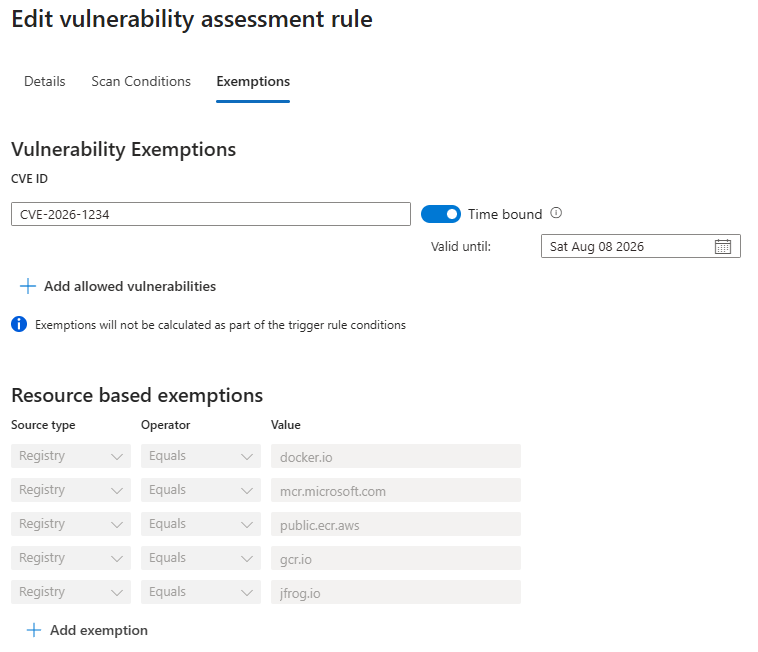
The same trade-off exists in CI/CD image gates. Pipeline enforcement happens earliest and is the right place for the bulk of the work, but it only covers images that go through the pipeline. Admission control adds a second, independent enforcement point at the cluster boundary — and its distinct value is catching what the pipeline never saw: manual applies, upstream Helm images, operator-injected sidecars. It does not cover already-running workloads, and it can only decide on images that already carry a vulnerability assessment, so the fail-open vs fail-closed choice for unscanned images is itself a security decision.
A useful rollout is more precise than “block high and above everywhere”: start in audit, scope to the workloads where risk reduction is highest, exclude system namespaces deliberately rather than by accident, define a documented exemption process, and use expiry dates for temporary exceptions.
The last option deserves a closer look. A missing scan result is not automatically the same as a clean image. It may mean the image has not been scanned yet, the registry is unsupported, or the Defender findings artifact was not published. You need to choose whether that should be allowed, audited, or blocked in your environment.
Where the Image Gate Sits in the Admission Chain
Also keep in mind how admission policies and webhooks are processed in Kubernetes. See below for a simplified order of evaluation. The image gate is a validating webhook, which is called after the in-process mutating and validating admission policies. If a mutating policy changes the image reference, the webhook will see the updated value.
- MutatingAdmissionPolicy (CEL) — in-process, beta 1.34, gate off by default, v1 in 1.36
- MutatingAdmissionWebhook — callout, serial, last mutator
- Validating admission plugins (PodSecurity, NodeRestriction) — in-process, before VAP
- ValidatingAdmissionPolicy (CEL) — in-process, GA 1.30
- ValidatingAdmissionWebhook — callout, parallel
- Persist — etcd
This also means if there are any misconfigurations that prevent the pod from being admitted, the image gate will not be called at all as the request will be rejected before it reaches the webhook. The image gate is not a replacement for misconfiguration policies, it is an additional control point.
Below is an example of a deployment blocked by the image gate because no scan results were available for the image. The output also shows the ValidatingAdmissionPolicy coming from my defined misconfiguration policies, but the relevant part here is the last 3 lines: the webhook-based admission decision on the image, the violation reason, and the rule that produced it. Note also the ratify user agent — the component that resolves the image digest and retrieves the findings artifact.
1
2
3
4
5
6
7
8
kubectl run ps-http-echo --image "<myregistry>.azurecr.io/ps-http-echo-py:v2" -n 1other

Warning: Validation failed for ValidatingAdmissionPolicy 'default-k8s-misconfiguration-policy-running-containers-as-root-user-should-be.vap' with binding 'default-k8s-misconfiguration-policy-running-containers-as-root-user-should-be.binding': Container must run as non-root in "ps-http-echo". Failing container(s): ps-http-echo. Set runAsUser to non-zero or runAsNonRoot to true
Warning: Validation failed for ValidatingAdmissionPolicy 'default-k8s-misconfiguration-policy-container-cpu-and-memory-limits-should-be.vap' with binding 'default-k8s-misconfiguration-policy-container-cpu-and-memory-limits-should-be.binding': Resource limits missing in "ps-http-echo". Failing container(s): ps-http-echo. Set resources.limits.cpu and resources.limits.memory
Warning: Validation failed for ValidatingAdmissionPolicy 'default-k8s-misconfiguration-policy-least-privileged-linux-capabilities-shoul.vap' with binding 'default-k8s-misconfiguration-policy-least-privileged-linux-capabilities-shoul.binding': Required capability drops missing in "ps-http-echo". Failing container(s): ps-http-echo. Must drop: ALL or ALL
Error from server: admission webhook "defender-admission-controller.mdc.svc" denied the request: No valid reports found on ratify response
Unscanned images are not allowed by policy
Verifier rule name: ps-block-medium-to-critical-images-in-specific-ns
📊 Monitoring image decisions
Defender surfaces admission activity in the portal under Environment → Security Rules → Admission Monitoring.
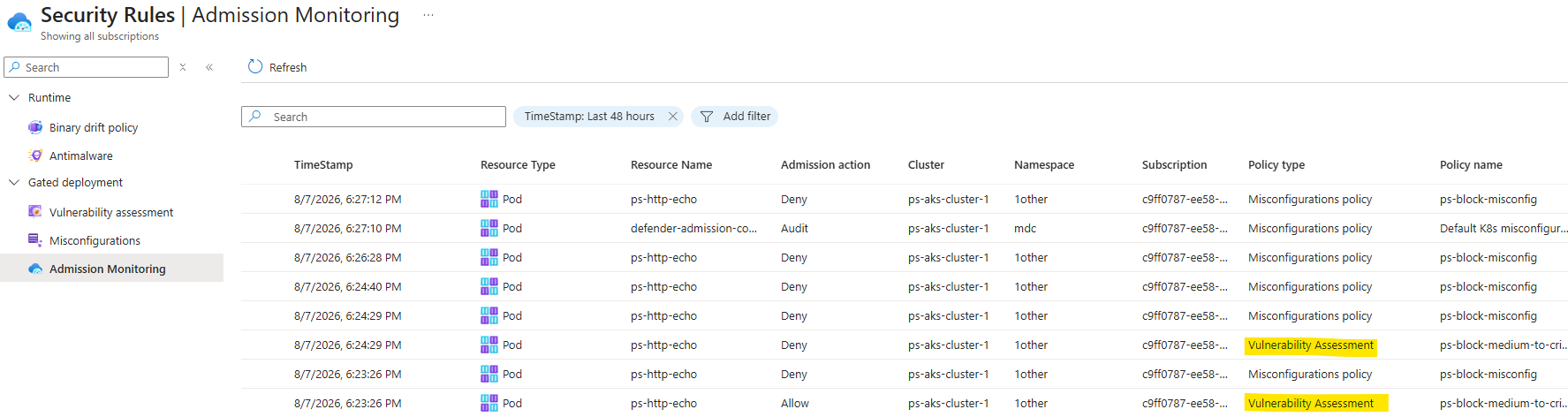
Additionally you can also query it directly via Defender Advanced Hunting and the CloudPolicyEnforcementEvents and CloudAuditEvents tables.
1
2
3
4
5
6
7
8
9
10
CloudPolicyEnforcementEvents
| extend AF = parse_json(AdditionalFields)
| extend PolicyProperties = tostring(AF.PolicyProperties)
| extend ActionType = case(
    ActionType == "Audit", "ℹ️ Audit",
    ActionType == "Deny", "⛔ Block",
    ActionType == "Allow", "✅ Allow",
    ActionType
)
| summarize Events = count() by Timestamp, ActionType, AzureResourceId, ResourceKind, KubernetesNamespace, ResourceName, Reason, PolicyProperties
1
2
3
4
5
6
7
8
9
10
11
12
13
14
15
16
17
18
19
20
21
22
23
CloudAuditEvents
| where Timestamp > ago(1d)
| extend
    ClusterName = tostring(split(AzureResourceId, "/")[-1]),
    ResponseStatus = (RawEventData.ResponseStatus),
    Annotations = (RawEventData.Annotations),
    ResourceObject = tostring(RawEventData.ObjectRef.resource),
    ResourceName = tostring(RawEventData.ObjectRef.name),
    Namespace = tostring(RawEventData.ObjectRef.namespace),
    DataPipelineEventName = tostring(RawEventData.DataPipelineMetadata.EventName)
| extend
    ResponseMessage = tostring(ResponseStatus.message),
    ResponseDetails = ResponseStatus.details,
    ResponseCode = toint(ResponseStatus.code),
    ResponseReason = tostring(ResponseStatus.reason)
//---------------------------------------
| where OperationName == "create"
| where ResponseMessage has "admission"
| where ResourceObject has_any ("pods")
//---------------------------------------
| project
    Timestamp, ClusterName, ActionType, OperationName, ResourceObject, ResourceName, Namespace, IPAddress,
    UserAgent, ResponseCode, ResponseReason, ResponseMessage, ResponseDetails, Annotations
The ResponseMessage field contains the admission controller’s explanation of the violation:
admission webhook “defender-admission-controller.mdc.svc” denied the request: No valid reports found on ratify response. Unscanned images are not allowed by policyVerifier rule name: ps-block-medium-to-critical-images-in-specific-ns
⚠️ Limitations and open questions
- The gate evaluates admission requests; it does not automatically re-evaluate workloads that were admitted before a rule was enabled.
- The decision depends on supported registries, findings publication, registry access and connectivity. A healthy admission pod alone does not prove that the full image-evaluation path works.
- A missing artifact is not automatically the same as a clean image. Decide explicitly whether that situation should be allowed, audited or denied.
- It requires the Admission Controller pod to be running. If it is down, the image gate will not work even if the rule is configured to block unscanned images.
The questions I would like to see explored further are how image-gate results could feed a broader posture view, how exceptions could be governed consistently across CI/CD and clusters, and how teams could identify existing workloads that would fail if redeployed today.
🧭 Conclusion
Defender for Containers gated deployment adds a useful image-security decision at the Kubernetes admission boundary. It connects registry vulnerability findings with the actual image being requested and can audit or deny the deployment before the node pulls the image. This further strengthens the layered security approach. The next step should be making the result easier to connect with posture visibility, CI/CD decisions and operational exception management.